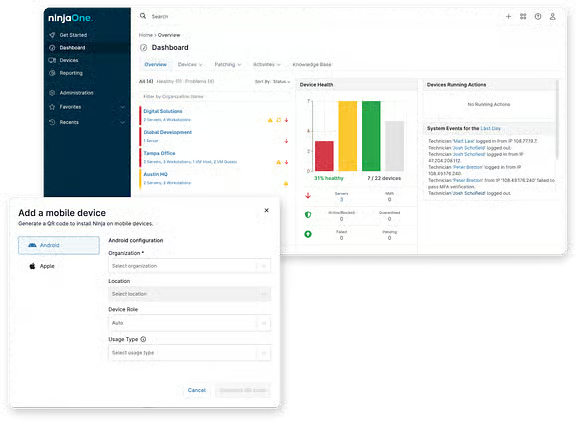
Enterprise mobility management capabilities for Apple and Android devices with NinjaOne MDM

NinjaOne Mobile Device Management (MDM) manages Apple and Android devices from one console, covering enrollment and app management across company-owned and BYOD devices.

iPad Management Software
IT business logo
Provide logo
Advantage Technologies logo
Dedicated IT logo
Alticap logo
Network Coverage logo

Addressing common enterprise mobility management challenges

Managing mobile devices across an organization can make enrollment, security, and app management difficult to handle consistently. Here is how NinjaOne Mobile Device Management (MDM) addresses these challenges.

ProblemHow NinjaOne Mobile Device Management resolves it

Managing mobile devices with different OS can require separate workflows

NinjaOne MDM lets IT teams manage supported Apple and Android devices from the same console used for broader IT operations.

Setting up mobile devices manually takes IT time

NinjaOne MDM supports device enrollment workflows that bring supported devices under centralized management and prepare them for assigned policies and configurations.

Keeping security settings consistent across mobile devices is difficult

NinjaOne MDM lets IT teams apply device policies for supported security settings, restrictions, and configurations across managed mobile devices.

Managing work apps across a mobile workforce can become complex

NinjaOne MDM provides centralized application management so IT teams can distribute and manage supported apps across enrolled mobile devices.

Managing BYOD devices can make it difficult to keep corporate management separate from personal use.

NinjaOne MDM supports BYOD management for supported Apple and Android devices, helping IT teams manage work-related resources while accommodating employee-owned devices.

Business benefits of enterprise mobility management

These benefits show how NinjaOne Mobile Device Management (MDM) helps organizations reduce administrative effort, support mobile work, and maintain greater control over their mobile environment.

Reduce mobile administration

Centralized management reduces the time IT teams spend handling devices individually. As mobile environments grow, teams can manage routine tasks without adding separate workflows for each device type.

Support a flexible workforce

Organizations can support employees using company-owned or personal mobile devices across office, remote, and hybrid environments. This gives employees greater flexibility while keeping business-related management under IT oversight.

Maintain consistent security standards

Centralized policies help organizations apply their requirements more consistently across managed mobile devices. IT teams gain greater control over how business devices and resources are configured and protected.

Scale mobile operations more easily

Organizations can add and manage more mobile devices without relying on repetitive, device-by-device administration. This helps IT teams support growth, new locations, and changing workforce needs.


Bring mobile into existing IT operations

Managing mobile devices alongside desktops, laptops, and servers gives IT teams a more consolidated view of their environment. This reduces tool switching and keeps mobile administration connected to broader IT workflows.

Enterprise mobility management capabilities for modern IT

NinjaOne Mobile Device Management (MDM) brings together core capabilities for managing Apple and Android devices across company-owned and BYOD environments.

computer and mobile phone screen showing charts and graphs

Company-owned device enrollment

NinjaOne MDM supports scalable enrollment for company-owned devices, including Automated Device Enrollment (ADE) for supervised Apple devices and zero-touch enrollment for Android devices.

Aert icon

Mobile policy creation and enforcement

Create MDM policies to manage supported security settings, restrictions, applications, networks, and other device configurations. Policies help IT teams apply requirements consistently across managed mobile devices.

Mobile Device icon

Mobile application management

Install, remove, block, and manage supported applications through MDM policies. IT teams can manage business applications from one console.

Desktop, tablet and mobile device

BYOD management

Manage supported personally owned devices while keeping work and personal use separated according to the enrollment model. On Android BYOD devices, work profiles isolate managed business apps and data from personal content.

Geolocation Services icon

Geolocation services

Use available location information to track supported managed mobile devices for inventory and loss-prevention use cases. Location tracking requires the NinjaOne Assist app installed and running on the device.

IT tools icon

Single and multi-app kiosk mode

Configure supported Android devices for dedicated use by limiting access to selected applications. IT teams can manage kiosk settings through Android MDM policies.

Enterprise mobility management in everyday IT scenarios

These examples show how IT teams and MSPs can use NinjaOne Mobile Device Management (MDM) to address common mobile management situations.

Onboarding mobile devices for new employees

When employees receive company-owned phones or tablets, IT teams need to get devices ready for work. NinjaOne MDM helps enroll supported devices and apply the required policies, apps, and settings.

Supporting employees who use personal devices for work

When employees use personal devices for work, IT needs to manage business resources without treating them like company-owned devices. NinjaOne MDM supports BYOD enrollment options for supported Apple and Android devices.

Managing mobile devices across MSP customers

When MSPs support mobile devices for multiple customers, technicians need an organized way to manage each environment. NinjaOne MDM brings supported mobile device management into the same NinjaOne platform used for other endpoint operations.

This is why customers love us

How enterprise mobility management works in NinjaOne MDM

I. Set up mobile device management

Configure NinjaOne Mobile Device Management (MDM) and the required Apple or Android services for the devices your organization needs to manage.

II. Enroll mobile devices

Add company-owned or personally owned devices using the appropriate enrollment method for each device and ownership type.

III. Assign policies and applications

Apply MDM policies to manage supported settings, restrictions, applications, and other configurations across enrolled devices.

IV. Manage devices over time

Monitor managed devices and adjust policies, applications, and configurations as organizational requirements change.

Ready to simplify work with unified IT?

Why organizations trust NinjaOne

Simplifying mobile device management

FCC Behavioral Health uses NinjaOne Mobile Device Management (MDM) to manage Apple devices, apply policies, and monitor mobile devices from a unified platform.

“One of the reasons we chose NinjaOne MDM is that it’s really easy to use, effective, and reliable. Unlike our previous solution, configuring and managing Apple devices is simple and works.”

Take control of your mobile environment

Bring mobile devices into your existing IT operations with NinjaOne Mobile Device Management (MDM). Manage supported Apple and Android devices, apps, and BYOD from one centralized platform.

FAQs

The NinjaOne approach to enterprise mobility management covers device enrollment, policy enforcement and application management for Apple and Android devices through NinjaOne Mobile Device Management (MDM), alongside the rest of the NinjaOne platform.

NinjaOne MDM manages applications through policies. IT teams can configure supported application actions within a policy, and those settings are applied consistently to all devices assigned to that policy. Available application controls vary by operating system and platform capabilities.

NinjaOne MDM supports BYOD management for supported Apple and Android devices, giving IT teams options to manage work-related resources on personally owned devices. Available controls vary by operating system and enrollment model.

NinjaOne MDM covers core enterprise mobility management needs for Apple and Android devices as part of a broader endpoint management platform. It is not a dedicated, full-suite EMM product, so organizations that also need mobile threat defense, mobile content management, or mobile identity management should evaluate those needs separately.

NinjaOne MDM provides supported device actions and location information that can help IT teams respond to lost or stolen managed devices. Available actions depend on the device platform and enrollment type.