Powering Efficient Android App Delivery with NinjaOne’s Native APK Deployment

Modern Android management requires fast, flexible app deployment. With Native APK Deployment Enhancements, IT teams can seamlessly distribute in-house and third-party apps directly to managed devices, without relying on the Play Store or manual installation. Built into policy-driven workflows, this capability enables precise targeting, consistent deployment, and full control over app installs and updates. The result is a more efficient, secure, and scalable approach to Android application management.
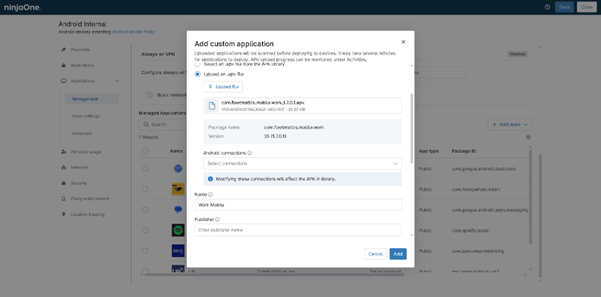

Android Native APK Deployment
IT business logo
Provide logo
Advantage Technologies logo
Dedicated IT logo
Alticap logo
Network Coverage logo

Powering fast, secure, and scalable APK deployment, built for control, consistency, and efficiency

Seamless Native APK Deployment

NinjaOne streamlines the deployment of native Android APKs by enabling direct installation across devices without reliance on third-party app stores. IT teams can push applications quickly and consistently, ensuring users always have access to the latest tools they need to stay productive.

Automated Native APK Deployment

Reduce manual effort with automated deployment workflows that handle app distribution, updates, and enforcement. Automation ensures consistent execution, minimizes human error, and allows IT teams to manage large device fleets efficiently.

Granular Control & Version Management

Maintain full control over application lifecycles with precise versioning and update management. Whether rolling out new features, enforcing mandatory updates, or maintaining legacy versions for compatibility, NinjaOne ensures deployments are predictable, controlled, and disruption-free.

Automated App Standardization

Ensure consistency across all managed devices by enforcing standardized app configurations and versions. This reduces configuration drift, improves compatibility, and simplifies troubleshooting across environments.

Scalable Internal Distribution

Efficiently distribute internal or custom-built applications across growing device fleets. NinjaOne enables organizations to scale app delivery without added complexity, supporting both small teams and enterprise environments.

Secure App Delivery

Every APK deployment is handled with security at its core. From controlled distribution to enforced installation policies, NinjaOne helps prevent unauthorized apps, protects sensitive data, and ensures that only trusted software runs within your Android environment.

What Does This Product Do?

Direct APK Deployment

Deploy native APK files directly to devices without relying on Google Play. This gives you full control over proprietary, internal, or restricted apps while bypassing public store limitations.

Granular Deployment Controls

Define exactly how and where apps are deployed. Target specific devices, groups, or environments, and control install behavior with precision—ensuring the right apps reach the right users every time.

Silent Installation & Updates

Silently deploy APKs in Device Owner (Fully Managed) mode with no user interaction required. Leverage Google Private Apps for direct deployment, utilizing Google Play Services in the background to keep applications automatically updated without disrupting end users.

Version Management & App Upgrades

Easily manage multiple APK versions and roll out updates in a controlled manner. Ensure consistency across devices while minimizing compatibility issues and deployment risks.

Staged Rollouts & Testing

NinjaOne MDM does not use Google Play Console staged rollouts. Instead, APK deployment is controlled through policy assignments and device syncs. IT teams can still limit risk by targeting smaller device groups first before expanding deployment across all devices.

Rollback & Deployment Recovery

Android does not support true in-place app rollbacks. Reverting to a previous version requires uninstalling the current app and redeploying the older APK, which may result in loss of local app data. This approach helps restore operational stability when issues occur.

Real-world scenarios where NinjaOne streamlines native Android APK deployment, enforces app control, and reduces IT workload at scale

Enterprise APK Deployment at Scale

Organizations that rely on internal or custom-built Android applications often face challenges in distributing APK files across multiple devices consistently. NinjaOne streamlines this process by allowing IT administrators to remotely deploy native APKs directly to enrolled Android devices through a centralized console. Whether rolling out a proprietary business app, a field service tool, or an industry-specific mobile solution, administrators can ensure that all users receive the correct version without manual installation. This reduces deployment delays, eliminates human error, and ensures that every device runs standardized software aligned with organizational requirements.

Controlled App Distribution and Policy Enforcement

In many enterprise environments, controlling which applications can be installed is critical for security and productivity. With NinjaOne’s Android application management capabilities, IT teams can enforce strict deployment policies by allowing only approved APKs to be installed while blocking unauthorized applications. Administrators can define deployment rules based on user groups, departments, or device ownership (corporate-owned or BYOD), ensuring that each device receives only the applications relevant to its role. This minimizes security risks such as data leakage or malicious app installation while maintaining a streamlined user experience.

Silent Installation and Zero-Touch Deployment

For organizations managing large fleets of Android devices, manual installation of applications is inefficient and unsustainable. NinjaOne supports silent APK installation, enabling applications to be pushed and installed automatically without requiring user interaction. This is especially valuable for kiosk devices, frontline workers, logistics teams, and retail environments where devices must remain operational with minimal downtime. Combined with zero-touch provisioning workflows, devices can be fully configured and application-ready out of the box, significantly reducing IT workload and deployment time.

This is why customers love us

Ready to simplify the hardest parts of IT?

Android Native APK Deployment FAQs

Android APK Deployment in NinjaOne MDM is the process of remotely distributing and installing Android application package (APK) files onto managed devices from a centralized console. It allows IT administrators to upload custom or third-party apps and automatically deploy them to selected users, devices, or groups without requiring manual installation from the Google Play Store. This feature is commonly used for internal business applications, ensuring consistent app versions across devices, and enabling fast, secure, and controlled app rollouts within an organization.

You can deploy APK files to Android devices remotely by using a Mobile Device Management (MDM) platform or Android Enterprise. The APK is uploaded to the MDM console or managed app store, then assigned to specific users, devices, or groups. Once assigned, the system pushes the app to enrolled devices over the internet, allowing it to install automatically or with minimal user interaction depending on device permissions and management mode. This approach is the most secure and scalable way to distribute APKs in enterprise environments, compared to manual installation methods like ADB, which are not suitable for large-scale deployment.

NinjaOne can install Android applications without the Google Play Store by utilizing custom APK deployment. This process involves uploading a standalone APK file directly to the NinjaOne console and assigning it to specific device policies. When devices are enrolled via Android Enterprise, particularly in Device Owner mode, the platform can silently push and install these files in the background without requiring user intervention or a Google account. This is a standard practice for deploying proprietary in-house software, legacy applications, or managing devices in highly restricted network environments where store access is disabled.

APK (Android Package Kit) files can be used to deploy almost any type of Android application outside the Google Play Store. Common examples include enterprise or line-of-business apps used internally by companies, productivity tools like inventory systems or CRM apps, custom business utilities, mobile kiosks, and device-specific control apps. They can also include consumer applications such as games, media players, and social apps, as well as system tools like device management agents, security apps, and automation tools. In short, any Android app that can run on the OS can be packaged and deployed as an APK, especially for private distribution, testing, or managed device environments (MDM).

APK deployment supports custom or internal apps by allowing organizations to distribute Android application packages directly to managed devices without publishing them on public app stores like Google Play. This is especially useful for enterprise apps such as internal tools, employee portals, custom workflows, or line-of-business applications that are not meant for public distribution. Through mobile device management (MDM) platforms, IT administrators can upload signed APK files, assign them to specific user groups or devices, and push silent or automated installations. This ensures controlled rollout, version management, and security enforcement while keeping internal apps restricted to authorized users only.

Yes, APK deployment can be automated across multiple Android devices using Mobile Device Management (MDM) or Android enterprise solutions. Administrators can upload an APK to a centralized console, assign it to device groups, and set deployment policies so the app is automatically installed, updated, or removed without manual user action on each device. This approach is commonly used for large-scale rollouts and internal applications, ensuring consistent app versions and faster, more efficient deployment across all managed devices.

NinjaOne ensures secure APK installation by enforcing Android Enterprise controls that restrict app deployment to trusted, managed channels such as private app distribution or Google Play (including private enterprise apps), preventing sideloading from unknown sources. All APKs must be signed and validated before deployment, and installation is governed by IT-defined policies that control which apps are allowed, forced, or blocked on devices. In addition, NinjaOne applies granular security settings such as permission management, installation restrictions, and device-level compliance rules, ensuring only approved applications can run within a secure managed work profile or fully managed device environment.

Yes, APK deployment can be combined with device enrollment workflows in Android MDM environments. In practice, when a device is enrolled into management (such as during zero-touch enrollment, QR code setup, or manual enrollment), administrators can automatically assign app deployment policies at the same time. This means that as soon as the device is registered and comes under management, required APKs can be silently installed or queued for installation without user intervention. Combining these processes helps ensure devices are compliant and ready for use immediately after enrollment, reduces manual setup steps, and improves consistency across all managed devices.

Updates for deployed APK applications are managed through a mobile device management (MDM) platform that controls app versions on enrolled devices. When a new version is available, the IT admin uploads it to the MDM console and assigns it to device groups via policy-based distribution. Updates are delivered based on device sync intervals and policy evaluation rather than native staged rollout features. The MDM agent installs updates in the background where supported to reduce disruption, and version control ensures older approved versions are replaced consistently. Android does not natively support app rollback; reverting to a previous version requires uninstalling the current app and reinstalling the older APK, which may result in loss of local app data unless it is backed up separately.

Android APK deployment improves mobile device management (MDM) efficiency by allowing IT teams to install, update, and manage applications directly on Android devices without relying on manual user installation or the Google Play Store. This enables centralized control over app distribution, ensuring consistent versions, faster rollout of business apps, and reduced human error. Administrators can push apps to multiple devices simultaneously, automate updates, and enforce compliance policies, which significantly reduces downtime and support workload. Overall, it streamlines large-scale device management by making application provisioning faster, more consistent, and easier to maintain across an entire fleet of Android devices.