Lightning-fast remote access built for modern IT teams

Why Choose NinjaOne:

Single-click, instant connection to your endpoints

Protect every session with end-to-end encryption and MFA

93% of customers reduce remote support time with NinjaOne Remote

Resolve issues remotely without interrupting end users

Why Choose NinjaOne:

Instantly detect and patch vulnerabilities in one unified view

Automate updates with AI-driven intelligence that prioritizes security and stability

95% of users save hours weekly with automated patching workflows

Patch seamlessly without interrupting end users or productivity

Watch a Free Demo of the #1
Remote Support Software on G2

This field is for validation purposes and should be left unchanged.

By continuing, you agree to our Terms of Use, acknowledge that the Privacy Notice applies, and consent to receive calls and emails. Consent is not required to purchase.


  • SiriusXM logo
  • Colorado State University logo
  • pwc logo
  • Konica Minolta logo
  • PGA logo
  • Siemens logo
  • Detroit Pistons logo
  • Kawasaki logo
  • Nissan logo
  • TeamLogicIT logo
  • The Ohio State University logo
  • About You logo
  • Huel logo
  • Covered California logo
14 Million+
14M+

Endpoints

150+
150+

Countries

35,000
35K

Customers

Fast, easy, and powerful remote access for all your endpoints

Fast, reliable device connection  

One-click connection to any Mac or Windows device from the NinjaOne console means technicians can get in, get to work and move on without delay.

Serious security 

From state-of-the-art encryption to strong access and data privacy features, NinjaOne Remote takes security very seriously.

Advanced support features

Multi-screen support, live chat differentiated user and tech cursors plus a focus screen indication border, make NinjaOne Remote a pleasure to use every day.

Customers love NinjaOne

0 %

saved time on manual tasks through automation

0 %

reduced ticket volumes and resolution times

0 %

replaced 3-4 tools with NinjaOne

Unmatched, fully-integrated remote access

Device > Click > Connect

Device > click > connect

Sessions launch in just 2–3 seconds, so techs can start resolving issues instantly. Remotely connect to devices right from the NinjaOne Device page or directly from a ticket – no signing in, no changing tabs – just fast connection to the endpoint from your NinjaOne console.
Ironclad Encryption

Ironclad encryption

For tight security, NinjaOne Remote uses x25519+XSalsa20+Poly1305 —  an industry-leading encryption standard. All sessions are encrypted, logged, and optionally recorded for full visibility and compliance.
Privacy & Data Protection

Privacy & data protection

Turn off clipboard synching and use the Paste as Keystrokes feature to keep private information private. Role-based access and auto-clear clipboard settings give admins control over privacy and security.
Dynamic Bandwidth Adjustment

Dynamic bandwidth adjustment

Ninja Remote adjusts to any bandwidth condition enhancing or degrading video quality – switching from TCP to UDP if necessary — to provide the best experience for the technician. GPU acceleration and grayscale mode ensure smooth sessions—even on weak networks or older machines.
End User Remote Access

End user remote access

Through the NinjaOne end-user portal, users can access devices quickly and securely. Access is granted through permission settings in NinjaOne. Users can print locally, blank screens for privacy, and connect securely with one click.
Mobile Device icon

Support while on the go

Launch sessions, chat with users, and troubleshoot from anywhere using the NinjaOne mobile app. Full-featured remote support from iOS or Android keeps your team responsive at all times.
In-Session User Features

In-session user features

Provide friendlier support with features like live chat and differentiated screen cursors, so it’s clear who’s “driving” the device.

Cross-OS Support

Support isn’t limited to Windows—NinjaOne Remote gives you full control across Windows, macOS, Android, and iOS. View iOS screens, control Android devices, and manage multi-OS environments from one unified tool.

Background Mode

Troubleshoot and resolve issues without interrupting the user’s workflow. Background Mode lets techs work silently behind the scenes—keeping users productive while support happens invisibly.

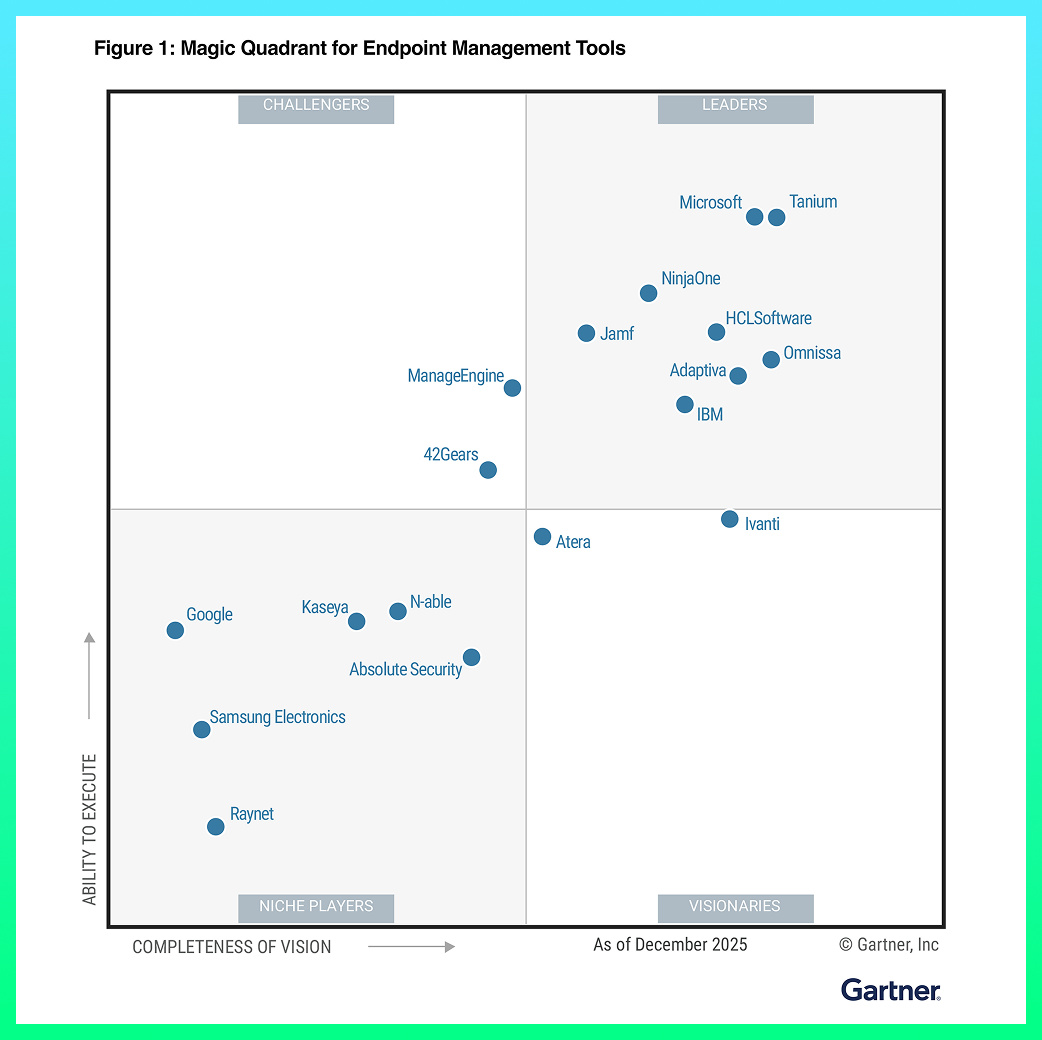
NinjaOne named a Leader by Gartner®

Discover value in 5 minutes.

DECKED poster

NinjaOne kicks IT into hyperdrive, and helps DECKED keep pace with rapid growth

This is why customers love us

Rated #1 on G2

G2’s No.1-Rated Remote Support Software

Fast, flawless remote access. Anywhere. Anytime.

NinjaOne Remote keeps customers happy and it shows with an Ease of Use score of 93 and perfect Satisfaction Score of 100.

“NinjaOne Remote has transformed how we support our global operations. We’ve eliminated the patchwork of third-party tools, improved security, and gained fast, reliable access to every system whether it’s a shop-floor dashboard or a specialized workstation halfway around the world.”

Matt Bloye
Corporate IT Administrator

G2 Grid - Remote Support Software - Winter 2026
G2 Leader - Spring 2026
G2 Best Results - Enterprise - Spring 2026
G2 Momentum Leader - Spring 2026
G2 Leader - Enterprise - Spring 2026
NinjaOneDatto RMMJumpCloudAteraConnectWiseN-ableAction1Kaseya VSA
Satisfaction Score10078928430278438
G2 Overall Score9483817649437055
Remote access is an integral part of any IT management platform. Although the TeamViewer, Splashtop and ConnectWise Control integrations are well-engineered, we wanted this vital part of our platform to be built from the ground up to fit our customers’ needs.
Like all parts of NinjaOne, security is taken very seriously with NinjaOne Remote. We use x25519+XSalsa20+Poly1305 key exchange + authorization + encryption technology to ensure all data is safe in transit and at rest. NinjaOne Remote also has many features like Paste Keystrokes to obfuscate typing when clipboard syncing is turned off, and the ability to record sessions to review later if needed.
NinjaOne Remote is currently only available as part of the NinjaOne Platform.
NinjaOne Remote provides fast, secure access from the NinjaOne console to all endpoints. NinjaOne Quick Connect is a separate product that enables technicians to remotely connect to devices that have neither the NinjaOne nor NinjaOne Remote agents installed on them. NinjaOne Remote provides fast, secure access from the NinjaOne console to all managed endpoints. NinjaOne Quick Connect is a separate product that enables ad-hoc connections to non-managed devices via secure invitation.
The small banner that appears to the end user during a remote session can be customized, yes. In addition, NinjaOne Quick Connect lets customers fully customize the email invitation that can be sent to end users giving them the secure link from which they download the NinjaOne Remote to their machine.
Support for Linux (and Raspberry Pi ARM) endpoints is squarely on the product roadmap, so look for it in coming months.
Ready to simplify work with unified IT?

GARTNER is a registered trademark and service mark of Gartner, Inc. and/or its affiliates in the U.S. and internationally and is used herein with permission. All rights reserved. Magic Quadrant is a registered trademark of Gartner, Inc. and/or its affiliates and is used herein with permission. All rights reserved.

Gartner does not endorse any company, vendor, product or service depicted in its publications, and does not advise technology users to select only those vendors with the highest ratings or other designation. Gartner publications consist of the opinions of Gartner’s business and technology insights organization and should not be construed as statements of fact. Gartner disclaims all warranties, expressed or implied, with respect to this publication, including any warranties of merchantability or fitness for a particular purpose.