NinjaOne Scriptable Endpoint Tasks for Smarter IT Automation

Managing endpoints across a distributed IT environment means dealing with an endless list of repetitive work including patching, maintenance, diagnostics, and more. NinjaOne’s scriptable endpoint tasks give IT teams the power to automate those workflows across every device in their environment from a single centralized platform.  Stop losing hours to manual processes and start letting smart automation do the heavy lifting.
Scriptable Endpoint Tasks
IT business logo
Provide logo
Advantage Technologies Logo
Dedicated IT Logo
Alticap Logo
Network Coverage logo

Automation that works, built for IT teams who need results

Eliminate Repetitive Manual Work Across Your Entire Fleet

NinjaOne lets you build automated endpoint tasks once and deploy them across any number of devices without repetitive effort. Whether you’re maintaining 10 devices or 10,000+, the platform scales with you and frees your technicians for higher-value work.

Full Flexibility With Multi-Language Script Support

NinjaOne natively supports endpoint automation scripts in PowerShell, Batch, VBScript, JavaScript, and Shell Script across Windows, macOS, and Linux. Your existing scripts transfer directly into the platform without any rewriting.

Trigger Automations Based on Real-Time Conditions

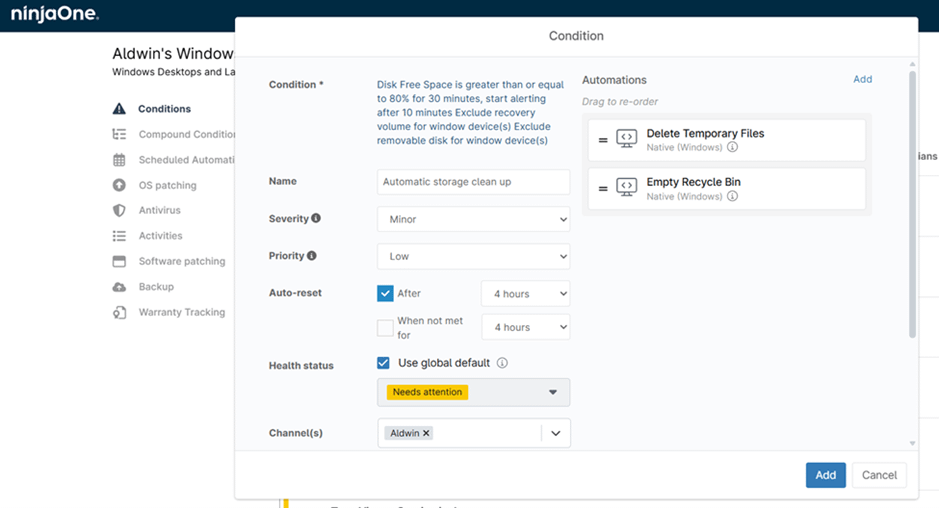
Scripting automation for endpoints in NinjaOne goes beyond scheduled runs. Scripts fire automatically in response to performance thresholds, system state changes, or monitoring alerts, remediating issues like low disk space or high CPU usage the moment they occur.

Granular Permissions and Role-Based Access Control

NinjaOne lets you assign custom endpoint scripts to categories and configure permissions at the role level, ensuring only authorized team members can execute critical automations. Version tracking and approval workflows keep your library controlled and accountable.

Complete Audit Trail for Compliance and Accountability

Script execution is logged and visible in NinjaOne’s activity feed, giving IT managers a reliable, timestamped record of all automated actions across every device for compliance and troubleshooting purposes.

Consistent Execution That Reduces Human Error

Pre-built automation scripts ensure tasks like patch deployment, permission changes, and diagnostics run the same way every time, reducing configuration drift and the mistakes that come with manual IT work.

Everything you need to automate script-based endpoint management at scale

On-Demand and Scheduled Endpoint Scripts

Run scheduled endpoint scripts on demand against a single device or across multiple endpoints at once, or set them to fire automatically at defined intervals through NinjaOne’s Scheduled Tasks. Automations can be launched from the device dashboard or selected in bulk from the device list.

Built better, from day one icon

Dynamic Script Forms for Code-Free Customization

NinjaOne’s Dynamic Script Forms let technicians adjust variables and parameters through a simple form at run time without touching the underlying code. A single script can serve multiple use cases, and non-developers can run and adapt automations safely.

Instant visibility and control icon

Automation Template Library With Community-Vetted Scripts

NinjaOne’s in-house team maintains a growing Template Library of ready-to-import scripts covering software deployments, diagnostics, and more. All code is visible for verification before use, giving you a trusted starting point for your automation library.

Policy-Driven Remote Task Automation Across Organizations and Device Groups

Through NinjaOne’s automation library, automation can be rolled out across entire organizations, sites, dynamic device groups, or individual endpoints from a single configuration, making it easy to enforce consistent standards across complex environments.

Lightning-fast icon

Software Package Repository for Complex Deployment Workflows

NinjaOne’s Software Package Repository lets you bundle scripts, configuration files, license keys, and pre/post-install steps into a single reusable package stored in the Automation Library, ready to redeploy across any number of endpoints whenever needed.

Simplicity by design icon

Custom Fields Integration for Advanced Multi-Step Workflows

Scripts in NinjaOne can read from and write to custom fields, feeding results into monitoring dashboards, asset inventories, or downstream automations. This turns individual scripts into connected workflow components that support advanced IT operations at scale.

Automation built for the real challenges IT teams face every day

Automating Routine Endpoint Maintenance at Scale

With NinjaOne, endpoint maintenance automation tasks like disk cleanup, system updates, registry edits, and service restarts can be scripted once and scheduled to run automatically across every device in scope. Scripts can be targeted at specific device groups , so routines apply consistently regardless of fleet size. Technicians can review results in the activity feed and flag any failures, while IT staff stay focused on work that actually needs human judgment.

Proactive Security Hardening and Incident Response

Security teams can use NinjaOne’s scriptable endpoint tasks to enforce compliance baselines and respond to threats faster than any manual process would allow. PowerShell automation tasks can be configured to trigger automatically when monitoring alerts detect anomalies, quarantining devices, revoking admin rights, or deploying emergency patches without delay. Role-based access controls and Dynamic Script Forms ensure the right people execute the right response quickly, turning reactive firefighting into a structured, auditable workflow.

Streamlined Software Deployment for MSPs Managing Multiple Clients

Managed Service Providers running NinjaOne can use the Automation Library to build reusable deployment packages that bundle scripts, configuration files, and installation prerequisites into a single library item. These packages deploy across different client organizations from one dashboard, with conditional logic adapting behavior based on OS version or device group. Custom parameters make the same package reusable across clients, cutting time spent on one-off scripts and supporting a scalable deployment practice that grows without adding headcount.

Take Control of Your Endpoints With NinjaOne

Related Resources

This is why customers love us

Ready to simplify the hardest parts of IT?

Scriptable Endpoint Tasks FAQs

Scriptable endpoint tasks in NinjaOne are automated scripts that can be run across managed endpoints to perform IT operations without manual intervention. These tasks live in NinjaOne’s Automation Library and can range from simple maintenance actions like clearing temp files or restarting services, to complex multi-step workflows involving software installation, security hardening, and system diagnostics. Technicians can run them on demand against a single device or roll them out simultaneously across hundreds of endpoints using NinjaOne’s policy engine, as well as schedule execution or trigger them based on defined conditions.

NinjaOne allows IT teams to write or import endpoint automation scripts into the Automation Library and then assign them to scheduled tasks, policies, or condition-based triggers. Once configured, these scripts run automatically at the defined time or in response to the specific events, such as maintenance windows, monitoring alerts, or a policy-driven actions. This enables routine tasks like patching, disk maintenance, user account management, and software deployment to run consistently in the background without manual intervention by a technicia.

The range is broad. Scripting automation for endpoints in NinjaOne supports endpoint hardening (encrypting drives, managing local users, configuring UAC), software deployment and updates, performance monitoring, system diagnostics, patch management, and issue remediation. Scripts can also read from and write to NinjaOne’s custom fields, enabling more complex multi-step workflows that feed results into dashboards, asset inventories, or downstream automation processes.

Yes. NinjaOne supports multiple execution modes. Scheduled endpoint scripts can be run manually on demand, set to execute at recurring intervals through scheduled tasks, or triggered automatically in response to predefined conditions. This means automations run exactly when they’re needed, whether that’s a nightly maintenance window or an immediate response to a critical event.

NinjaOne natively supports PowerShell, Batch, VBScript, JavaScript, and Bash scripting for endpoints. This covers Windows, macOS, and Linux environments, meaning your team can work with the languages they already know and apply existing scripts to NinjaOne without rewriting them from the ground up.

By automating repetitive, time-consuming automated endpoint tasks, NinjaOne removes the need for technicians to manually execute the same operations across multiple devices day after day. NinjaOne customers have reported saving upwards of 20 to 40 hours per week by leveraging the platform’s automation capabilities, time that can be redirected toward strategic IT initiatives rather than routine upkeep.

Yes. Custom endpoint scripts can be run against multiple devices at once by selecting them in bulk from the device list, or by assigning automations to device groups, organizations, or sites through NinjaOne’s policy engine. This makes it straightforward to apply the same configuration or maintenance task across an entire fleet in a single action.

NinjaOne provides role-based access controls at the script category level, ensuring only authorized technicians can run sensitive automations. Scripts can be executed as System, Current User, or using stored credentials from NinjaOne’s credential store. The platform also logs every script execution in the activity feed, providing a full audit trail for compliance and accountability purposes.

Yes. NinjaOne’s automation capabilities are tightly integrated with its monitoring and policy systems. Scripts can be configured to execute automatically on endpoints when defined conditions are met, such as CPU usage exceeding a threshold, disk space falling below a limit, or a security event being detected. This enables condition-driven remediation that responds to endpoint issues in real time without requiring manual intervention.

Beyond the direct time savings, script-based endpoint management in NinjaOne improves consistency and reduces human error by ensuring tasks are executed the same way every time. Policy-driven deployment means changes and configurations propagate uniformly across all targeted devices, reducing configuration drift. The combination of a comprehensive Template Library, dynamic script forms, and multi-language support also lowers the barrier for teams to adopt automation, even those without deep scripting expertise can build and run effective automated workflows.