
Key Points:
- What Is Patch Management? Patch management covers tasks related to ensuring endpoints and programs are updated and secured.
- Why Patch Management Is Important: Updated systems are more likely to prevent cyberattacks, especially those targeting known vulnerabilities.
- How Often Enterprises Should Patch Their Systems: Critical security patches must be deployed as soon as possible; other updates may follow a staggered rollout.
- Automating Patch Management: Automation significantly reduces human error and saves crucial business resources.
Patching vulnerable software and systems is more important and challenging to keep up with than ever. Here’s how IT pros can make their patch management process more efficient, eliminate disruption, and keep their networks secure.
What is patch management?
The patch management process covers tasks related to ensuring endpoints and programs are updated and secured. This generally involves the acquisition, testing, and deployment of software updates (patches) for operating systems, applications, and firmware across managed devices within the IT environment.
While Windows devices continue to dominate the market, Mac and Linux endpoints are just as mainstream today. With that said, the modern patch management process requires a tool to secure all three platforms effectively.
💡 Tip: To learn more, download our patch management guide for IT leaders.

Why is the patch management process important?
The patch management process keeps systems and applications running smoothly and is also one of the core activities involved in keeping today’s organizations secure.
According to IBM’s 2024 Cost of a Data Breach Report, the global average cost of a data breach reached $4.88 million, a record high and a 10% increase from the prior year. Since then, compliance penalties and loss of trust among clients have further compounded such a setback.
Leaving machines unpatched makes them vulnerable to cyberattacks, and the risk is anything but theoretical. In fact, Verizon’s 2024 Data Breach Investigations Report found that the exploitation of vulnerabilities as an initial attack vector grew 180% year over year, making unpatched systems one of the fastest-growing points of entry for attackers.
Patch management process challenges for SMBs
Some of the largest, most well-funded organizations in the world are having difficulties with patch management. So what chance do small and medium-sized businesses with limited IT support have? Here are some common challenges for moderately sized IT stacks:
- The lack of funds for enterprise-grade patch management solutions
- A mix of new and old devices plus different operating systems (Windows, macOS, Linux) and applications
- Small IT teams without the time or manpower to constantly monitor and deploy patches
- The lack of testing environments
- Manual patching being a time-consuming (and often deprioritized) process
Some of the biggest patch management challenges involve the process being time-consuming, complicated, and disruptive to end users. As a result, it’s easy to put patching off or simply have important updates get lost in the shuffle.
Unfortunately, the risk that unpatched systems pose is increasing. Once a vulnerability has been disclosed and a patch has been released, it’s a race for organizations to apply the patch before attackers begin actively exploiting it.
A real-world use case for solving patch management process issues
The solution to staying on top of patching cycles is to outsource the burden to managed services providers (MSPs). The MSPs then push the envelope using advanced and specialized solutions, like an RMM.
“We use Ninja to automate patching across our end-user devices and servers. We save a ton of time on patching now as we no longer have any manual steps in our patching workflow.”
Martin Wells, CEO of Syscomm Group
👉 Read: Learn how the Syscomm Group was able to leverage NinjaOne to get the most out of their security monitoring.
An RMM is an excellent IT management solution for streamlining and automating the hardest parts of IT, but the strategy around it must also be resilient and scalable. To give you a better idea, check out our recommendations below. We offer tips on how MSPs and IT leaders can build a cost-efficient and enduring patch management process framework.
10 key steps in the patch management process
Below is a 10-step patch management process template. It highlights the fundamental considerations that need to go into any patch management plan. You’ll want to make sure you’ve established clear roles and responsibilities for each step before the process. Also, make sure all key stakeholders are fully on board.
⚠️ To avoid common pitfalls along the way, be sure to watch our video entitled “Patch Management Mistakes and How to Avoid Them.”
Step 1: Discovery
First, you need to ensure you have a comprehensive network inventory. This includes understanding the types of devices, operating systems, OS versions, and even third-party applications at the most basic level.
Many security breaches occur because IT neglects or forgets certain endpoints. MSPs should be proactive and utilize network inventory tools. These are useful for scanning their clients’ environments on schedule and attain clear visibility over the managed network.
Step 2: Categorization
Next, segment-managed systems and/or users according to risk and priority.
For instance, you may filter via machine type (server, laptop, etc.), operating system, OS version, user role, etc. This will allow you to create more granular patching policies instead of taking a one-policy-fits-all approach.
Step 3: Patch management policy creation
Create patching criteria by establishing what will be patched, when, and under what conditions.
For example, determine which endpoints need to be automatically updated and set a timeline of how frequently they should be patched. The patching schedule for laptop end users may be weekly, while patching for servers may be less frequent and done manually.
You may also consider having flexible workflows for different patches. Some should have a quicker or more extensive rollout process (think browser updates vs. OS updates—critical vs. non-critical updates, for example).
Finally, you’ll want to identify maintenance windows to avoid disruption (take into account time zones for “follow the sun” patching etc.) and create exceptions.
Step 4: Monitoring for new patches and vulnerabilities
Understand vendor patch release schedules and models. Then look to identify reliable sources for timely vulnerability disclosures. Create a process for evaluating emergency patches as well. Referencing CISA’s known exploited vulnerabilities (KEV) catalog and CVSS severity scores also helps teams triage which patches require immediate action versus scheduled deployment.
Step 5: Patch testing
Create a testing environment or an isolated segment to avoid being blindsided by unintended issues. This initiative should include creating backups for a reliable and convenient rollback protocol.
Also, validate successful deployment and monitor for incompatibility or performance issues.
Step 6: Configuration management
Document any changes about to be made via patching. This will come in handy should you run into any issues with patch deployment, especially beyond the initial test segment or environment.
Step 7: Patch rollout
Follow the established patch management policies you created in step 3. For greater efficiency, identify which systems, applications, or devices require updates. From there, prioritize them based on risk level (e.g., security patches vs. feature updates).
Step 8: Patch auditing
Conduct a patch management audit to identify any failed or pending patches.
At the same time, continue monitoring for any incompatibility or performance issues. Tapping specific end users who can help by being additional eyes and ears is also a good idea.
Step 9: Monitoring and reporting
Produce a patch compliance report you can share with your clients to gain visibility into your work. Track which patches have been applied to maintain compliance with security standards. Additionally, set up a system that tracks patching status across systems, so that remediation can be done more quickly and timely.
Step 10: Review, improve, and repeat
Lastly, establish a cadence for repeating and optimizing steps 1–9. The workflow should include phasing out or isolating any outdated or unsupported machines, reviewing your policies, and revisiting exceptions. This will help verify whether they still apply or are necessary.
Patch management best practices
The demand for effective patch management continues to become more integral. As such, MSPs need to improve on their own process and offerings or risk falling behind. Here are three keys to MSPs providing smarter, more efficient, and more effective patch management services in 2026.
1) Automate patch updates
Patching is a game that’s extremely easy to fall behind in, especially if you’re still relying on identifying, evaluating, and deploying patches manually. Cloud-based, automated patch management software allows MSPs to schedule regular update scans.
It also helps to ensure patches are applied under specific conditions or automatically. Nowadays, modern RMM and patch management platforms even incorporate AI-driven risk scoring to help IT teams prioritize patching decisions.
How NinjaOne can help
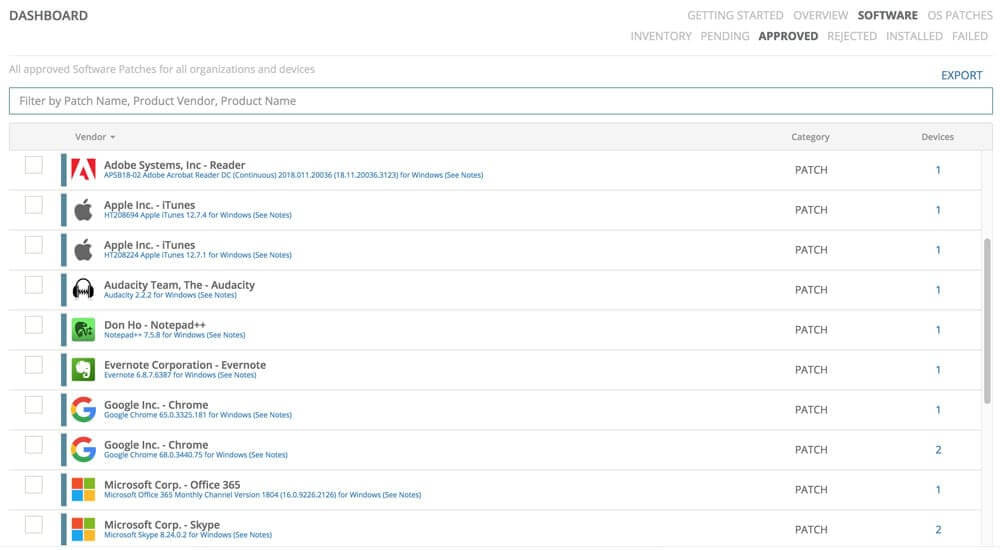
- Automate patching for Windows and third-party software from a continuously growing library of vendors
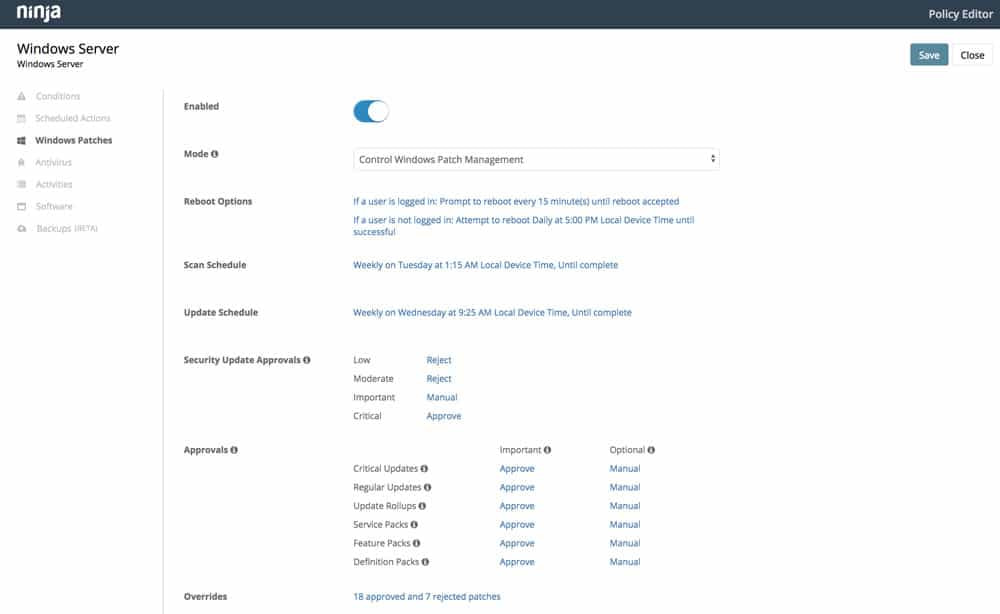
- Easily configure patch scanning and update schedules for specific segments of devices or users (get granular control or set it and forget it)
- Spend less time combining through new update releases and vulnerability disclosures and more time growing your business
2) Mitigate patch deployment validation with audit reports
Despite patching automation becoming increasingly popular, MSPs unfortunately can’t always assume automated patching solutions are working as promised.
That means time-consuming, manual validation. Developing scripts or processes to ease that burden (or, better yet, utilizing solutions that don’t require double-checking) is a worthwhile investment.
How NinjaOne can help:
- Gain access to detailed patch audit reporting.
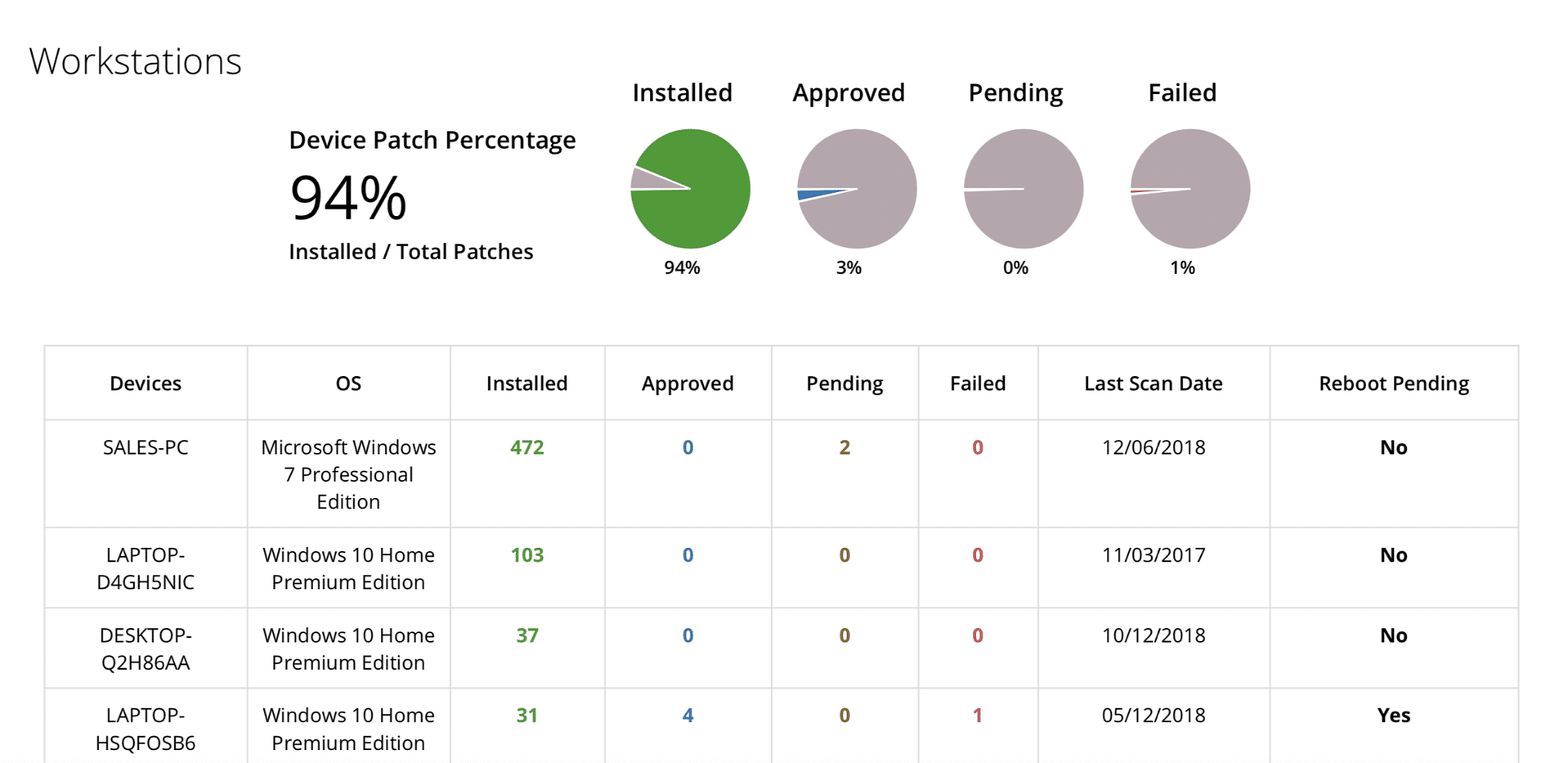
- Eliminate guesswork via access to reliable real-time information
3) Streamline reporting
Everything you do as an MSP should be communicated as value added to your clients. Patch management should be no exception, but delivering patch management audit reports should be as automatic as possible. After all, the more time reporting takes, the less time you have for providing additional services and growing your business.
Implementing your patch management process
The ultimate goal of the patch management process is to ensure that all software solutions in the IT stack and managed network are updated and secure. On balance, the patch management workflow should include these steps:
- Determine baseline data
- Establish priorities based on risk and criticality
- Create a patch management policy
- Test patches, new integrations, and system compatibility
- Set up a resilient backup and recovery solution
- Monitor patch updates and fix issues
Additionally, regularly check individual endpoints for compliance with regulatory standards such as GDPR and PCI DSS. A capable RMM can also automate endpoint security at scale.
Related topics:
- What Is Patch Compliance?
- How to Create a Patch Management Policy: Definition & Steps
- Best Patch Management Software for MSPs & IT in 2025
- Why Automated Patch Management Is Critical for Modern IT Operations