Key Points
- Comprehensive Device Inventory & Visibility
A strong MDM solution must provide real-time tracking of all devices (corporate and BYOD) to strengthen security and streamline IT operations. - Intuitive Onboarding & Training
Simplified enrollment ensures fast, error-free setup and enables even junior IT admins to become proficient in days instead of months. - Continuous Innovation & Updates
Choose an MDM vendor that delivers frequent product improvements and adapts quickly to evolving IT needs and security threats. - Cross-Platform & Centralized Management
Effective MDM supports iOS, iPadOS, and Android devices, allowing IT teams to manage everything from a single unified console. - Robust Security & Policy Enforcement
Essential features include remote lock/wipe, data encryption, policy enforcement, and application control to ensure compliance and protect sensitive data.
Mobile devices are the norm in the workplace today, allowing your teams around the world to communicate and work together more efficiently. Traditional network boundaries shifted significantly during the global pandemic and organizations had to quickly learn to support a newly remote workforce. With the remote and hybrid work model the new normal, IT departments now support more mobile devices than ever. While employees enjoy more flexibility, IT administrators are dealing with a whole new level of complexity thanks to the proliferation of company-issued or personal mobile devices.
Enter mobile device management or MDM. MDM tools monitor and manage the endpoints (phones, tablets, laptops) connected to your IT infrastructure allowing you to enroll, inventory, configure, track, and secure all the mobile devices on your network. Let’s examine six key functionalities to consider when evaluating an MDM solution for your organization.
While MDM traditionally refers to smartphones and tablets (iOS, Android), NinjaOne goes further by unifying MDM with endpoint management for Windows, macOS, and Linux. This means IT teams can manage all devices—mobile and traditional endpoints—within one platform.
Manage, support, and secure all your mobile devices in one easy-to-use solution.
1. Centralized management and streamlined device onboarding
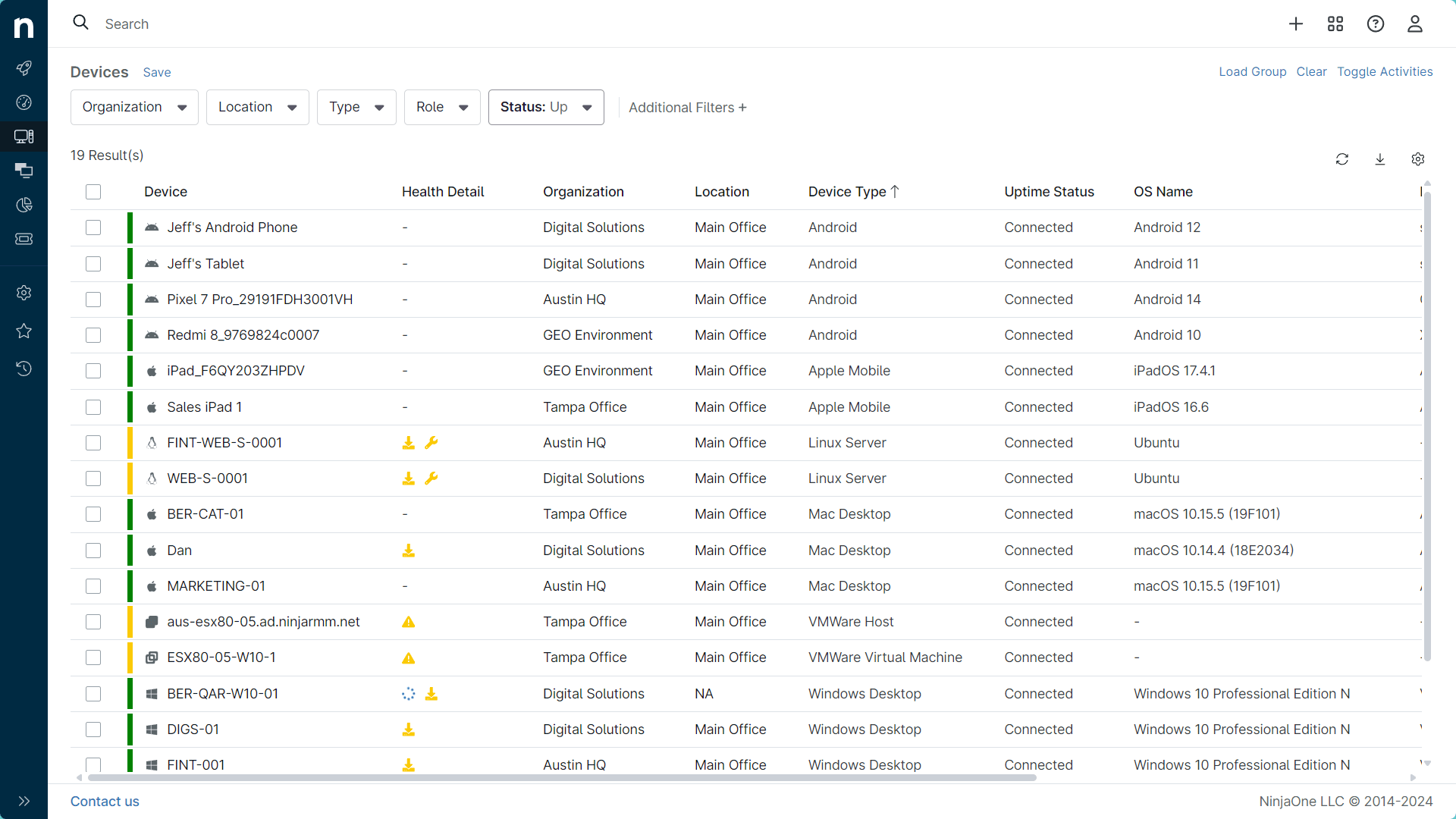
No matter where an organization’s mobile devices are located, IT technicians need to monitor and manage them remotely. A platform with a centralized dashboard allows teams to manage and support servers, virtual machines, and mobile devices.
NinjaOne MDM supports operating systems ranging from Windows, macOS, Linux, Android, iOS, and iPadOS. There’s no need for a separate instance for each device type or operating system. Not only does this simplify device management for your IT teams, but it reduces the number of tools needed to manage all endpoints, resulting in significant cost savings.
For example, IT admins can remotely configure Wi-Fi, VPN, and email profiles during onboarding, ensuring every device is secure and ready before an employee logs in for the first time.
NinjaOne MDM streamlines device onboarding with its intuitive dashboard. Once all the mobile devices are provisioned, it’s easy to enforce mobile device policies and provide ongoing support at scale through the dashboard.
2. Robust security features
With mobile devices now comprising a large portion of IT networks, security for these devices is more important than ever. MDM hardens your endpoint security by allowing IT admins to create comprehensive security policies and deploy them at scale to all mobile devices. This includes provisioning mobile devices with the apps and configurations they need based on their assigned group.
Whether the device is a personal or a company-issued phone or tablet, the MDM solution uses mobile-specific requirements like passcodes and remote lock/wipe to prevent data from being compromised. It can also help improve device security should an enrolled device connect to a public Wi-Fi source.
Admins can also enforce encryption, require regular OS updates, and restrict app installations to maintain compliance with industry standards like HIPAA, GDPR, and ISO 27001.
NinjaOne MDM benefits both the organization and the device user by protecting and managing personal devices and any data related to an organization or its projects, while respecting the device owner’s privacy and personal information. Moreover, NinjaOne detects when a device falls out of compliance and can take corrective action. If automatic corrective action isn’t possible, the IT team is notified immediately so that an alternative corrective action can be taken quickly, limiting the threat risk and potential device downtime.
Lost or stolen devices can be remotely locked or wiped instantly, ensuring sensitive data never leaves your control.
3. Application management
NinjaOne MDM application management is designed to enable IT admins to provision mobile devices with the applications that best support the mobile workforce delivering streamlined workflows and fast problem resolution. NinjaOne MDM also allows IT teams to whitelist or blacklist applications, push updates remotely, and enforce version control to prevent vulnerabilities from outdated apps.
It’s easy to configure the applications so that the network’s security posture remains strong and compliant with industry regulations.
4. Inventory
Look for an MDM platform that helps your team track the devices connected to your network. NinjaOne MDM makes it easy to maintain clear inventory information for the mobile devices on the network. The dashboard provides complete visibility into all managed devices and applications that support mobile user workflows on the go. Reduce device-based risk through complete, accurate, and always up-to-date inventory of corporate-owned and BYOD devices connected to the network.
Clear inventory records also reduce software licensing costs by helping IT teams quickly identify unused devices or applications, eliminating shadow IT and unnecessary spending.
5. Employee training
Most IT teams have a mix of experienced managers and admins to less experienced technicians. This isn’t a problem when managing NinjaOne MDM. NinjaOne tools are easy to use, so the learning curve is short. The console offers intuitive steps to enrolling and provisioning devices. If you need help, NinjaOne offers free, unlimited onboarding, training, and support so that even junior IT admins can become proficient on the NinjaOne platform in days not months. This means IT leaders spend less time training their staff and more time resolving issues—delivering faster ROI from your device management investment.
6. Constant innovation
Look for an MDM solution that evolves with the changing IT environment and offers regular updates based on customer feedback. Never satisfied with good enough, NinjaOne is always listening to and implementing feedback from our customers. NinjaOne customers can count on frequent release updates to address the changing needs of endpoint management. Stay on the leading edge of innovation.
For example, recent releases included [insert a real feature update if available—such as improved iOS device enrollment or Android work profile support. Customers can also submit feedback directly through the NinjaOne platform, ensuring the product evolves with their real-world needs.
Request a demo to see for yourself how NinjaOne’s MDM solution helps you manage, monitor, and resolve issues on all your mobile devices from a single user interface. Experience faster training cycles and onboarding while reducing IT administration costs and increasing technician efficiency.
Consider watching this video guide: ‘Mobile Device Management: 6 Features You Need in your MDM Solution’.