Remote Driver Updates

Remote driver updates are a critical component of modern endpoint management, allowing IT teams to maintain stable, secure, and high performing devices without physical access. For MSPs and internal IT teams, remote driver updates simplify large-scale device management, reduce support tickets, and create a consistent, optimized experience across all managed environments.
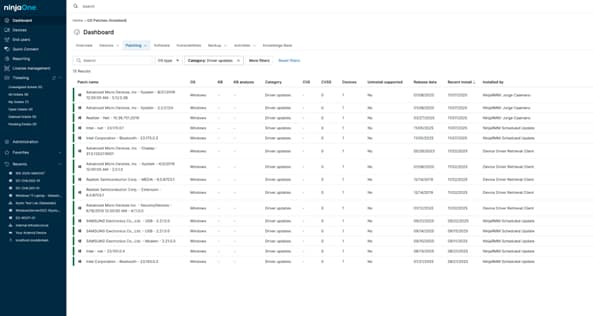

Remote Driver Updates
IT business logo
Provide logo
Advantage Technologies logo
Dedicated IT logo
Alticap logo
Network Coverage logo

Core Values

Centralized Control

NinjaOne provides a centralized view of device health and update status, making it easy for technicians to deploy Windows driver updates through patch management without needing direct access to each machine.

Enhanced Security and Stability

Regular driver updates help mitigate security risks and prevent compatibility issues. With NinjaOne, every device stays current with the latest certified drivers, improving reliability and maintaining smooth performance across the network.


Operational Efficiency

Automation and scripting tools enable IT teams to deploy driver updates to multiple devices at once.. This reduces repetitive tasks, saves valuable time, and ensures consistent performance across all managed environments.

Features

Automated Driver Updates via Patch Management

Manage Windows driver updates through NinjaOne’s centralized patch management policies, allowing technicians to schedule, deploy, and verify updates from a central console.

Custom Patch Policies 

Configure driver update schedules, maintenance windows, and device groups to ensure updates are deployed automatically and consistently. 

Scalable Endpoint Management

Deploy driver updates across hundreds of devices simultaneously through NinjaOne’s automation layer.

Use Cases

Automating Driver Maintenance

Schedule and apply driver updates automatically across all managed Windows devices using NinjaOne’s centralized patch policies, ensuring consistent performance without manual work.

Reducing User Disruption

Run driver updates during predefined maintenance windows or off-peak hours to keep endpoints secure while minimizing downtime and user impact.

Standardizing Device Performance

Apply unified driver update policies across environments to maintain consistent hardware reliability and simplify troubleshooting for MSPs and IT departments.

Improving Security and Compliance

Keep all device drivers current to close security gaps and meet compliance requirements for internal and industry IT standards. 

Simplify Your Driver Management Today

NinjaOne makes remote driver updates simple, secure, and fully automated.

  • Eliminate manual maintenance.
  • Prevent hardware performance issues.
  • Keep every device optimized and compliant.

Manage all driver updates from one unified platform, empowering your IT team with faster updates, better visibility, and full control across every endpoint.

Driver management, streamlined from a single console.


Related Resources

This is why customers love us

Ready to simplify the hardest parts of IT?

Remote Driver Updates FAQs

NinjaOne lets IT teams manage Windows driver and feature updates from a single console. Integrating driver updates into patch management keeps every device secure and stable without manual intervention.

Up-to-date drivers ensure hardware runs optimally with the operating system, improving speed, stability, and compatibility while reducing connection or performance issues.

Yes. All updates use encrypted TLS connections. Driver updates delivered through Windows Update are also validated using Microsoft’s digital signatures, ensuring update packages cannot be altered or installed unless they pass Microsoft’s signature verification. Detailed reporting and audit logs help maintain internal and regulatory compliance.

Updates can be automated and scheduled during maintenance windows or off-peak hours. Devices stay online while updates are deployed, minimizing user disruption and downtime.

No. With NinjaOne, driver updates can be automated or pushed remotely through custom scripts and patching policies. This means technicians don’t need to log in or control devices one by one.

Yes. Driver updates are handled through NinjaOne’s patch management workflows. You can combine them with automation policies and schedules to keep systems up to date with minimal effort.

NinjaOne offers real-time dashboards and reports showing update status and compliance levels. IT teams can easily verify which devices are up to date and quickly spot any that needs attention.

Automating driver updates saves technicians from repetitive manual work. It keeps devices healthy, reduces support tickets, and gives IT teams more time to focus on other priorities.