Security patch management with NinjaOne Autonomous Patch Management
NinjaOne Autonomous Patch Management helps IT teams prioritize and deploy security patches across supported endpoints based on risk.
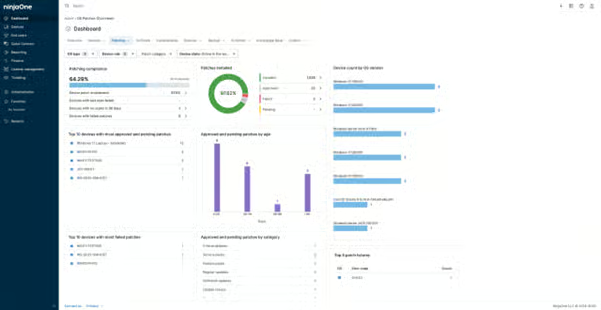
NinjaOne Autonomous Patch Management helps IT teams prioritize and deploy security patches across supported endpoints based on risk.
The following table highlights common security patching challenges and how NinjaOne Autonomous Patch Management helps address them.
Problem | How NinjaOne Autonomous Patch Management resolves it |
Teams struggle to identify which security patches need attention first. | NinjaOne shows CVE and CVSS data with patches, helping teams see vulnerability severity and prioritize patching based on risk. |
Teams may deploy a Windows patch without knowing about stability issues. | Patch Intelligence AI highlights known issues and patch stability information before deployment, helping teams make informed patching decisions. |
Vulnerability data and patch remediation can require separate workflows. | NinjaOne imports vulnerability data and connects CVE and CVSS information with patching workflows from a centralized console. |
Manual patching makes it difficult to keep distributed endpoints up to date. | NinjaOne uses patch settings within agent policies to define schedules, and approval controls to automate patch deployment across supported Windows, macOS, and Linux endpoints. |
Security patch management with NinjaOne Autonomous Patch Management helps IT teams reduce security exposure, make better patching decisions, and maintain greater control over patch operations.
Risk context helps IT teams identify higher-priority security patches sooner, so they can focus remediation efforts where they matter most instead of treating every update with the same urgency.
Patch stability insights help teams evaluate Windows OS updates before broader deployment. This gives administrators more information to balance vulnerability remediation with potential patch issues.
Automating recurring patch deployments reduce the time technicians spend managing recurring patch deployments across individual endpoints. Teams can apply schedules, approval rules, and deployment settings at scale.
Approval controls give IT teams more flexibility over which patches move forward and when they are deployed. This helps organizations align patch rollouts with their operational requirements.
The patching dashboard provides an at-a-glance view of patch status and compliance, helping teams quickly identify failed updates, pending patches, and devices that require attention. This reduces the need to check endpoints individually.

View CVE and CVSS data associated with patches to understand the severity of known vulnerabilities. This risk context helps IT teams prioritize which security patches to address first.

Review AI-generated insights for Windows OS patches, including patch analysis and known issues. Statuses such as Appears Stable, Caution, and Known Issues help teams make more informed patching decisions.

Use patch settings to define scan and update schedules, approvals, reboot behavior, and other deployment settings. IT teams can automate OS patch deployment across supported Windows, macOS, and Linux endpoints.

Approve, reject, or require manual approval for patches based on patching settings and organizational requirements. Teams can control which updates are allowed to move forward before deployment.

View patches by status, including Pending, Approved, Rejected, Installed, and Failed, from the NinjaOne dashboard. This centralized view helps teams identify patches that still require attention.
A newly disclosed vulnerability affects devices across your environment, and the IT team needs to determine which updates require immediate attention. CVE and CVSS data helps technicians assess severity, prioritize relevant security patches, and focus remediation efforts on higher-risk vulnerabilities.
A Windows security update addresses an important vulnerability, but the team wants more information about potential issues before deploying it broadly. Patch Intelligence AI provides stability insights and known-issue information that administrators can review before deciding how to proceed with the rollout.
An MSP needs to manage security updates across customer environments without reviewing and deploying every patch endpoint by endpoint. Centralized policies, approval controls, and patch status visibility help technicians manage deployments and identify updates that still require attention across their managed environments.
Within agent policies, configure scan and deployment timing, approvals, reboot behavior, and other patching settings for managed endpoints.
Review available patches and use CVE and CVSS data to identify higher-risk vulnerabilities that may require more immediate attention.
Approve patches for deployment and, for Windows OS patches, review Patch Intelligence AI insights when available to inform deployment decisions.
Track installed, pending, rejected, and failed patches from the NinjaOne console to identify updates that require follow-up.
Import vulnerability data from Tenable and map identified CVEs to managed devices, giving IT teams clear visibility into which endpoints may require remediation.

Bring Qualys vulnerability findings into NinjaOne and associate identified CVEs with managed devices, helping teams connect vulnerability data with patch remediation.
Import Rapid7 vulnerability data into NinjaOne and map identified CVEs to managed devices so teams can use those findings to guide remediation efforts.
Executech uses NinjaOne Autonomous Patch Management to strengthen patching across its managed environments. After moving to NinjaOne, the MSP achieved a 42% improvement in patch compliance.
“When we audited our old patching tool, the number of false positives was alarming. It showed patches marked as installed that were still missing entirely.”
James Wright, Chief Technology Officer, Executech
Source: NinjaOne
See how NinjaOne Autonomous Patch Management helps IT teams prioritize security updates, automate patch deployment, and maintain visibility across managed endpoints.
In this guide, we’ll break down the stages of the patch management lifecycle, explore common challenges, and show how automation can streamline the process for IT professionals.

Patching vulnerable software and systems is more important and challenging to keep up with than ever. Here’s how IT pros can make their patch management process more efficient, eliminate disruption, and keep their networks secure.
NinjaOne introduced Patch Intelligence AI within its automated patch management platform to address these risks. The tool helps IT teams manage patches proactively and with greater confidence.
Security patch management in NinjaOne Autonomous Patch Management helps IT teams identify, evaluate, and deploy security updates across managed endpoints. Teams can use centralized agent policies, risk information, approval controls, and patch status data to manage remediation from the NinjaOne console.
NinjaOne provides CVE and CVSS data associated with patches to give IT teams context about known vulnerabilities and their severity. Administrators can use this information to identify higher-risk vulnerabilities and determine which security patches should receive attention first.
Patch Intelligence AI provides AI-generated analysis for Windows OS patches, including information about known issues and patch stability. Administrators can review statuses such as Appears Stable, Caution, and Known Issues before deciding whether and how to deploy an update.
Yes. NinjaOne Autonomous Patch Management uses patching settings within agent policies to automate patch scanning and deployment across supported endpoints. Administrators can configure schedules, approval settings, reboot behavior, and other policy controls to manage how patches are deployed.
Yes. NinjaOne provides patch approval controls that let administrators approve or reject patches and configure approval behavior through patch policies. This gives teams control over which updates can move forward and helps them align deployments with their patching requirements.
Yes. NinjaOne supports vulnerability data integrations with tools such as Tenable, Qualys, and Rapid7. Vulnerability findings can be imported and mapped to managed devices, helping teams connect identified vulnerabilities with remediation workflows in NinjaOne.
The NinjaOne patch management dashboard provides centralized visibility into patch status across managed endpoints. Teams can review statuses including Pending, Approved, Rejected, Installed, and Failed to identify patches or devices that may require follow-up.