Remote site patch compliance

Remote site patch compliance is a capability of NinjaOne Patch Management. It gives organizations centralized visibility into patch status across remote offices, branch locations, and distributed endpoints, with policy enforcement and compliance reporting from a single console.

Remote site patch compliance
IT business logo
Provide logo
Advantage Technologies logo
Dedicated IT logo
Alticap logo
Network Coverage logo

Common remote site patch compliance challenges 

The following table highlights common patch compliance challenges across remote sites and how NinjaOne Patch Management helps administrators resolve them.

ProblemHow NinjaOne resolves it
Patch compliance is difficult to monitor across remote sites.NinjaOne Patch Management centralizes patch compliance data for remote offices, branch locations, and distributed endpoints in a single dashboard.
Coordinating patch deployments across multiple locations is difficult.Administrators apply standardized patch policies while assigning maintenance windows and deployment schedules for different sites or device groups.
Compliance reporting takes too much time.Centralized reporting provides real-time compliance data, helping administrators review patch status and prioritize remediation.

Key remote site patch compliance capabilities 

The following capabilities show how NinjaOne Patch Management supports remote site patch compliance across distributed environments.

Patch compliance dashboard

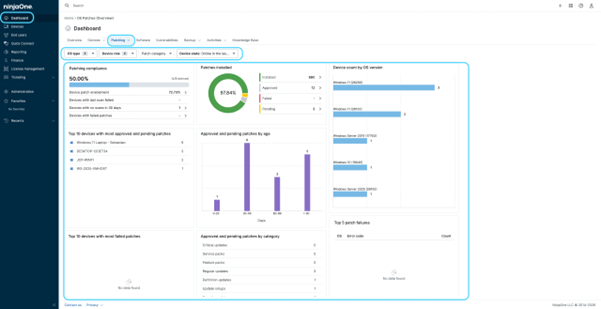
NinjaOne Patch Management uses the Patching dashboard to centralize patch compliance data for managed endpoints. The dashboard displays compliance status, patch activity, deployment metrics, and patch health across managed devices.

Patch status monitoring

NinjaOne Patch Management tracks installed, missing, pending, and failed patches across managed endpoints. Patch status is continuously updated to reflect the current deployment state of each managed device.

Patch compliance reports

NinjaOne Patch Management provides patch compliance reports that summarize patch status, deployment activity, and compliance data across managed endpoints, remote sites, and distributed environments.

Patch policies

NinjaOne Patch Management uses policies to define deployment schedules, maintenance windows, approval settings, and other patch management rules for managed endpoints. Policies can be assigned to organizations, sites, or individual devices.

What does remote site patch compliance do?

The following benefits highlight the operational improvements organizations gain by implementing remote site patch compliance in NinjaOne Patch Management.

Simplicity by design icon

Centralized compliance visibility

Administrators monitor patch compliance across remote sites from a single location instead of reviewing individual devices or locations separately. This improves visibility across distributed environments and simplifies ongoing compliance management.

Built better, from day one icon

Faster identification of compliance issues

Administrators identify missing, pending, or failed patches more quickly across managed endpoints. Earlier visibility allows remediation efforts to be prioritized before compliance gaps expand.

Instant visibility and control icon

Consistent patching across remote locations

Standardized patch policies help maintain consistent patch compliance across remote offices while supporting different maintenance windows and deployment schedules where needed. This reduces configuration inconsistencies across distributed environments.

Simplified compliance reporting

Centralized compliance reporting makes it easier to review patch status across multiple locations and document patch management activities. This supports operational reporting and helps organizations prepare for internal compliance reviews.

How organizations use remote site patch compliance 

The following examples show how organizations and MSPs use NinjaOne Patch Management to monitor patch compliance across remote sites and distributed environments.

Monitoring compliance across remote offices

Organizations use NinjaOne Patch Management to maintain consistent patch compliance across remote offices with limited or no on-site IT staff. Administrators monitor compliance centrally and respond to issues without traveling to each location.

Managing compliance during patch rollouts

Organizations use NinjaOne Patch Management to configure patch settings and schedule updates during defined maintenance windows. Administrators maintain patch compliance without disrupting users or interrupting daily operations.

Managing patch compliance across multiple clients

MSPs use NinjaOne Patch Management to monitor patch compliance across multiple customer environments from a single console. This allows technicians to prioritize remediation, standardize patch management practices, and maintain consistent compliance across every managed client.

How remote site patch compliance works 

The following workflow outlines how administrators configure, apply, and monitor remote site patch compliance using NinjaOne Patch Management. Each phase highlights the administrator’s actions and how the platform helps maintain patch compliance across managed endpoints.

I. Define patch management settings

Administrators create patch policies that establish deployment schedules, maintenance windows, and approval settings, creating a consistent patching standard for managed endpoints.

II. Deploy approved patches

Administrators approve updates and configure patch management settings, deployment schedules, and maintenance windows. Managed endpoints download and install approved updates using their native update engine based on the configured settings.

III. Monitor compliance status

NinjaOne Patch Management continuously evaluates patch compliance across managed endpoints, while administrators review compliance status and identify devices that require remediation.

IV. Remediate non-compliant devices

Administrators address missing or failed patches when needed, and NinjaOne Patch Management updates compliance status as endpoints return to a compliant state.

This is why customers love us

Why organizations trust NinjaOne Patch Management 

Top-rated Patch Management solution

NinjaOne is rated No. 1 for patch management on G2, with a 93% Ease of Use score and a 100% Satisfaction score. These ratings reflect customer feedback across the platform’s patching and compliance experience.

"NinjaOne's patch management is, without question, the best we've used. It's consistent, reliable, and gives us confidence that our systems are always up to date."

See remote site patch compliance in action 

Discover how NinjaOne Patch Management helps organizations monitor patch compliance across remote offices, standardize patching policies, and maintain compliance across distributed environments.

Related Resources

Ready to simplify the hardest parts of IT?

Remote Site Patch Compliance FAQs

Remote site patch compliance in NinjaOne Patch Management helps administrators monitor and maintain patch compliance across remote offices, branch locations, and distributed endpoints. It provides centralized visibility into patch status, making it easier to identify non-compliant devices and maintain consistent patching practices across multiple locations.

NinjaOne Patch Management continuously tracks the patch status of managed endpoints and updates compliance data as deployments are completed. Administrators can monitor compliance across remote locations from a centralized dashboard and identify devices that require remediation.

Yes. The Patching dashboard provides a centralized view of patch compliance across managed endpoints, including remote offices, branch locations, and distributed environments. This allows administrators to monitor compliance without switching between multiple management tools.

Maintaining consistent patch compliance helps reduce the number of devices running missing or outdated security updates. NinjaOne Patch Management supports this process by helping administrators identify compliance issues and apply standardized patch policies across distributed environments.

Yes. NinjaOne Patch Management allows administrators to assign different patch management settings, maintenance windows, and deployment schedules to support different operational requirements across remote sites and organizational structures. This flexibility supports different operational requirements while maintaining centralized management.

NinjaOne Patch Management tracks installed, missing, pending, and failed patches across managed endpoints. Administrators can identify non-compliant devices in the Patching Dashboard using the compliance status and the red and yellow indicators displayed next to devices that require attention, allowing them to prioritize remediation.

NinjaOne Patch Management provides patch compliance reports that summarize compliance status across remote sites, branch offices, and distributed environments. These reports help administrators review patch activity, document compliance, and support operational reporting.

Patch compliance reports provide documented records of patch deployment and compliance status across managed endpoints. Organizations can use this information to support internal reviews and demonstrate patch management activities during compliance or audit processes.

NinjaOne Patch Management provides visibility into patch compliance that can support vulnerability management activities by helping administrators identify endpoints that require security updates. However, the specific integration of compliance data into broader vulnerability management workflows depends on the organization’s security tools and processes.

Centralized compliance visibility allows administrators to monitor patch status across all managed endpoints from a single location. This reduces the time required to identify compliance issues, prioritize remediation, and maintain consistent patch management across distributed environments.

No. Remote site patch compliance is a capability within NinjaOne Patch Management, not a standalone product. Administrators access it through the Patching dashboard in the NinjaOne console, where they can monitor and enforce patch compliance across remote offices, branch locations, and distributed endpoints from a single location.

NinjaOne Patch Management supports patching across Windows, macOS, and Linux endpoints. The Windows Update Agent is used for Windows patch delivery. Contact your NinjaOne account team to confirm which endpoint types apply to your specific environment.