Geolocation tracking with NinjaOne MDM
NinjaOne MDM tracks the GPS location of enrolled Android and iOS mobile devices from one console, so IT teams can locate devices and support recovery.
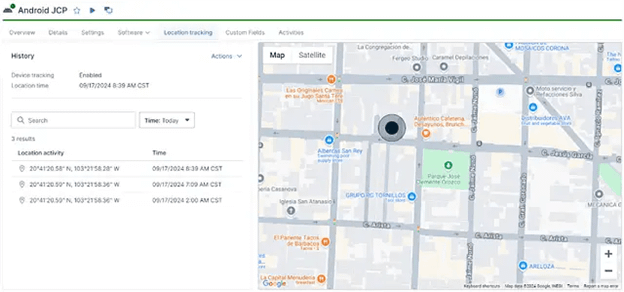
NinjaOne MDM tracks the GPS location of enrolled Android and iOS mobile devices from one console, so IT teams can locate devices and support recovery.






Problem | How NinjaOne resolves it |
| A company mobile device is lost or stolen and IT has no way to find it. | NinjaOne MDM tracks the GPS location of the enrolled device and returns it from the console, so IT can locate the device for recovery. |
| Field and remote mobile devices are used outside the office with no location visibility. | NinjaOne MDM reports device location from one console alongside every other managed endpoint, with no separate tracking tool. |
| Users disable location services on Android devices and defeat tracking. | NinjaOne MDM can lock location services on managed Android devices so they cannot be turned off. |
| Devices at different sites need different rules applied automatically. | NinjaOne MDM applies location-based policy overrides configured under the organization’s Locations. |
Lost and stolen mobile devices are recovered faster, because IT can locate an enrolled device from the console.
Remote and field devices stay visible from the same console used for every other endpoint, with no separate tracking tool.
Tracking stays reliable on Android, because users cannot switch location services off.
Site-specific rules apply automatically, because policies follow each device’s assigned location.

NinjaOne MDM reports the GPS location of enrolled Android and iOS mobile devices from the central console. It supports inventory tracking and loss prevention, and it relies on the NinjaOne Assist app running on the device to report location.

IT teams request a managed device’s current location from the dashboard. Real-time lookup helps staff locate a device when it is lost or needs to be confirmed on site.

NinjaOne MDM can lock location services on managed Android devices so users cannot turn them off. Locking preserves the ability to locate a device and keeps tracking consistent across the fleet.

Administrators apply different policies based on a device’s assigned location, configured under the organization’s Locations. A device receives the right policy for where it is, without a separate console for each site.

Device location is managed alongside every other endpoint in the NinjaOne console. Teams track mobile devices without adding a separate location-tracking tool to the stack.
When a company phone or tablet goes missing, support staff request its location from the NinjaOne console. The NinjaOne Assist app on the device reports its GPS location, and IT uses that location to recover the device.
Teams that issue devices to field staff track device location from the same console they use for laptops and servers. Administrators confirm a remote device’s location without logging into a separate tracking tool.
MSPs can monitor the location of managed Android and iOS devices across multiple Organizations from a single console. Technicians can locate a client’s lost device or confirm its location without switching tools for each client.
The device is enrolled in NinjaOne MDM and the NinjaOne Assist app runs on it to report location.
Administrators turn on location tracking in the device policy and can lock location services on managed Android devices.
IT requests a managed device’s current location from the dashboard for recovery or verification.
Device locations are managed in the same console used for all other endpoints.
100,000
Endpoints managed
“NinjaOne is a scalable solution. It’s built on a modern SaaS architecture and it’s future-proof.”

40%
More Cost Effective
“NinjaOne’s price point is 40% less than any other endpoint management tool on the market, while being more powerful and easy to use.”

10-15
Tools Replaced
“Before, I needed 10-15 different tools to execute what NinjaOne does in its centralized, single pane of glass.”

30%
Less time for patching
“We observed a 30% reduction in the time taken for patch deployments compared to our previous solution.”

2,000
Endpoints managed
“NinjaOne gives me much more flexibility and security in my work”

30%
Annual ROI
“[NinjaOne] has already shown its value in ROI…it’s at least a hundred thousand dollars annually.”

24x
Faster Endpoint Management
“Our processes have become 24x faster with NinjaOne.”

20-40
Hours Saved Each Week
“Leveraging the automations feature within NinjaOne has enabled me to save upwards of what would likely be 20 to 30 to even 40 hours per week.”

"Mobile devices can be a security risk, but with NinjaOne, we have complete control over all device activity and can monitor those devices from a single dashboard."
- Tyler Ellison, IT Officer, FCC Behavioral Health
NinjaOne MDM delivered 4X faster policy updates on mobile devices for FCC Behavioral Health, a healthcare provider serving nearly twenty counties in Southeast Missouri.
Discover how NinjaOne Patch Management helps organizations monitor patch compliance across remote offices, standardize patching policies, and maintain compliance across distributed environments.
Manage mobile, desktop, and networking devices in one place.

This article explains how to enable and manage location tracking on your managed mobile devices in NinjaOne.
Geo-tracking has emerged as a technological tool that has transformed how businesses and organizations operate. This advancement has helped monitor devices by providing geographical data, improving security and operations across various industries.
NinjaOne geolocation tracking is a NinjaOne MDM capability that displays the GPS location of enrolled Android and iOS mobile devices from the central console. IT teams use it to locate lost or stolen devices, support recovery efforts, while maintaining visibility into managed mobile devices.
NinjaOne MDM uses the NinjaOne Assist app running on the enrolled device to report its GPS location. Administrators enable tracking in the device policy, then request a device’s current location from the dashboard.
Android and iOS devices support location tracking when they are enrolled in NinjaOne MDM and the NinjaOne Assist app is installed with the required location permissions. Location tracking helps administrators locate managed devices for asset management and recovery of lost or stolen devices.
On BYOD Android and iOS devices, users can generally disable Location Services or revoke the NinjaOne Assist app’s location permission. On company-owned Android devices, administrators can typically prevent users from disabling Location Services. On supervised iOS devices, administrators can prevent users from disabling device-wide Location Services on supported OS versions. However, app-specific location permissions are governed by Apple’s privacy framework and available MDM controls.
Yes. NinjaOne MDM can lock location services on managed Android devices so users cannot disable them, which preserves the ability to locate a device.
For BYOD-enrolled devices, user consent is required for location tracking. On iOS devices in supervised mode, the end user must grant location tracking permissions to the NinjaOne Assist app. NinjaOne MDM supports transparent policy communication and role-based access so teams can meet legal and compliance requirements.
No. NinjaOne MDM does not support geofencing or applying policies based on a device’s geographic location. It does support GPS location tracking, allowing administrators to view a managed device’s current location from the NinjaOne console. Separately, administrators can assign different policies to devices based on their assigned organizational Location (such as an office, department, or customer site), not their physical location.