Executive Endpoint Reporting in NinjaOne
Generate clear, structured reports on device health, security, and compliance, and share them automatically with the managers, leaders, and stakeholders who need them most.
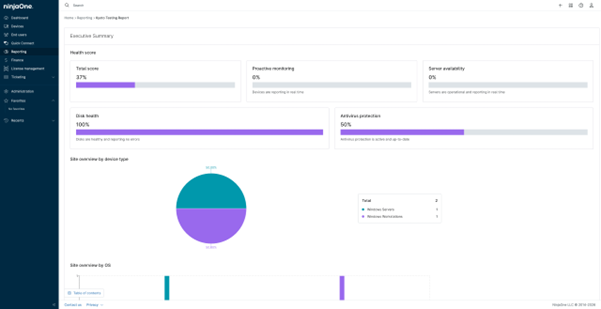
Generate clear, structured reports on device health, security, and compliance, and share them automatically with the managers, leaders, and stakeholders who need them most.






Turn complex device data into structured, easy-to-read reports that any leader or stakeholder can understand, without needing to access the platform directly.
Schedule reports to generate and deliver automatically to the right people at the right time, eliminating the need for manual compilation and follow-up.
Give leadership consistent access to device health, security, and compliance data, making it easier to identify trends, justify investments, and plan ahead.

Create high-level reports that cover device health, antivirus protection, patch compliance, server availability, and more, giving leadership a complete picture of the IT environment.

Narrow down report data by organization, location, device group, and date range to ensure each report shows exactly what is relevant to the intended audience.

Set up automatic report generation and delivery to specific recipients at defined intervals, so stakeholders always receive up-to-date information without any manual effort.

Manage report creation and access based on technician roles, ensuring that sensitive endpoint data is only shared with the right people.

Create separate reports for different device groups, locations, or organizations, making it easy to deliver the right information to each client or team without mixing data from different environments.
Instead of manually compiling data from multiple sources, IT teams can generate a structured summary report with a single click, covering everything from device health to patch compliance, ready to present to leadership in minutes.
When handling several clients or departments, IT teams can create separate reports filtered by organization or location, ensuring each stakeholder receives only the data relevant to their environment.
When audits or compliance reviews require documentation of the IT environment, scheduled reports provide a consistent and reliable record of device health, antivirus status, and patch coverage over time.
When a department reports frequent device issues, IT teams can generate a report filtered by location or device group to get a clear picture of that area’s endpoint health, making it easier to identify patterns and prioritize where attention is needed.
This guide outlines collecting, formatting, and automating RMM (Remote Monitoring and Management) reports, highlighting critical IT metrics. These include patching, security posture, backup status, system uptime, compliance alignment, and asset lifecycle trends.

Whether operations are running smoothly or you’re running into a number of hiccups, the question to IT is always the same – “What do we even pay you for?” Rather than viewing IT as a vital piece of the puzzle, organizations often view IT as a cost center, leading to warped perceptions of the importance of IT.
This guide will show you how to maintain essential MSP reporting without a PSA, using practical methods like simple scripts and structured templates to document your work and demonstrate value.
100,000
Endpoints managed
“NinjaOne is a scalable solution. It’s built on a modern SaaS architecture and it’s future-proof.”

40%
More Cost Effective
“NinjaOne’s price point is 40% less than any other endpoint management tool on the market, while being more powerful and easy to use.”

10-15
Tools Replaced
“Before, I needed 10-15 different tools to execute what NinjaOne does in its centralized, single pane of glass.”

30%
Less time for patching
“We observed a 30% reduction in the time taken for patch deployments compared to our previous solution.”

2,000
Endpoints managed
“NinjaOne gives me much more flexibility and security in my work”

30%
Annual ROI
“[NinjaOne] has already shown its value in ROI…it’s at least a hundred thousand dollars annually.”

24x
Faster Endpoint Management
“Our processes have become 24x faster with NinjaOne.”

20-40
Hours Saved Each Week
“Leveraging the automations feature within NinjaOne has enabled me to save upwards of what would likely be 20 to 30 to even 40 hours per week.”

It is a feature that allows IT teams to generate clear, easy-to-read reports about the state of all managed devices, so leaders and stakeholders can stay informed about the IT environment without having to dig into technical details.
They turn complex device data into clear summaries, making it easier for IT leaders to stay on top of the environment without reviewing each device individually.
Reports provide high-level summaries of key data, highlighting essential insights such as endpoint status, system performance, and IT asset information (including hardware and software). They can be customized to include specific metrics, filters, and scopes based on organizational needs.
Yes, reports can be filtered by organization, location, and device group, and can include a custom title, description, and cover page, making it easy to tailor them for different clients, teams, or leadership audiences.
It gives stakeholders a consistent, structured view of device health, security, and compliance without requiring them to access the platform, making it easier to build trust and demonstrate the value of IT operations.
Yes, reports can be scheduled to generate and deliver automatically to specific recipients at defined intervals, ensuring stakeholders always have up-to-date information without requiring manual effort from the IT team.
They provide a high-level view of key security indicators like antivirus protection status, patch compliance, and disk health across all managed devices, making it easy to spot gaps and take action before they become bigger issues.
Yes, by providing structured documentation of device health, patch status, antivirus coverage, and security configurations over time, reports can serve as a reliable reference during audits or compliance reviews.
By having consistent access to historical data and performance trends, IT leaders can identify recurring issues, justify infrastructure investments, and make more informed decisions around budgeting and capacity planning.