Key Points
- QBRs aren’t just client reviews: they’re powerful MSP sales tools.
- Introduce your QBR process early to stand out from competitors.
- Use pre-sales assessments and lifecycle reports to add immediate value.
- Consistent QBRs strengthen client relationships and boost renewals.
- Turn QBR insights into revenue through project and budget planning.

In this guest post, Lifecycle Insights Chief Customer Experience Officer Alex Farling explains the untapped potential of using quarterly business reviews (QBRs) to close deals and drive new business.
Running an MSP in 2025 is not going to be easy. Malware and ransomware threats are on the rise. Competition for customers is higher than ever before. The worldwide transition to software-as-a-service has created a world in which most of the barriers to entry for a new MSP have been removed.
When my break/fix company transitioned to managed services in 2008, we spent over $40,000 on software purchases and an additional$15,000 on the servers used to run that software. Today, an MSP can go into business with nothing but a credit card. This is great news for those who want to exit corporate IT for a little more freedom and flexibility in their careers, but it could be viewed as bad news for established MSPs who have significantly more overhead when compared to a one-man startup.
Increasingly, MSPs are facing downward price pressure on basic managed services because of how easy it is for new MSPs with minimal operating expenses to enter the market. As an established, mature MSP, you’re often going to be in a position to be undercut on price by these competitors. With that in mind, let’s explore how you can use your maturity as a more compelling advantage during the sales process and beyond.
Looking Beyond a Table-Stakes Offering
First, let’s look at the things I like to call “permission-to-play items”. Those include:
- Patch management (Windows and third party)
- Managed antivirus and next-gen anti-malware/EDR
- Content filtering and antispam
- Remote support
- Helpdesk ticket systems
- Office 365 and related services
Let’s be honest, anyone with a credit card and a business license (optional) can purchase most of the tools required to provide these services. So, what continues to distinguish mature MSPs from others? What allows them to rise above commoditized pricing to command best-in-class rates?
The Impact of the QBR process
One big answer is that with experience comes process, and process will deliver value like nothing else in your business. The way an MSP approaches its quarterly business review (QBR) process is a perfect example. The most successful MSPs understand that QBRs aren’t just about(re)establishing their place at the table; they’re also an opportunity to drive new revenue.
In this post, we’ll explore five ways you can get more strategic with your QBRs so that they can become your unfair advantage for:
- acquiring new clients
- retaining your current ones
- securing more project work
- generating more referrals
QBRs as Customer Acquisition Tool
Strategy #1: Position your QBRs as a key differentiator early in the sales process
In a more and more commoditized world of managed services, you need to show clients that you are offering more than the basics, with a monthly price tag attached.
Scenario 1: A status update — not a QBR (more reactive)
Sales pitch: Mr. Prospect, we would like to meet quarterly to review the work we have done for you and address any outstanding device issues that still need attention, as well as any requirements you may have for the next quarter.
Scenario 2: The Strategic QBR (proactive)
Sales pitch: Mr. Prospect, let me show you a sample agenda of what we will discuss at our quarterly business reviews:
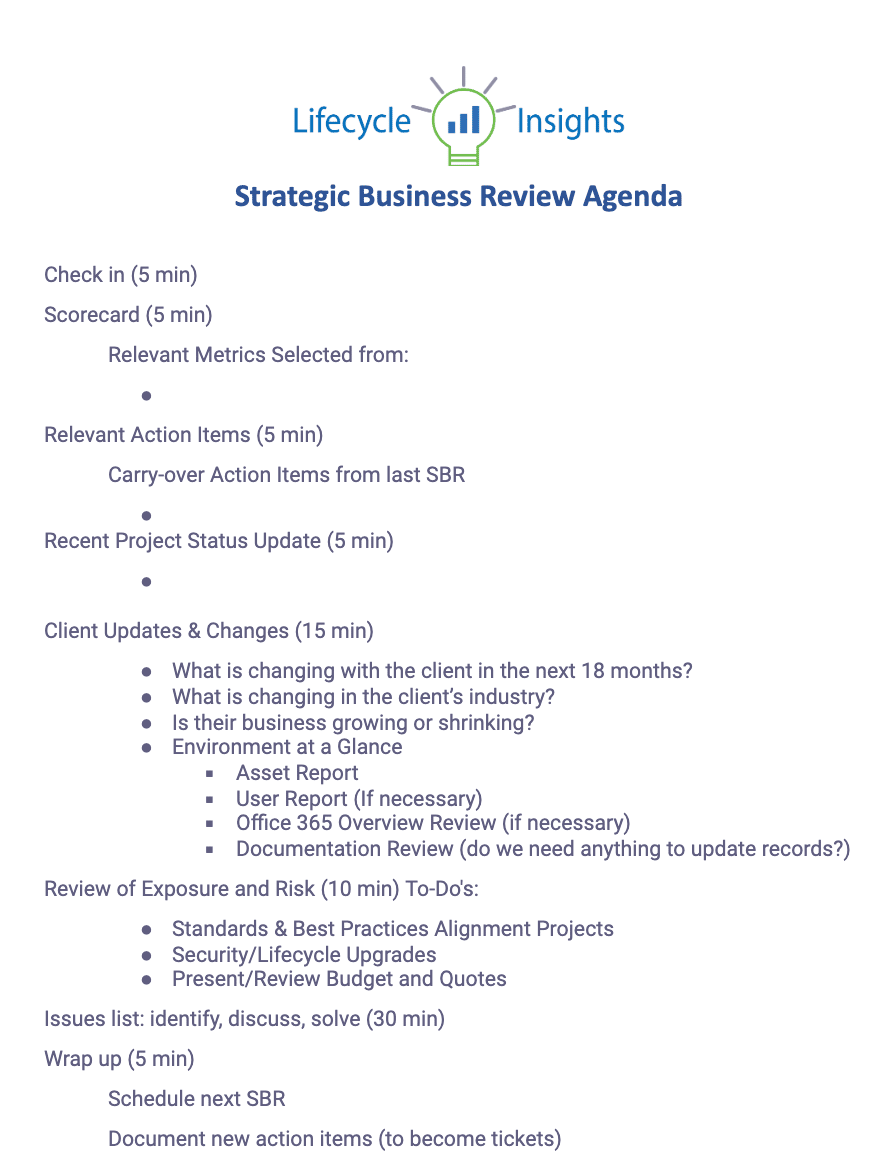
Sample QBR agenda for prospect (click to expand)
As you can see, we would like to help you maximize the value and use of your technology, so we strive to be proactive in identifying your needs. Healthy asset lifecycle management is key to that. Additionally, having a plan in place for lifecycle replacement will enable us to provide your budgeting forecasts. ensuring there are no surprises. We also use the review time to discuss trends and changes in your business or industry so we can best help you meet your technology needs.
Part of bringing up your QBR process during the pre-sales cycle allows you to show the client what it is like to be engaged with your company.
Strategy #2: The pre-assessment leave-behind
Having a pre-sales assessment (like the sample shown below) during the sales conversation provides valuable insights for both you and the prospect. First, it shows you know your business. By having key questions that focus on their potential risks, it also indicates that you aim to understand their strengths and weaknesses, and that your focus will be on addressing these.
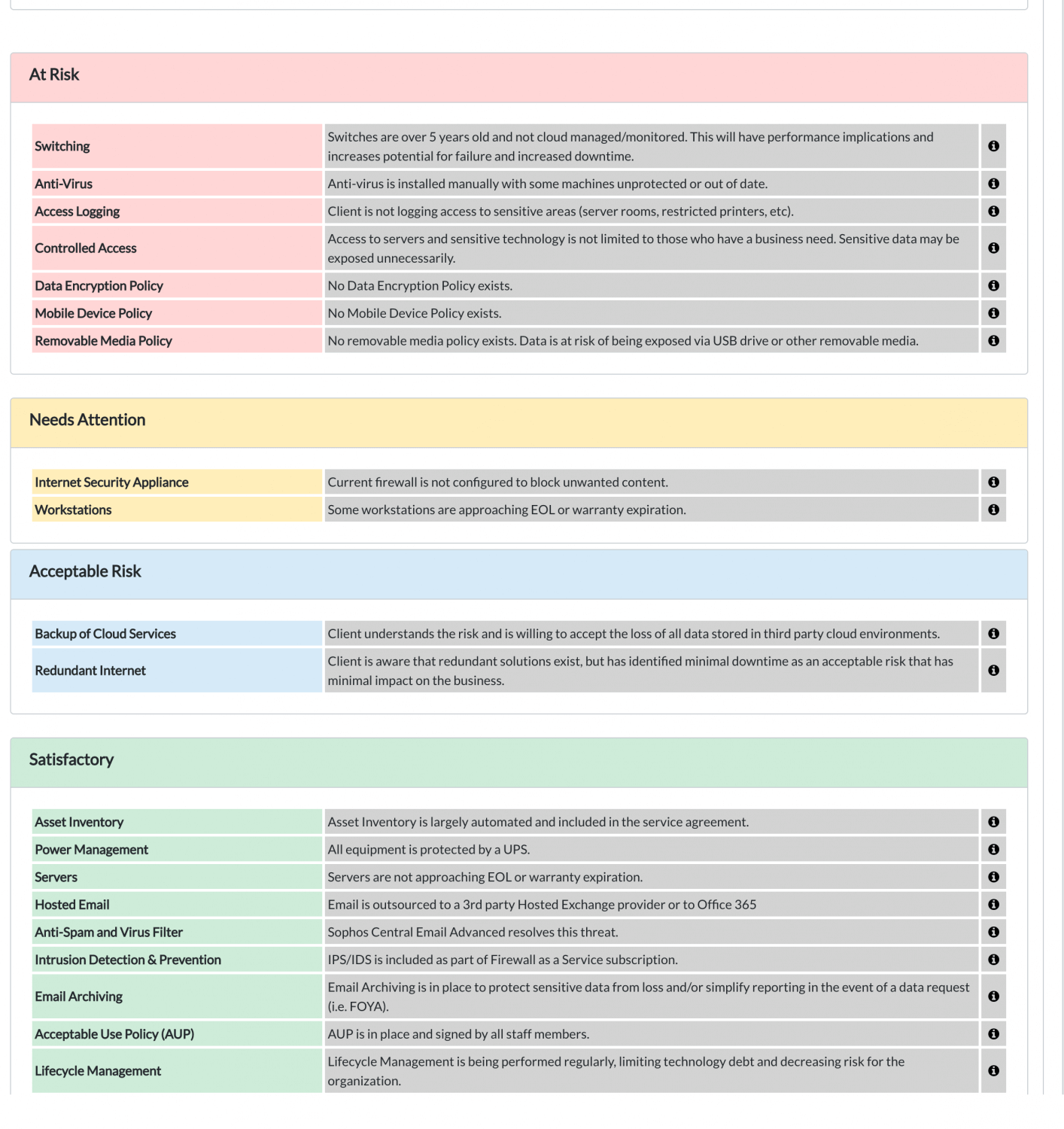
Sample Risk Assessment (click to expand)
One of the most effective sales tools we have seen is the assessment leave-behind. After your initial diagnosis of their needs, providing them with a baseline risk assessment report gives them immediate value. Could they go give that to the lowest bidder and say, “Fix this!”? Of course. More likely, however, they will see you as an instant trusted advisor, and you will earn their business.
QBRs as Customer Retention Tool
Strategy #3: Establish a regular cadence of positive, practical engagement
You’ve heard it before: It costs less to keep a customer than it does to acquire a new one. In a world of automation, one key to customer success is engagement. If clients only think of you or deal with you when there is a problem, then they tend to believe you are the problem. Whether your QBR is truly quarterly or less frequent based on segmentation (see my blog post on segmentation here), your client will appreciate the positive interaction and value of regular business reviews. In turn, you will appreciate their likely renewal at the time of the contract.
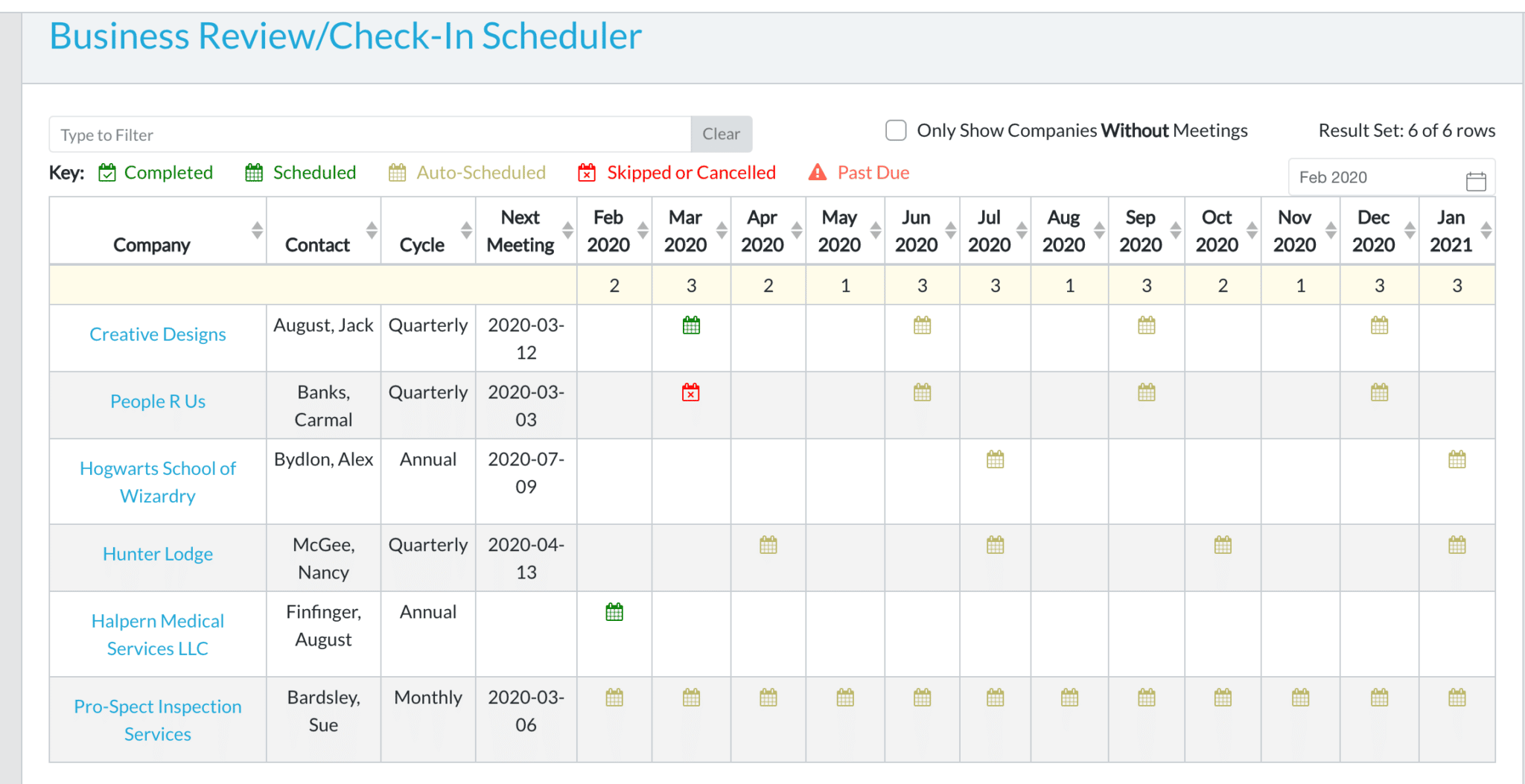
Keep yourself your clients on track by getting organized with your QBR scheduling (click to enlarge)
QBRs as Additional Revenue Driver
Strategy #4: Uncover what needs replacing
There is no shortage of information on why outdated technology is a risk to any company:
- Loss of productivity costs Americans approximately 1.8 trillion per year (State of Workplace Survey)
- SMBs are at risk of losing more than 42 hours per year of productivity
- Outdated technology is more susceptible to viruses or cyber attacks
- Increases chances of data loss
Having a clear picture of asset lifecycle management is critical. Having a color-coded report that shows which devices are at or nearing the end of their life is an easy sales tool, as it eliminates the need for overly technical explanations. The report clearly indicates that the “red” devices need to be replaced. From there, the conversation with the client is simply about when they can budget for that.
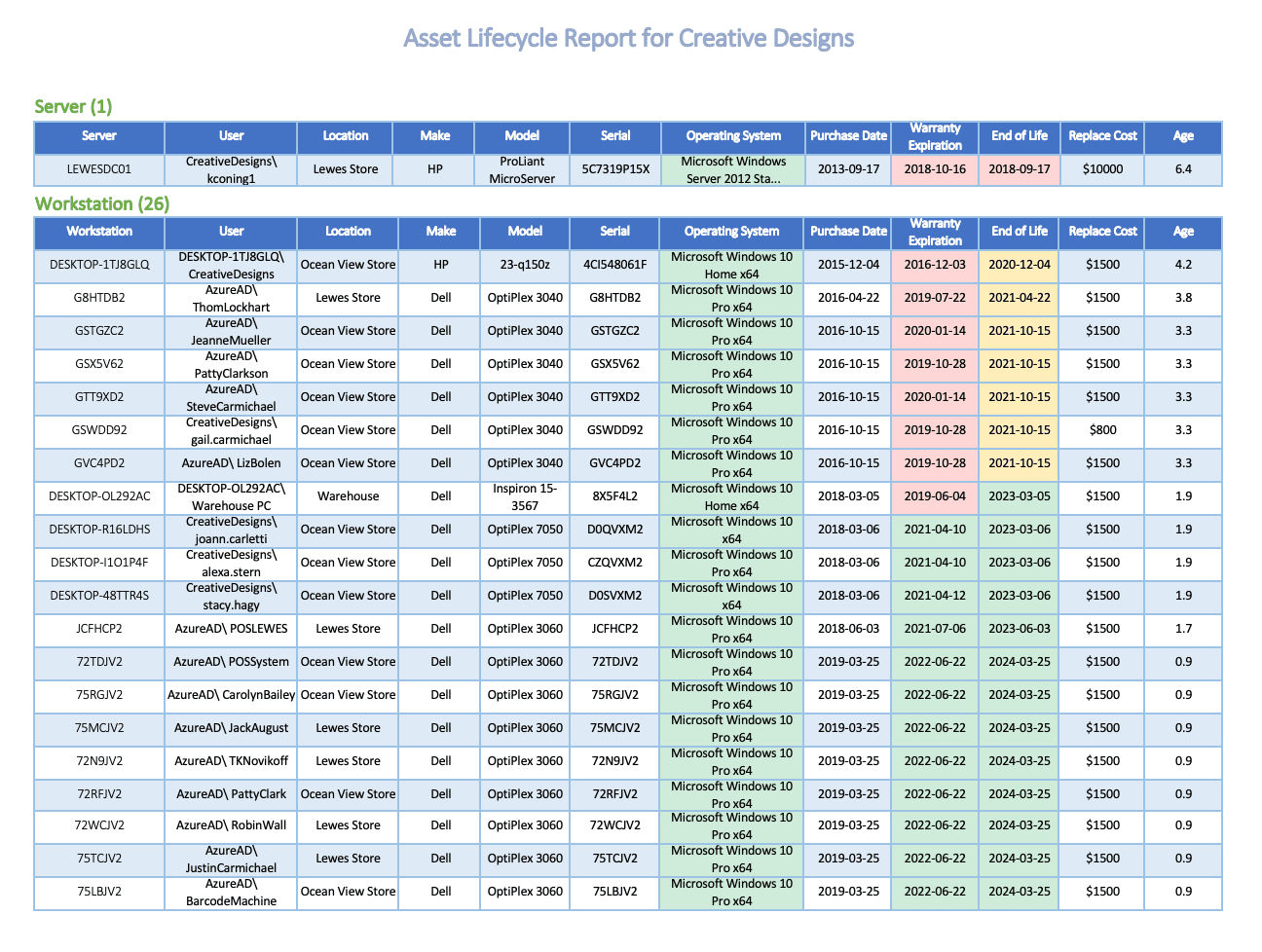
Sample Asset Lifecycle Report (click to expand)
Strategy #5: Lead the budget planning and prioritization discussion
The last way you should be leveraging your QBRs is by positioning them as a forecasting tool.
If a client can see a multi-year projection as well as a detailed view of the next few quarters, they can prioritize and strategize more around their finances. Having the ability to quickly answer questions for them about how much a specific location or department might be forecasting is such a value-added benefit that the QBR will become a key part of their business decision-making process, year after year.

Excerpt from a budget forecast (click to expand)
As your QBRs uncover lifecycle replacement opportunities or new product deployments, you are opening up project engagements and driving additional revenue for your MSP. Consistency in your QBRs allows for more consistent project revenues.
Want to make your QBRs more data-driven and efficient? Check out our NinjaOne RMM FAQ page for helpful insights and answers to common questions about using automation and reporting tools.
Conclusion
Contrary to conventional thinking, the QBR is not just a client retention tool. It is a valuable tool. It is a sales tool. It is a living and breathing process that helps you build your relationship with the customer, all the way from pre-sales through year-over-year renewal. It will continue to evolve over the customer’s lifetime, but if you’re doing it right, the one constant is that it will open new doors, not just open existing ones.