


Key Points
- Automating Mobile Device Management (MDM) eliminates repetitive IT bottlenecks and establishes a perfectly accurate, real-time device inventory.
- Aligning automated workflows with the natural hardware lifecycle, like zero-touch provisioning and secure end-of-life offboarding, maximizes ROI.
- Build a solid foundation for automation by standardizing your security policies and integrating your MDM platform with core identity systems.
- Always validate your automated rules in an isolated test environment to prevent configuration errors from instantly disrupting your entire device fleet.
- Prevent common automation failures by cleaning outdated identity data, separating policies for devices, and removing hard-coded credentials from scripts.
- Prove the value of your MDM investments by tracking actionable performance metrics like reduced setup times, fewer manual support tickets, and improved security compliance rates.
Manually configuring thousands of employee devices is an impossible IT bottleneck. Mobile device management (MDM) automation solves this by programmatically managing your fleet, enforcing strict security, and maintaining perfect data quality at scale.
In this guide, you will learn how to successfully implement these automated workflows across your organization.
How business MDM solutions drive efficiency and guarantee data quality
Business MDM solutions drive efficiency by replacing manual IT tasks with automated processes, ensuring accurate device data across your organization.
IT teams use MDM to configure, secure, and update company devices remotely. An enterprise MDM scales this process to thousands of users. Automation eliminates repetitive setup work, saving administrators hours of effort and helping employees work faster.
Successful automated device management requires accurate user records to function correctly. In return, automation guarantees data quality by removing human error from manual entry. This creates a single, reliable source of truth for your device inventory and compliance status.
In daily operations, MDM software ensures every device maintains consistent security policies. When you implement business mobile device management, systems instantly detect issues and fix them without requiring users to submit helpdesk tickets.
| Manual Device Management | Automated Device Management |
| Outdated Tracking: Relying on manual data entry and easily outdated inventory spreadsheets. | Real-Time Accuracy: System-synced asset tracking provides a trusted, up-to-date inventory record. |
| Slow Setup: Unboxing, installing software, and configuring each device by hand. | Zero-Touch Setup: Devices download their profiles and configure themselves upon initial startup. |
| Reactive Support: Waiting for employees to submit helpdesk tickets for software issues. | Self-Healing Systems: Software instantly detects and resolves common endpoint errors without human intervention. |
| Inconsistent Security: Baseline security setups vary depending on which IT staff member configured them. | Policy Enforcement: Devices automatically maintain strict, uniform compliance with company security rules. |
| Maintenance Outages: Tracking software updates and security certificates by hand leads to missed deadlines and downtime. | Silent Maintenance: Security certificates, applications, and system updates deploy quietly in the background. |
Focus your automation efforts on the device lifecycle
Aligning automated workflows with the natural lifecycle of employee hardware is the most effective way to manage a large device fleet.
Phase 1: Zero-touch provisioning (Onboarding)
Zero-touch deployment provides the highest return on investment. When human resources adds a new employee, your systems automatically create an account and assign a device. This allows IT to ship sealed hardware directly to the user.
Upon the first startup, the device automatically downloads its specific apps, settings, and security profiles. This approach removes the need for manual IT setup entirely.
Phase 2: Ongoing governance (Maintenance)
After deployment, automated device management maintains your fleet’s security and configuration without manual intervention. Your systems can systematically roll out software updates to small pilot groups before a company-wide release.
Automating background tasks like renewing security certificates prevents service outages. This keeps devices compliant and secure while ensuring employees remain productive.
Phase 3: Autonomous remediation (Security)
Modern MDM solutions, like NinjaOne, feature self-healing workflows. If a device becomes non-compliant, such as having a disabled firewall or a missing security app, the system detects the issue immediately.
Rather than waiting for an employee to report the problem, the automation deploys a fix in the background. This rapid, proactive response is a major advantage for large organizations.
Phase 4: Secure offboarding (End-of-Life)
When an employee leaves, automated workflows protect company data by running in reverse. HR system updates automatically remove the user’s access to corporate applications.
The system then remotely erases sensitive information from the device. Finally, the platform generates return shipping labels to route the hardware back to IT for future reuse.
Establish a solid foundation for successful MDM automation
Before you automate, you must refine your underlying processes to ensure you aren’t simply accelerating existing errors.
Standardize your policies first.
- Automation requires predictable inputs. Before configuring automated workflows, audit your current security and configuration rules.
- Remove stale settings, resolve policy conflicts, and ensure your baseline configurations are uniform across all device models and ownership types.
Integrate your core systems.
- Effective MDM automation relies on high-quality data from your broader enterprise ecosystem.
- Connect your mobile device management platform directly to your identity provider (such as Microsoft Entra ID or Okta) and your IT service management tool, like NinjaOne.
- This integration ensures that user changes automatically trigger the correct device actions.
Phase your rollout carefully.
- Avoid the urge to automate every process simultaneously.
- Begin with low-risk tasks, such as automated reporting or basic app distribution.
- Once these workflows are validated and stable, gradually expand into higher-impact areas like security enforcement, compliance monitoring, and automated remediation.
Require human oversight for critical actions.
- Automation improves consistency, but it does not replace the need for governance.
- Implement “approval gates” for destructive or high-impact actions, such as remote device wipes or broad security policy changes.
- Require an administrator to review and sign off on these events before the system executes them.
Common automation traps to avoid during implementation
Automating enterprise mobile device management offers significant benefits, but poorly designed workflows can lead to widespread operational outages.
The impact of automation errors
In a manual environment, a configuration error typically impacts one device. When you automate that same error, it instantly spreads to your entire global fleet. Always test your automated device management rules in a separate, isolated environment before applying them to your production systems.
Essential traps to avoid
- The Trap: Relying on inaccurate identity data.
If your human resources or user directory systems contain outdated or incorrect records, your automation will propagate those errors.- The Fix: Clean up your identity groups and user data before syncing them to your MDM. Ensure your central knowledge base, the system where user data originates, is accurate and up-to-date.
- The Trap: Using one-size-fits-all policies.
Applying identical security settings to personal devices (BYOD) and corporate-owned hardware creates unnecessary friction and security gaps.- The Fix: Separate your policy rules. Use strict, comprehensive management for company-owned assets and privacy-focused, limited configurations for employee-owned devices.
- The Trap: Confusing “Request Portals” with automation.
Using a digital form to request a device is not true automation if an administrator must still manually configure the hardware afterward.- The Fix: Ensure your workflows are automated from start to finish. True automation pushes settings directly to the device without any manual intervention by IT staff.
- The Trap: Storing credentials in scripts.
Placing sensitive information, such as API keys or administrator passwords, directly into your automation scripts is a major security risk.- The Fix: Always use secure credential management systems or managed identities. Never store passwords or private keys in plain text within your configuration files or scripts.
- The Trap: Buying devices through retail channels. Modern automated setup (Zero-Touch) requires hardware to be pre-registered by authorized resellers. Buying from retail stores breaks this automation chain, forcing you to register devices manually.
- The Fix: Work with your procurement department to ensure all company devices are purchased through authorized channels that automatically register serial numbers in your management portals.
Measure success through tangible IT outcomes
You can only demonstrate the value of your MDM automation program by tracking data that links directly to business goals.
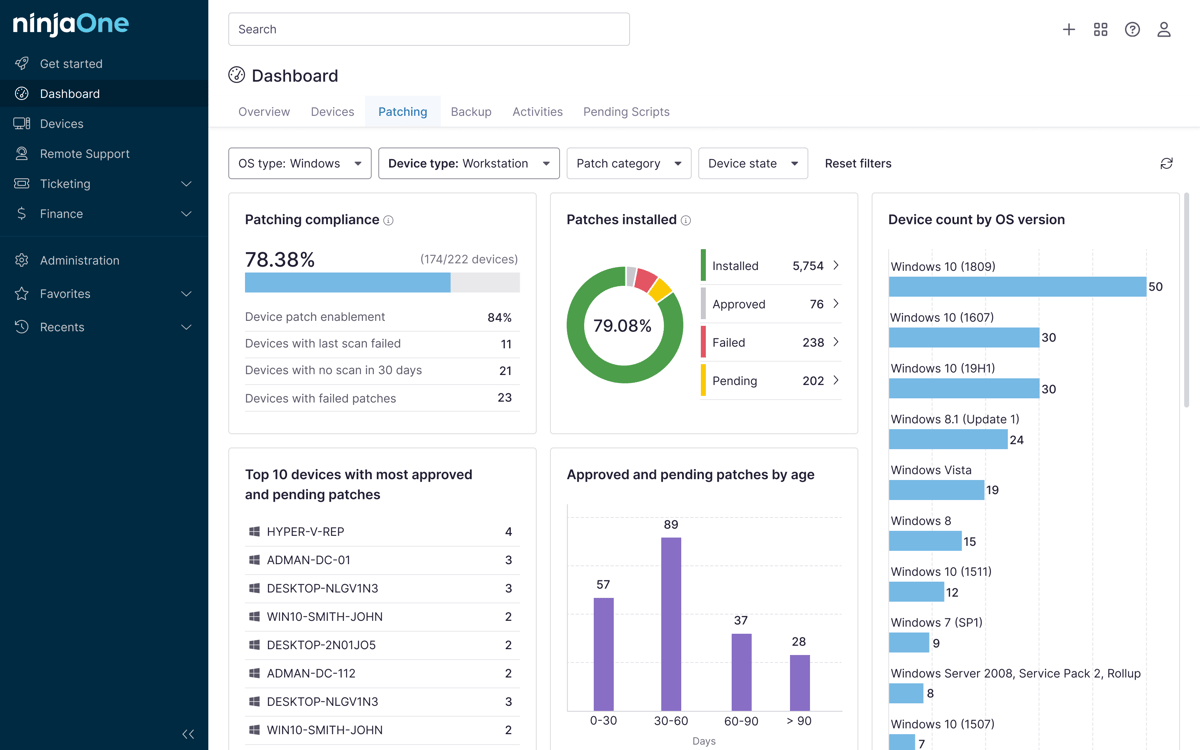
To prove the value of your investment, track key performance indicators that show how automation improves speed, reduces manual work, and ensures device security. The following table highlights the core metrics that IT leaders should monitor to assess the ongoing effectiveness of their automated device management strategies.
| Operational Efficiency Metrics | Security and Data Metrics |
| Setup Time: Reduction in minutes spent per new device setup. | Compliance Rate: Percentage of fleet meeting company security standards. |
| Manual Tickets: Drop in support requests for routine device fixes. | Inaccurate Records: Reduction in untracked or inactive device records. |
| Efficiency Gains: Hours saved per endpoint from automated setup. | Update Speed: Time taken to apply security updates to the full fleet. |
| Issue Resolution: Faster fix times for common device problems. | Fix Success Rate: Percentage of security issues fixed automatically. |
Focus on actionable improvements
Efficiency metrics show whether your team is reclaiming time previously lost to manual troubleshooting. By automating repetitive tasks, you allow your staff to focus on higher-value projects rather than routine support.
Security and data metrics confirm that your business MDM solutions are keeping your fleet secure and properly managed. A successful program does not just run automated tasks; it ensures every device remains secure, compliant, and visible to your inventory systems.
Consistently reviewing these metrics provides the business case for further automation investment and helps you identify which workflows require further optimization.
Read How to Choose the Right IT KPIs and Performance Metrics for more information.
Use MDM automation to turn reactive IT into proactive management
When executed correctly, MDM automation shifts your team from reactive troubleshooting to proactive fleet management. By integrating these workflows with your core identity platforms, you eliminate manual bottlenecks, consistently enforce security policies, and maintain perfectly accurate device records at any scale.
Related topics: