Key Points
IT automation maturity can be measured across four stages: Ad-Hoc, Developing, Standardized, and Optimized.
- Identify if your organization is at the Ad-Hoc stage by checking if automation is reactive, handled by a single person, and lacks formal processes.
- Advance to the Developing stage by dedicating resources, creating multi-step workflows, and building reporting to secure executive support.
- Reach the Standardized stage by forming collaborative automation teams, involving non-IT leaders, and chaining processes into complex workflows.
- Optimize automation by expanding across departments, using advanced technologies like AI, and implementing detailed reporting with forecasting.
Automation operates in many areas of daily life, often unnoticed. Common examples include scheduled social messaging, self-parking cars, robot vacuums, facial recognition pet feeders, and mechanical stirring devices for cooking. Automation is equally critical in IT, where it directly impacts performance.
IT automation replaces repetitive, time-consuming tasks with scheduled actions triggered by conditions such as time, device status, or user onboarding. It can range from simple tasks to complex, multi-step processes. Organizations new to automation should begin with basic tasks before scaling to advanced workflows. (This automation guide is a great place to start!)
But, how do you know where you stand in your automation journey? Understanding your automation maturity level will help you make decisions on the next steps and how you can make the biggest impact without straining your current resources.
The IT Automation Maturity Matrix
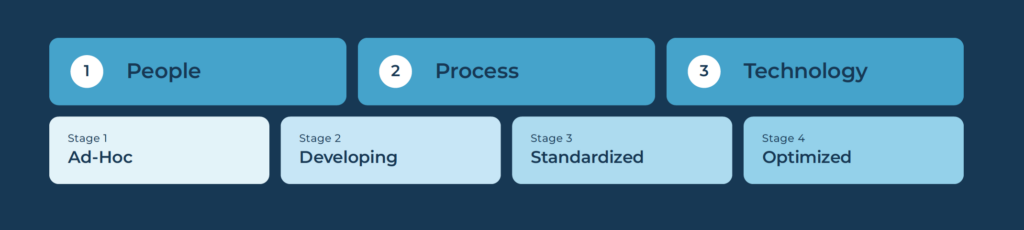
To help you discover your IT automation maturity levels, we’ve developed a new matrix that will guide you through four different stages of automation maturity and how they impact three different categories – People, Process and Technology.
The stages of automation maturity included in this matrix are:
- Ad-Hoc
- Developing
- Standardized
- Optimized
You can download the IT Automation Maturity matrix here, but we’ve provided a bit of information about these stages below.

See the four stages of automation maturity come to life—watch this brief video: ‘How to Measure Your IT Automation Maturity Level’.
Ad-Hoc
These organizations are in the early stages of IT automation. A single individual may handle automation tasks as needed, but no formal processes exist. IT leaders may identify tasks suitable for automation, but implementation remains limited. Needed automations are usually urgent and are almost always in response to issues rather than in any proactive plan.
For organizations at the ad-hoc status, it’s important to begin to look into established processes, opportunities for automation, and more resources devoted to automation.
Developing
These organizations have begun to invest more resources in IT automation tasks. They will likely have a dedicated individual performing automation work full-time, and IT team members will occasionally collaborate on automation needs. IT leaders are now brainstorming more comprehensive automation workflows and getting buy-in from executive leadership on the resources and tools needed for automation.
The tasks themselves have a bit more structure with basic multi-step processes but are still mostly responsive to sudden issues. But even with a focus on urgency, the team does recognize the need for more proactive plans. Basic reports are introduced and sent to executives to prove the value of automation.
Developing organizations should focus on fleshing out processes and consider how automation could be used for more complex workflows. To get more budget for tools and resources, consider building more comprehensive reporting.
Standardized
These organizations are much more focused on automationThey have a dedicated team with defined SMEs hired from the outside and trained within. Work on IT automation tasks is fully collaborative between team members, and many teams conduct regular check-ins on upcoming automation efforts.
At this stage, non-IT organization leaders are now being pulled into automation efforts and encouraged to look for opportunities. Automation tasks are more refined, with the occasional urgent requests left to accommodate. Task automation has a more readily defined process and tasks are chained together in multi-step processes. Reporting is more complex and is sent to stakeholders throughout the organization.
Organizations within the Standardized stage are far along in the maturity cycle, with multiple teams on board with automation. For the next steps, it’s important to continue to add to reporting to prove value and consider how IT can expand automation into other divisions of the organization.
Optimized
These organizations have optimized their automation efforts, with automation implemented through various departments. IT organizations now have dedicated teams with multiple areas of expertise around automation, with members assigned to different parts of the process. IT leaders are now spearheading efforts throughout the org, not just in IT.
Automation processes have become fully planned with improvements constantly implemented. Multi-step task processes are chained seamlessly without the need for much intervention. Advanced tech, such as AI or machine learning, may be used. Reporting is sent and developed by other departments and shows detailed success metrics, along with forecasting.
For organizations that are Optimized, it’s all about maintenance and continually demonstrating value. Focus on documenting everything and hiring/training experts in the field.
Common Tasks to Automate
If you find yourself in one of the first couple of stages, here are a few common tasks that can help get you started with automation, pulled from a previous automation blog:
- Automated tickets based on device status (including, but not limited to the below)
- Low disk space
- Device offline
- High resource usage
- End user onboarding and offboarding
- Domain account creation
- Role assignments
- Device provisioning
- Software installation/uninstallation
- Cloud logins
- Patch management
- Weekly network summary (including, but not limited to the below)
- Resource usage
- Server uptime and downtime
- Backup status
- Device performance
- Patch status
- Network and endpoint backups
- Snapshot cleanups (“snapshots older than X days are deleted”)
- Monthly compliance checks
- Network data log collection
- Password changes
- Enabling device firewalls / other security features
- Vulnerability scans
- Removal of extraneous accounts
- Help desk ticket responses
- Time of day submitted
- User role
- Type of ticket
- VM templates and deployment
- File migrations
IT automation is a huge asset for any organization and doesn’t have to be complex right off the bat. If you’re feeling overwhelmed by the idea of automation, start with a few of the basics and expand from there. Automation takes time and the right technology, but it’s a worthwhile journey.
You can check out other NinjaOne automations here and see how Computer Technology Solutions optimized its onboarding process with IT Automation.
“NinjaOne’s automation abilities have been invaluable to us as a company,”
– Lorenzo Kopari, Service Manager at Computer Technology Solutions (CTS)
If you’d like to learn more, download the IT Automation Maturity Matrix here: https://www.ninjaone.com/it-automation-maturity-matrix/