Key Points
- Cloud-first backup for hybrid work: Cloud backup enables secure, flexible, and scalable data protection for distributed endpoints without relying too much on hardware.
- Reduce costs with cloud backup: A cloud-first model eliminates hardware, maintenance, and manual recovery while automating data protection.
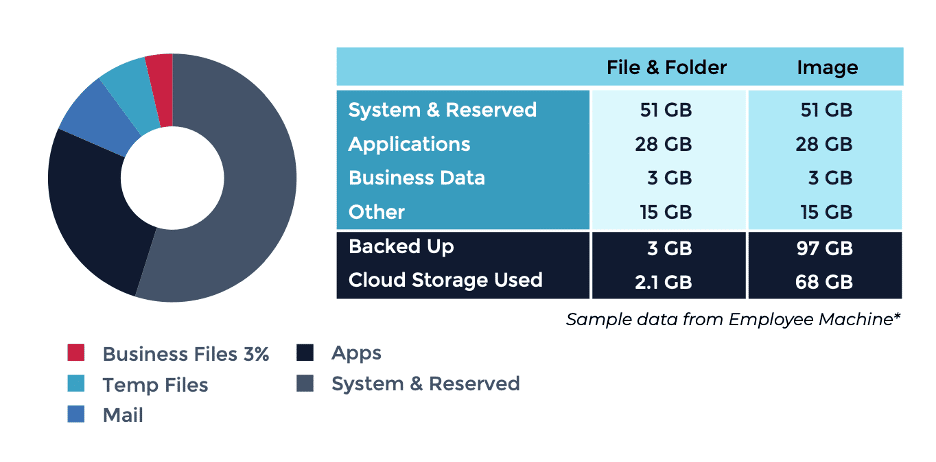
- Use file-and-folder backups for most endpoints: Approximately 3-5% of data stored in standard laptops is not mission-critical, so file-and-folder backups are recommended.
- Automate backups with an RMM: Integrating RMM tools into your backup solution enhances visibility and enables self-service restores, which can help reduce your IT team’s workload.
With the surge of remote workers and a need for increased flexibility, the traditional workplace is a thing of the past.
According to the most recent workforce reports, approximately 20-25% of US employees work fully remotely, while the number of hybrid roles continues to grow. This confirms the notion that flexible work has become the new standard for many organizations.
Now, what does this mean for IT teams?
- Fewer endpoints are physically in the office, with most devices never entering the office.
- Employees are distributed and may be working from variouslocations, including their homes the office, or the field.
- More employees will need to utilize a VPN.
- A distributed workforce creates additional security concerns.
- These new challenges mean that maintaining traditional, on-premise-only backup is no longer advisable. Employees expect their data to follow them wherever they work. They want their files to be accessible, but secured.
Traditional, on-premises backup solutions often come with costly and complex architectures that require additional hardware, maintenance, and labor costs.
To aid in the transition, we’ve compiledr a few tips on how you can adapt your backup strategy to a hybrid workforce and save some money along the way.
Learn more about changing backup trends in our free guide Backup Solutions for a Changing Workplace.
Three ways you can lower backup costs for remote and hybrid workforces
While flexible work arrangements have significantly increased employee productivity, they have also made backing up and securing data much more difficult and expensive for organizations. The good news is that with the right approach, you can modernize your backup strategy and cut costs at the same time.
Utilize a cloud-first backup solution
Cloud backup enables IT professionals the ability to remotely recover from any event, whether it’s a cyberattack, accidental data loss, device failure, or even natural disasters. Cloud-first models are infrastructure-free, infinitely scalable, and low risk. They provide seamless backups as endpoints transition from on-site, at-home, and office networks without a VPN.
On-premises backup solutions rely on hardware for local backups. This means that a catastrophic natural disaster could destroy local devices and result in major data loss. Data backed up in the cloud ensures that essential data can be recovered quickly, allowing you to avoid costly downtime.
This reliance on hardware also means that on-premise backup must be maintained and eventually upgraded to ensure the fastest recovery time objectives.
With cloud backup, an organization does not have to worry about the cost of hardware maintenance, the cost of monitoring its backup hardware, or the hassle of purchasing new hardware to stay in compliance and up to date.
More importantly, it gives you the flexibility to fully automate your backup strategy, manage backups remotely, and choose from local-only to cloud-only storage options depending on the needs of your organization.
Use file-and folder backups for most laptops and workstations
Choosing between file-and-folder or full image backups can impact the recovery speed and storage utilization of your backup solution.
Full image backups are ideal for mission-critical systems that require quick and complete recovery, whereas file-and-folder backups are recommended for most laptops and standard workstations.
In most cases, only a small percentage of the data stored in a typical end-user laptop is actually business-critical. This means that if only 3-5% of a device’s data is critical, there’s no need to pay to store or transfer OS files, applications, caches, and other non-critical components.
By using file-and-folder backup for your standard endpoints, you can reduce the cloud storage you need and speed up backup cycles.
That said, you should still use full image backups for critical devices, including:
- Executive or developer laptops with special configurations
- Machines that support specialized workflows
- Devices that require exact backups
These backups are also ideal for scenarios that have near-zero recovery time objectives (RTOs).
Pair backup with your RMM to save time and automate workloads
As threats to data security continue to rise and evolve, having reliable and automated backup strategies is essential. With the increase of hybrid workflows, employees expect their data to be backed up and restorable as they transition from different locations. This means that data needs security more than ever before.
By pairing your backup solution with your remote monitoring and management (RMM) or endpoint management system, you can provide visibility and prevent some risks of human error within your backup approach by automating backups.
Pairing your backup with your RMM also allows you to streamline your backup process. This helps by monitoring and managing your backups from the same dashboard you use for other IT operations tasks. If your RMM has comprehensive self-service options, your IT team can save time and tickets by enabling end-users to restore their own files as needed.
Looking for a more unified approach to backup?

Ninja Data Protection is built to help you protect critical business data for today’s distributed workforce. A single backup solution for all your endpoints, workflows, and employees, wherever they are.
See for yourself and try it free for 14 days.