NinjaOne OS Deployment Software for Fast and Reliable Windows Imaging

By combining image-based deployment with automated configuration and post-deployment management, NinjaOne helps organizations accelerate provisioning, reduce manual effort, and maintain standardized Windows environments at scale. The result is a cleaner, more controlled way to prepare and refresh devices while integrating OS deployment directly into ongoing endpoint management operations.

OS Deployment
IT business logo
Provide logo
Advantage Technologies logo
Dedicated IT logo
Alticap logo
Network Coverage logo

Simplify and accelerate every Windows OS rollout

Hardware Flexible Windows Deployment Across Mixed Fleets

By capturing images from a virtual machine without vendor specific drivers, your deployment image remains hardware independent. NinjaOne supports injecting Windows compatible drivers during deployment for smooth installs across different hardware types.

Automated Windows Setup with Comprehensive Unattended Configuration

Attach an unattend XML file to automate Windows OOBE steps. This reduces manual work and ensures your OS deployment tool consistently provisions devices with accurate regional, language, and privacy settings.

Seamless Windows Agent Onboarding After Deployment

Whether added before capture or during deployment, the NinjaOne Windows agent ensures newly imaged systems appear in your console shortly after deployment, ready for monitoring, automation, and policy assignment across your managed endpoints.

Unified Windows Imaging Workflow Purpose Built for IT Teams

NinjaOne provides a guided interface optimized for Windows OS deployment, making it an effective OS deployment software solution for organizations that need consistency without complexity.

Purpose built capabilities for streamlined Windows OS provisioning

Instant visibility and control icon

Multiple Boot Media Formats for Flexible Windows Deployment

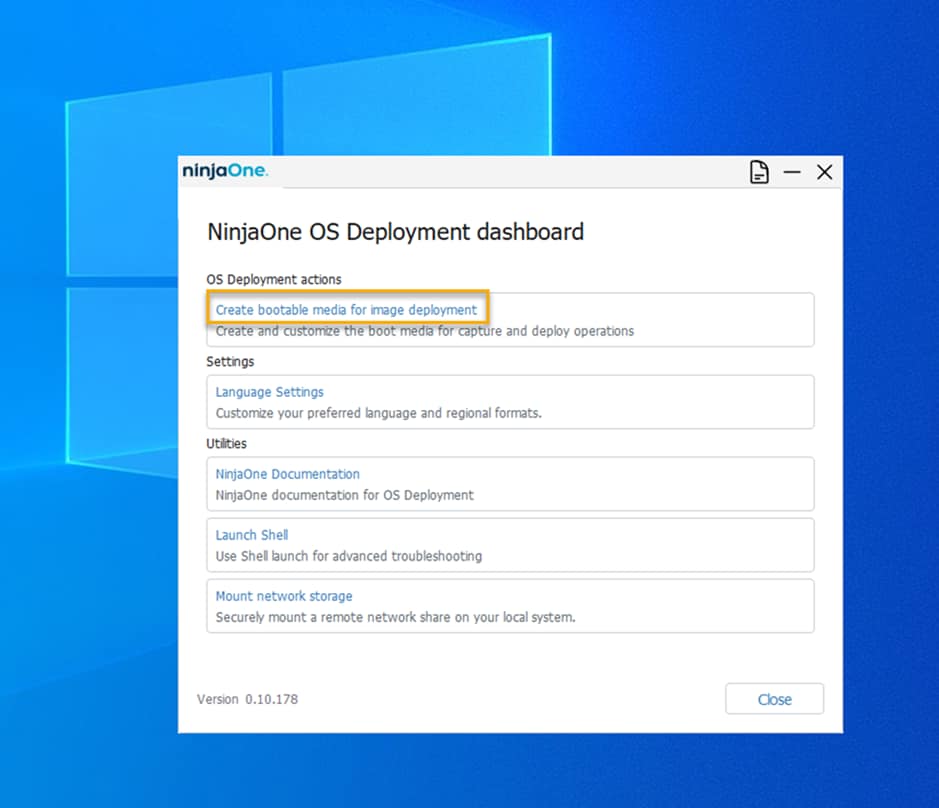
Create WIM, ISO, or USB boot media to support PXE servers, virtual machines, or offline imaging scenarios. This ensures your imaging and deployment software supports any environment.

legal holds icon

Guided Windows Image Capture with Accurate Partition Selection

NinjaOne guides technicians through selecting existing system partitions for image capture, naming the deployment image, confirming generalization, and saving the resulting WIM to network storage.

Lightning-fast icon

Driver Injection Engine for Accurate Windows Hardware Support

Attach Windows driver folders during deployment to ensure each device receives the appropiate drivers without embedding them directly into the base OS deployment image.

Simplicity by design icon

Integration of Windows Provisioning Packages for Automated Setup

Add Windows provisioning packages (.ppkg), to automate application installation, Wi Fi settings, security policies, and other Windows specific configurations during the deployment process.

automation icon

Support for Fully Unattended Windows Installations

Unattend XML support enables true zero touch deployments, making the OS deployment tool ideal for large environments and remote locations.

Transparent Windows Deployment Progress with Real Time Logging

Technicians gain full visibility during the process through event logs that show real time operations like disk partitioning, formatting, DISM execution, and Windows image application, providing clar insight at every stage.

How IT teams streamline Windows provisioning with NinjaOne

Standardized Windows Rollouts for Fast Growing Organizations

NinjaOne helps organizations deploy a clean Windows baseline across large fleets using reliable OS deployment software workflows. Each device receives the same deployment image, ensuring consistency and predictable configuration. Driver injection ensures hardware compatibility across different models. Devices check in shortly after provisioning, and become fully managed endpoints, enabling ongoing monitoring, policy enforcement, software management, automation, and lifecycle operations from a single console.

Reimaging and Refreshing Windows Endpoints to Extend Device Lifespan

When Windows devices experience persistent system instability, severe performance degradation, or require secure reset for reuse, NinjaOne enables technicians to restore them using a clean deployment image.. The automated workflow resets partitions and reinstalls Windows with minimal technician intervention. This reduces recovery time, eliminates configuration drift and residual software issues, and returns devices to a known good state. I OS deployment workflows support secure remediation, device refresh and help maintain long term endpoint performance across the endpoint fleet.

Windows OS Deployment for MSPs Managing Multiple Organizations

MSPs benefit from an OS deployer that supports multiple customers without increasing operational overhead. NinjaOne lets MSPs manage separate Windows images or deploy a flexible base image with dynamic agent assignment. Provisioning packages and unattend XML files make it simple to tailor post deployment settings per client while maintaining an efficient and scalable imaging and deployment software process.

Deploy Windows at Scale with Confidence using NinjaOne

NinjaOne brings speed, consistency, and automation to every stage of Windows OS deployment. With guided image capture, flexible deployment options, automated setup, and rapid device onboarding, your team can deploy Windows systems faster, more efficiently and with greater consistency. The platform helps eliminate manual work, ensure standardization, and maintain control over Windows provisioning at any scale.

Related Resources

This is why customers love us

Ready to simplify the hardest parts of IT?

OS Deployment FAQs

OS deployment is the process of installing and configuring an operating system on a device in a consistent and repeatable way, typically using standardized workflows and automation.

NinjaOne supports Windows OS deployment using a reference-image approach, where technicians first capture a prepared Windows installation and then apply that image during deployment. This method streamlines large-scale provisioning while ensuring consistent Windows configurations across endpoints.

Yes. NinjaOne supports deploying custom Windows images by generalizing a prepared reference system, capturing it as a deployment image, and applying it to multiple compatible devices.

Yes. With unattend XML and provisioning packages, NinjaOne enables fully automated Windows installations without technician involvement.

NinjaOne recommends capturing the image from a VM and injecting drivers during deployment. This keeps the deployment image clean and ensures compatibility across multiple hardware types.

Yes. NinjaOne supports ISO and USB deployment methods, making it suitable for OS deployments in offline or network-restricted network environments.

While deployments are not time-scheduled to start automatically, technicians can initiate imaging during, approved maintenance windows, with unattended workflows completing the installation once started.

You can attach provisioning packages that install applications and apply configurations during the Windows imaging process.

NinjaOne offers real time logging and progress indicators so technicians always have insight into the deployment process.

NinjaOne uses WIM files as the standard deployment image type and supports WIM-based deployments, delivered through ISO, and USB boot media.

NinjaOne provides a more streamlined approach to Windows OS deployment, focusing on guided imaging, automation, and integration with endpoint management rather than the deep infrastructure and task-sequence complexity of MDT or SCCM. This makes it well suited for MSPs and IT teams that prioritize simplicity, consistency, and operational efficiency over highly customized deployment pipelines.