Remote wipe and lock for Android and iOS with NinjaOne MDM
NinjaOne MDM lets IT teams remotely lock or wipe Android and iOS devices to protect business data when devices are lost, stolen, or no longer in use.
NinjaOne MDM lets IT teams remotely lock or wipe Android and iOS devices to protect business data when devices are lost, stolen, or no longer in use.






| Problem | How NinjaOne resolves it |
| Employees can lose company phones or tablets, leaving business data exposed to anyone who finds the device. | NinjaOne MDM lets IT remotely lock managed Android and iOS devices, preventing unauthorized access until the device is unlocked with the configured authentication method. |
| A lost or stolen device may contain sensitive company data that should not remain accessible if the device cannot be recovered. | NinjaOne allows authorized technicians to remotely wipe managed devices, erasing device data to reduce the risk of sensitive information being accessed by unauthorized users. |
| IT teams need to secure company data on employee-owned devices without necessarily removing the employee’s personal data. | For supported BYOD scenarios, NinjaOne can selectively remove corporate data from the managed work environment without wiping the entire personal device. |
| Employee offboarding can leave company data accessible if a device is not returned or access is not removed promptly. | NinjaOne lets IT remotely lock or wipe managed devices during offboarding, helping prevent former employees from accessing company data on devices that remain outside the organization’s control. |
IT teams can remotely lock a managed mobile device when it is lost or stolen, preventing unauthorized users from accessing the device while it is out of the organization’s physical control.
When a device can no longer be recovered or should no longer contain company information, administrators can remotely initiate a wipe to remove data without needing the device in hand. Depending on the device and usage scenario, this can mean a factory reset or removal of corporate data.
Remote lock and wipe give IT teams a way to take action when a device is lost, stolen, compromised, or being decommissioned, helping reduce the window in which sensitive information could be accessed.
When an employee leaves the organization, IT can use remote actions to secure managed devices and remove company data without waiting for the device to be returned before taking action.
Administrators can manage remote lock and wipe alongside other NinjaOne MDM capabilities, including passcode policies, device restrictions, application management, and security settings, from a centralized platform.

Lock managed Android and Apple devices remotely when they are lost, stolen, or otherwise at risk. The device requires the configured authentication method before it can be accessed again, helping prevent unauthorized access to business data.

Erase a managed device remotely when it can’t be recovered, is being decommissioned, or poses a security risk. Depending on the device and enrollment type, the action can erase the device or remove corporate data from a personally owned device.

Manage remote security actions across supported Android, iOS, and iPadOS devices from NinjaOne MDM. Available actions can vary based on the device’s operating system and enrollment type.

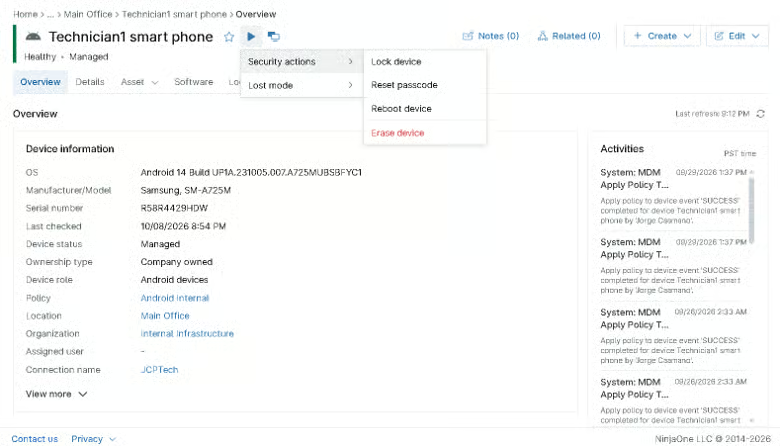
Technicians can start security actions from the device dashboard without physical access to the device. The Security actions menu includes lock, reset passcode, reboot, and erase, and available actions vary by operating system and enrollment type. NinjaOne permissions control which technicians can view and perform device actions.

NinjaOne requires confirmation before an erase action is carried out, including entering the technician’s NinjaOne account email address. This adds a safeguard against accidentally wiping the wrong device.
When an employee reports a company phone or tablet as lost or stolen, IT teams can remotely lock the device to prevent unauthorized access while the device is being recovered. If the device is confirmed stolen or its data can no longer be trusted, technicians can issue a remote erase to remove stored information and reduce the risk of sensitive business data being accessed.
When an employee leaves the organization, IT teams need to prevent continued access to company information on managed mobile devices. Administrators can remotely lock a company-owned device and, when the device is not returned, use a remote erase to remove its data. For supported BYOD scenarios, organizations can remove corporate data from the managed work environment without necessarily erasing the employee’s personal data.
If a managed device is suspected of being compromised, IT teams can use remote security actions to restrict access while they assess the incident. Locking the device can prevent further local access, while erasing the device can be used when removing the stored data is necessary to reduce the risk of unauthorized access. This gives IT a way to respond without waiting to physically recover the device.
100,000
Endpoints managed
“NinjaOne is a scalable solution. It’s built on a modern SaaS architecture and it’s future-proof.”
40%
More Cost Effective
“NinjaOne’s price point is 40% less than any other endpoint management tool on the market, while being more powerful and easy to use.”

10-15
Tools Replaced
“Before, I needed 10-15 different tools to execute what NinjaOne does in its centralized, single pane of glass.”

30%
Less time for patching
“We observed a 30% reduction in the time taken for patch deployments compared to our previous solution.”

2,000
Endpoints managed
“NinjaOne gives me much more flexibility and security in my work”

30%
Annual ROI
“[NinjaOne] has already shown its value in ROI…it’s at least a hundred thousand dollars annually.”

24x
Faster Endpoint Management
“Our processes have become 24x faster with NinjaOne.”

20-40
Hours Saved Each Week
“Leveraging the automations feature within NinjaOne has enabled me to save upwards of what would likely be 20 to 30 to even 40 hours per week.”

Administrators enroll Android and Apple mobile devices in NinjaOne MDM by usage type, whether BYOD, corporate-owned personally enabled (COPE), or company-owned. Enrolled devices appear in the same console as the rest of the environment, so technicians can reach them when a device goes missing.
IT and security teams agree on when each action applies, such as a lost, stolen, or compromised device, and who approves it. Because a wipe removes data from the device, teams often reserve it for devices that are lost or compromised and use a lock when recovery is still possible.
Technicians select the action that fits the situation:
Where location tracking is active, technicians can review a device’s location before choosing an action.
Administrators can review available MDM audit logs to monitor device management activity and maintain oversight of remote security actions. Regular reviews help teams refine their lock and wipe procedures.
Protecting company data when mobile devices are lost or stolen
NinjaOne MDM gives IT teams remote security actions for managed Android and Apple devices, including remote lock and remote wipe. When a device is lost, stolen, or otherwise needs to be secured, administrators can issue the appropriate action from the NinjaOne console without needing physical access to the device. Remote lock prevents unauthorized access, while remote wipe can remove device data when stronger action is required.
FCC Behavioral Health, a healthcare organization supporting communities across Southeast Missouri, uses NinjaOne MDM to manage and secure its mobile devices from a centralized platform. The organization reported 4X faster policy updates on mobile devices and a 15% faster MTTR for mobile devices, while also highlighting improved visibility and control over its mobile environment.
“We can manage all our devices knowing the policies we push out will take effect on all our devices.”
Dustin Skelton, IT Director, FCC Behavioral Health
Give IT teams a direct way to secure managed mobile devices when they’re lost, stolen, or being retired. NinjaOne MDM lets administrators remotely lock Android and iOS devices to prevent unauthorized access and remotely wipe devices when data needs to be removed. For applicable BYOD deployments, IT can remove corporate data without wiping the entire personal device.
NinjaOne MDM remote wipe and lock are remote actions in NinjaOne Mobile Device Management (MDM). Technicians use them from the NinjaOne console to lock a managed Android or Apple mobile device, or to wipe the data on one, when the device is lost, stolen, or compromised.
Technicians can take remote actions on Android and Apple mobile devices enrolled in NinjaOne MDM, including BYOD, corporate-owned personally enabled (COPE), and company-owned devices. Android devices must run version 8.0 or later, and Android management requires an Android Enterprise connection.
Lock the device when recovery is still possible, since a lock blocks access without removing data. Wipe it when the device is lost or compromised and the data on it must be removed. Where location tracking is active, technicians can review the device location before choosing.
No. In supported BYOD configurations, NinjaOne MDM keeps personal and corporate data separate, allowing IT administrators to manage work-related data and settings without accessing personal files, photos, or private app content. The exact privacy protections depend on the operating system and enrollment method.
NinjaOne MDM audit logs track device management actions, including remote actions, policy assignments, and configuration changes. Administrators can review them to see how lock and wipe are used across managed devices.