MDM software for iPadOS with NinjaOne MDM
NinjaOne MDM enrolls, configures, and secures iPadOS devices at scale, with remote actions to protect company data if a device is lost or compromised.
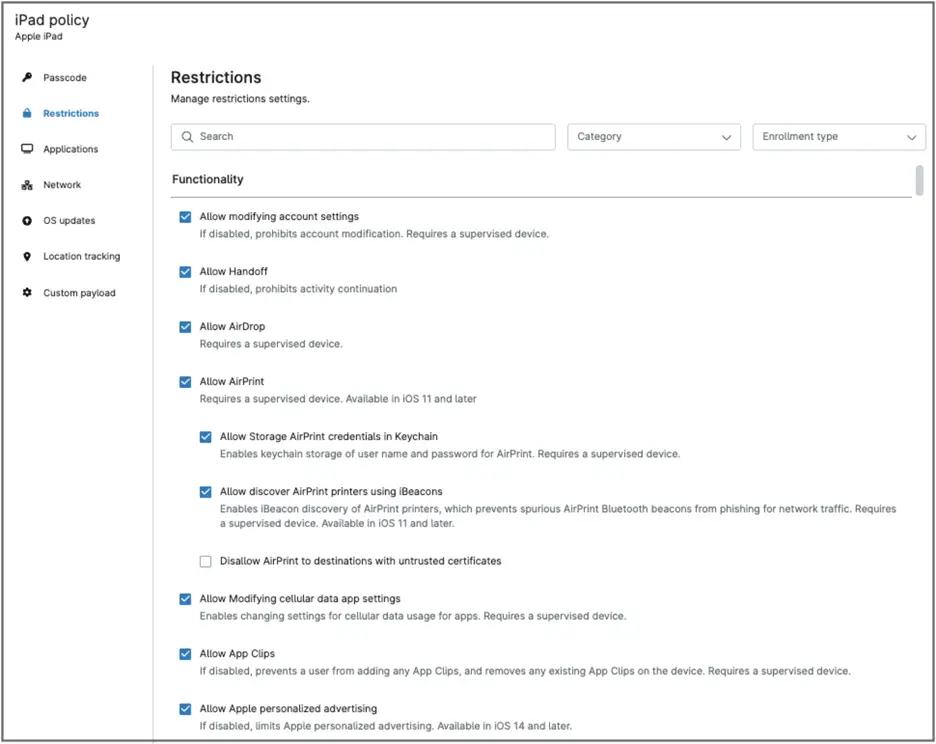
NinjaOne MDM enrolls, configures, and secures iPadOS devices at scale, with remote actions to protect company data if a device is lost or compromised.






The following problems describe common friction points in managing iPads at scale, and how NinjaOne MDM addresses them.
Problem | How NinjaOne resolves it |
Manually configuring each iPad one at a time doesn’t scale as a fleet grows, especially across a mix of company-owned and personally owned devices. | Once enrolled, managed iPads are configured through policies that scale across the fleet, keeping settings, configurations, and installed apps consistent regardless of how many devices are added. |
A lost or stolen iPad puts company data at risk for as long as it takes IT to notice and respond. | NinjaOne MDM lets administrators remotely lock or wipe an iPad, or use Lost Mode on company-owned or supervised devices, limiting the window of exposure. |
Deploying and updating apps across a fleet of iPads one at a time is slow and inconsistent as the fleet grows. | NinjaOne MDM policies control app installation across the fleet, choosing either Apple Apps and Books for a silent, background install or the App Store for an install the end user approves with their own App Store credentials. |
Supporting a remote employee’s iPad without physical access to it can turn a simple fix into a lengthy back-and-forth. | NinjaOne MDM lets technicians view a managed iPad’s screen in real time to diagnose the issue and walk the user through a fix, without needing the device in hand. |
These are the outcomes NinjaOne MDM delivers for iPad management.
Because devices are configured through policy once enrolled, settings and apps stay consistent no matter how many iPads join the fleet.
Apple Business Manager enrollment gets new, company-owned iPads into policy without configuring each one by hand. (Automated enrollment requires the device to be registered in Apple Business Manager or Apple School Manager.)
Because IT controls app installation through policy, whether via Apple Apps and Books or the App Store, the fleet stays free of software that could introduce security or compliance risk.
Combining remote lock, wipe, and Lost Mode lets IT act within minutes of a device going missing, rather than leaving data exposed indefinitely.
Remote screen viewing lets technicians diagnose issues on a managed iPad without waiting for the device to be brought in or mailed back.
The following features describe how NinjaOne MDM supports iPad management.

NinjaOne MDM integrates with Apple Business Manager and Apple School Manager for automated device enrollment, so a supervised iPad is enrolled and assigned its policies automatically the moment it connects to the internet. Personally owned iPads can also be enrolled manually.

Administrators can configure passcode requirements, network settings, restrictions, and other security controls at the policy level, applied consistently across the fleet.

NinjaOne MDM policies control which apps are installed on managed iPads and how. Apple Apps and Books installs an app silently in the background, while the App Store pushes an install request that the end user approves with their own App Store credentials.

If an iPad is lost or stolen, administrators can remotely lock or wipe the device. Lost Mode is also available for company-owned or supervised iPads, locking the screen and displaying a custom message or contact information.

Company-owned iPads enrolled as supervised devices support the full range of NinjaOne MDM policies and restrictions. Personally owned, unsupervised iPads support a narrower set of controls that preserve user privacy.

Administrators can track device status, policy compliance, and inventory details from the same console used for other endpoint types. Technicians can also view an iPad’s screen in real time to help diagnose an issue; Apple’s platform restrictions limit this to viewing rather than full remote control.
The following practical applications describe how NinjaOne MDM supports iPad management in real-world IT and MSP environments.
When a school or company orders a batch of new iPads, Apple Business Manager enrollment and policy-based configuration get every device ready for use without IT touching each one individually.
When a remote employee runs into an issue with a company iPad, a technician can view the screen in real time to diagnose the problem and walk the user through a fix, without needing the device shipped back to IT.
When an employee reports an iPad missing, IT can lock it with Lost Mode on a company-owned or supervised device, or wipe it outright, depending on the situation and how sensitive the data on it is.
100,000
Endpoints managed
“NinjaOne is a scalable solution. It’s built on a modern SaaS architecture and it’s future-proof.”

40%
More Cost Effective
“NinjaOne’s price point is 40% less than any other endpoint management tool on the market, while being more powerful and easy to use.”

10-15
Tools Replaced
“Before, I needed 10-15 different tools to execute what NinjaOne does in its centralized, single pane of glass.”

30%
Less time for patching
“We observed a 30% reduction in the time taken for patch deployments compared to our previous solution.”

2,000
Endpoints managed
“NinjaOne gives me much more flexibility and security in my work”

30%
Annual ROI
“[NinjaOne] has already shown its value in ROI…it’s at least a hundred thousand dollars annually.”

24x
Faster Endpoint Management
“Our processes have become 24x faster with NinjaOne.”

20-40
Hours Saved Each Week
“Leveraging the automations feature within NinjaOne has enabled me to save upwards of what would likely be 20 to 30 to even 40 hours per week.”
Here’s how iPad management is set up and used in NinjaOne MDM, at a high level.
Administrators enable NinjaOne MDM, connect it to Apple Business Manager or Apple School Manager using an Apple ID reserved for device management, and enroll the organization for Apple Push Notification service.
Administrators configure policies covering passcode requirements, restrictions, network settings, and app deployment through Apple Apps and Books or the App Store, before enrolling devices.
iPads are enrolled automatically as supervised devices through Apple Business Manager or Apple School Manager, or manually as unsupervised devices for personally owned iPads.
IT tracks device status, policy compliance, and inventory from the same console used for other endpoint types.
Administrators can remotely lock or wipe a device, use Lost Mode on a company-owned or supervised iPad, or view the screen to diagnose an issue. Apps and policies are also added, removed, or adjusted on an ongoing basis as needs change.
FCC Behavioral Health chose NinjaOne MDM to manage and secure its Apple devices after its previous solution struggled to configure and monitor them consistently.
"Unlike our previous solution, configuring and managing Apple devices is simple and works. It's a night and day difference with NinjaOne. We can manage all our devices knowing the policies we push out will take effect on all our devices,"
said Dustin Skelton, IT Director, FCC Behavioral Health.
See how NinjaOne MDM enrolls, configures, and secures iPads from one console.
NinjaOne MDM enrolls, configures, and secures iPadOS devices through policy, keeping settings and installed apps consistent across the fleet. Administrators can also take remote action, such as locking, wiping, or viewing a device, from the same console used for other endpoint types.
Company-owned iPads can be enrolled automatically as supervised devices through Apple Business Manager or Apple School Manager, or personally owned iPads can be enrolled manually as unsupervised devices by scanning a NinjaOne-generated QR code.
A supervised iPad, typically company-owned and enrolled through Apple Business Manager, supports the full range of NinjaOne MDM policies and restrictions. An unsupervised iPad, typically personally owned, supports a narrower set of controls to preserve user privacy.
Yes. NinjaOne MDM policies control app installation on managed iPads, using either Apple Apps and Books for a silent, background install or the App Store for an install the end user approves with their own App Store credentials. Policies can also block specific apps from being installed.
Yes. Administrators can remotely lock or wipe the device, or use Lost Mode to lock it and display a custom message or contact information on the screen. Lost Mode itself is limited to company-owned or supervised devices.
Yes, but view only, since Apple’s platform restrictions limit iPad remote access to screen viewing rather than full remote control. A technician can see the screen to diagnose an issue but cannot take over the device directly.
Yes. Company-owned iPads are typically enrolled as supervised devices, giving IT full control of the device. Personally owned iPads are typically enrolled as unsupervised devices, where IT’s control is partial, preserving the user’s privacy over personal apps and data.
Yes, for company-owned iPads already enrolled in Apple Business Manager or Apple School Manager and running iPadOS 26 or later. NinjaOne MDM supports migrating these devices from another MDM without a full device wipe.