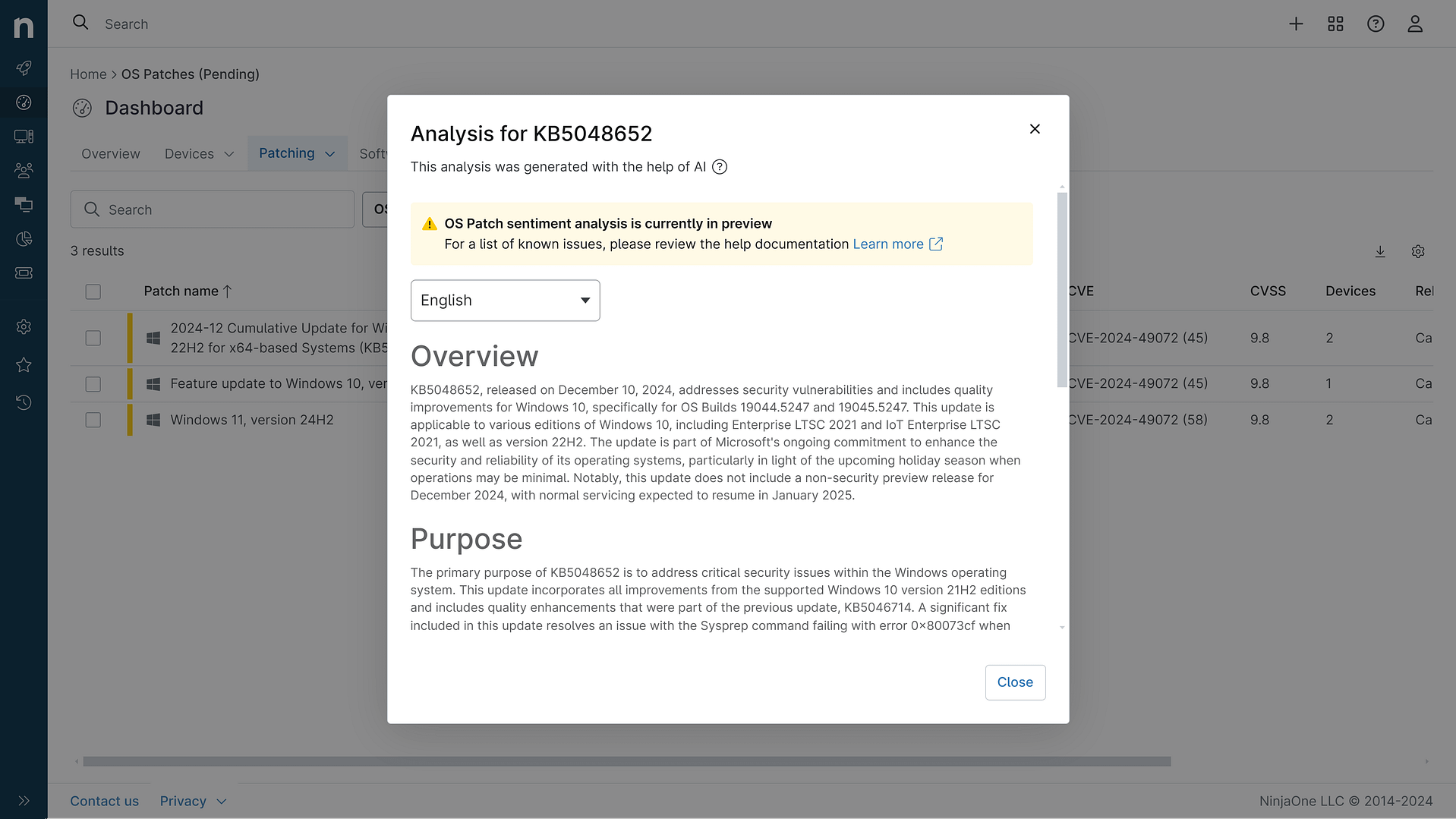
KB5082402: Overview with user sentiment and feedback
Last Updated May 30, 2026
Probability of successful installation and continued operation of the machine
Overview
KB5082402 is a cumulative security and quality rollup released on April 14, 2026, targeting .NET Framework versions 4.6.2, 4.7, 4.7.1, and 4.7.2 on Windows Server 2012 R2. This patch represents a critical maintenance update for legacy .NET Framework installations, particularly important given that Windows Server 2012 R2 reached end of support on October 10, 2023, and is now only receiving Extended Security Updates (ESUs) through October 13, 2026.
The update addresses six significant security vulnerabilities spanning remote code execution, denial-of-service, security feature bypass, and information disclosure vectors. Additionally, the patch includes quality improvements to the .NET runtime, specifically enhancing ClickOnce verification logic to support modern cryptographic hash algorithms. Organizations maintaining Windows Server 2012 R2 infrastructure should prioritize this update as part of their Extended Security Update subscription to maintain baseline security posture during the remaining support window.
General Purpose
This security and quality rollup delivers targeted remediation for multiple critical security vulnerabilities within the .NET Framework ecosystem. The patch resolves a remote code execution vulnerability (CVE-2026-32178) that could allow attackers to execute arbitrary code through compromised .NET applications, alongside three distinct denial-of-service vulnerabilities (CVE-2026-32203, CVE-2026-32226, CVE-2026-23666) that could disrupt application availability. The update also addresses a security feature bypass vulnerability (CVE-2026-26171) and an information disclosure vulnerability (CVE-2026-33116) that could expose sensitive system data.
Beyond security fixes, the patch enhances the .NET runtime with improved verification logic for ClickOnce deployments, extending support for SHA384 and SHA512 cryptographic hash algorithms. This quality improvement ensures compatibility with modern security standards and deployment methodologies. The update replaces two previously released patches (KB5066741 and KB5065960), consolidating security fixes into a single cumulative release. Installation requires either .NET Framework 4.6.2, 4.7, 4.7.1, or 4.7.2 to be present on the system, and Microsoft recommends installing the latest servicing stack update (KB5044411) beforehand to ensure reliable patch application.
General Sentiment
The sentiment surrounding KB5082402 is decidedly positive from a security perspective, as it addresses multiple critical vulnerabilities in legacy .NET Framework versions that remain widely deployed in enterprise environments. The patch demonstrates Microsoft's continued commitment to supporting end-of-life operating systems through the Extended Security Update program, which is essential for organizations unable to migrate from Windows Server 2012 R2 immediately.
However, there are important contextual considerations. The underlying platform (Windows Server 2012 R2) is nearly three years past its mainstream support end date, and Microsoft explicitly recommends upgrading to newer Windows Server versions rather than relying on ESUs indefinitely. Organizations should view this patch as a necessary interim measure rather than a long-term solution. The requirement to pre-install servicing stack updates and the potential for installation failures on Azure Arc-enabled devices introduce minor friction points, though these are well-documented and manageable. The absence of reported issues in the wild, combined with the straightforward nature of the fixes, suggests this patch should integrate smoothly into most environments. The consolidation of multiple previous patches into this single release also reduces update management complexity.
Known Issues
- Installation of this Extended Security Update may fail on Azure Arc-enabled devices running Windows Server 2012 R2; ensure all required ESU-specific network endpoints are accessible as documented in Connected Machine agent network requirements
- Language pack installation after applying this update requires reinstallation of the patch; install all required language packs prior to applying this update
- System restart may be required if any affected .NET Framework files are in use; exit all .NET Framework-based applications before installation
Disclaimer: We take measures to ensure that AI-generated content is of the highest possible quality, but we cannot guarantee its accuracy and recommend that users do their own independent research. Generated on 2026-05-30 07:49 PM