VMware ESXi monitoring and management in NinjaOne Endpoint Management
NinjaOne Endpoint Management monitors and manages VMware ESXi hosts and virtual machines alongside your other endpoints from a single console.
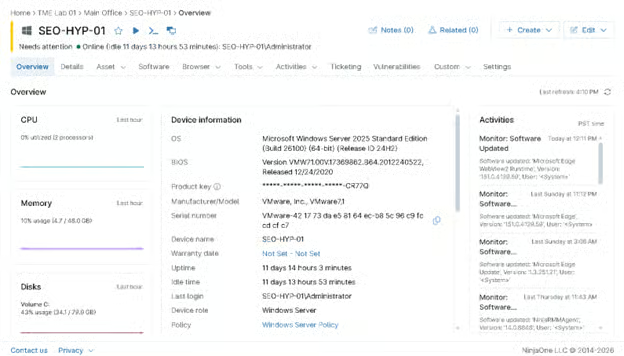
NinjaOne Endpoint Management monitors and manages VMware ESXi hosts and virtual machines alongside your other endpoints from a single console.
Problem | How NinjaOne resolves it |
| VMware hosts and virtual machines are often monitored through separate virtualization tools, making it difficult to view infrastructure health alongside the rest of the IT environment. | NinjaOne extends endpoint management with VMware monitoring, allowing administrators to monitor VMware ESXi hosts and virtual machines from the same console used to manage endpoints and servers. |
| IT teams need visibility into VMware host and virtual machine health, but manually checking resource utilization and VM status across multiple hosts is time-consuming. | NinjaOne continuously monitors VMware hosts and virtual machines, collecting health, resource utilization, and inventory data while generating alerts when predefined thresholds or conditions are met. |
| Performance issues on VMware hosts or virtual machines can affect multiple workloads before administrators become aware of the problem. | NinjaOne monitors key VMware performance metrics and alerts administrators to issues affecting hosts or virtual machines, enabling faster investigation and remediation. |
| Managing a virtualized infrastructure requires technicians to switch between VMware management tools and endpoint management platforms to investigate related issues. | NinjaOne combines VMware monitoring with endpoint management, giving administrators visibility into VMware infrastructure alongside the Windows and macOS devices running within their environment from a single console. |
VMware infrastructure becomes easier to manage by giving administrators centralized visibility into ESXi hosts and virtual machines, reducing the need to switch between separate management tools.
Virtualization issues are identified sooner through continuous visibility into host and virtual machine health, helping IT teams investigate performance and availability problems before they affect workloads.
Administrative effort decreases when routine monitoring, alerting, and remote management are consolidated into a single workflow, allowing IT teams to spend less time on repetitive operational tasks.
Operational consistency improves by providing standardized monitoring and management across VMware environments, helping administrators maintain consistent oversight as virtual infrastructure grows.
Infrastructure reliability increases through better visibility into VMware inventory, resource utilization, and system status, enabling IT teams to make informed management decisions and maintain stable virtual environments.
saved time on manual tasks through automation
reduced ticket volumes and resolution times
replaced 3-4 tools with NinjaOne

Monitor VMware ESXi hosts and virtual machines from a single dashboard. NinjaOne provides visibility into host status, virtual machine inventory, and infrastructure health, enabling administrators to monitor their VMware environment alongside physical endpoints without switching between multiple management tools.

Track the health and performance of VMware ESXi hosts with continuous monitoring of key infrastructure metrics, including CPU utilization, memory usage, datastore capacity, network activity, uptime, hardware health, and system events. Configurable alerts help administrators identify potential issues before they affect hosted virtual machines.

Monitor VMware virtual machine health, performance, and status from the NinjaOne console. Administrators can configure monitoring policies and alerts and view guest information without accessing each host individually.

Manage VMware virtual machines alongside Windows, macOS, Linux, and other endpoints from a single console. By installing the NinjaOne agent on guest virtual machines, administrators gain access to endpoint management capabilities such as software deployment, patch management, automation, remote access, and scripting using the same workflows applied to physical devices.

Standardize VMware monitoring with policies that define performance thresholds, health conditions, notifications, and automated responses for virtual machines. Administrators can apply consistent monitoring configurations across VMware environments to simplify ongoing operations and quickly respond to infrastructure issues.
Managed service providers use NinjaOne to continuously monitor VMware ESXi hosts and virtual machines across customer environments for infrastructure issues that could affect workload availability. Customer-specific monitoring policies and automated alerts help technicians identify potential problems earlier and prioritize response based on each customer’s operational requirements. This supports more proactive service delivery while reducing the need for manual infrastructure monitoring.
IT teams use NinjaOne to monitor VMware ESXi hosts, virtual machines, and physical endpoints from a unified management platform. Centralized visibility into infrastructure health, inventory, and operational alerts helps administrators investigate issues across physical and virtual systems without relying on separate monitoring workflows. This improves operational efficiency while providing a more complete view of the IT environment.
Organizations with VMware infrastructure deployed across multiple data centers, branch offices, or remote locations use NinjaOne to apply consistent monitoring policies and maintain centralized visibility across ESXi hosts and virtual machines. Administrators can monitor infrastructure health across sites, identify location-specific issues, and maintain standardized monitoring practices as the environment grows. This improves operational consistency while simplifying oversight of distributed VMware environments.
Administrators connect supported VMware ESXi hosts to NinjaOne to establish centralized visibility into managed virtualization environments.
NinjaOne inventories connected ESXi hosts and virtual machines, providing administrators with centralized infrastructure information for ongoing management.
NinjaOne continuously monitors VMware host and virtual machine health, generating alerts when monitored conditions require attention.
Administrators use the NinjaOne console to review VMware inventory, health information, performance data, and alerts to support ongoing administration and troubleshooting.
NinjaOne integrates with VMware environments through a monitor delegate agent installed on a device within the environment. The delegate communicates with VMware ESXi hosts to collect virtual machine inventory, health, and performance data, so VMware infrastructure can be monitored alongside physical endpoints from the same NinjaOne console.
NinjaOne helps IT teams monitor VMware ESXi hosts and virtual machines from a centralized console. Organizations can monitor host and virtual machine health, performance, inventory, and infrastructure alerts. Guest operating systems can be managed using the NinjaOne agent, allowing IT teams to manage virtualized workloads alongside other managed endpoints from a single platform.
"With NinjaOne, we have a single pane of glass to manage backups, ticketing, antivirus, asset management, software updates, software deployment, remote management, and device management and monitoring..."
— Joann Dewwealth-O'Brien, Senior Technology Manager
Monitor VMware ESXi host and virtual machine health and performance alongside your managed devices, and manage IT from a single console.
Monitor and manage VMWare and Hyper-V virtual machine hosts and guests.

One platform to manage, patch, secure and support every endpoint.
NinjaOne simplifies VMware monitoring through its intuitive interface and powerful features.
VMware management software helps IT teams monitor, manage, and maintain VMware virtualization environments, including ESXi hosts and virtual machines. It may provide infrastructure administration, health monitoring, inventory, alerting, and operational visibility, depending on the solution.
NinjaOne Endpoint Management monitors VMware ESXi hosts and virtual machines from a centralized console, helping IT teams track VM health, inventory, and performance while receiving alerts for infrastructure issues. Administrators can also manage guest operating systems using the NinjaOne agent, allowing virtual infrastructure to be monitored alongside other managed endpoints. Native tools such as VMware vCenter provide similar infrastructure visibility but require switching to a separate management console.
NinjaOne Endpoint Management provides visibility into VMware resource utilization by monitoring CPU, memory, and datastore metrics for ESXi hosts and virtual machines alongside your managed endpoints. This allows administrators to identify resource bottlenecks and capacity trends without leaving the NinjaOne console. VMware vCenter and the ESXi Host Client also provide utilization data, but require administrators to use a separate management interface.
NinjaOne Endpoint Management monitors VMware ESXi hosts and virtual machines from the same console used for physical endpoints. It tracks host and VM health, resource utilization, and inventory, and generates alerts when predefined thresholds are met.