Fast, Reliable OS Image Backup and Restore

With NinjaOne, working with image-based backups is straightforward and well integrated. The platform uses block-level backup technology to create accurate and efficient system images that take up less space and complete faster. You can store these images locally, in the cloud, or both. When recovery is needed, NinjaOne provides quick and intuitive restore workflows, including bare metal recovery for new or fully wiped devices.
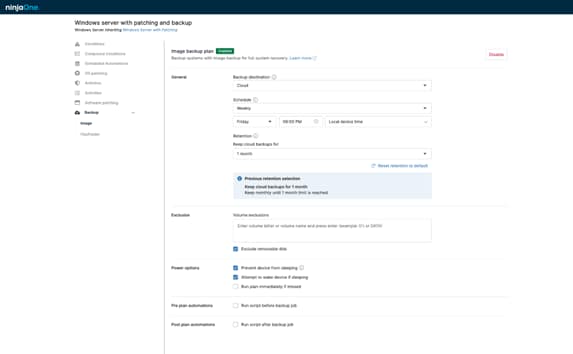

OS Image Backup and Restore
IT business logo
Provide logo
Advantage Technologies logo
Dedicated IT logo
Alticap logo
Network Coverage logo

Faster, More Reliable Recovery 

Restoring a complete system image helps IT teams bring devices back online in minutes, reducing downtime and avoiding the manual effort of reinstalling and reconfiguring endpoints. 

Stronger Endpoint Resilience 

Having a full system snapshot available ensures organizations can recover quickly from ransomware, hardware failures, OS corruption, and other unexpected disruptions.

Simplified IT Operations 

Consistent image backups reduce repetitive rebuild tasks and give teams a predictable, streamlined recovery process, allowing them to focus on higher-value work.

OS Image Backup Capabilities

These features make OS image backup and restore efficient, reliable, and simple to manage:

Full System Image Capture

NinjaOne creates complete OS images that include the operating system, apps, settings, and data, giving IT teams an exact snapshot they can restore at any time for fast, consistent recovery.

Flexible Storage Options

Images can be stored locally, in the cloud, or in a hybrid setup, giving organizations multiple recovery paths and ensuring critical system snapshots remain accessible when needed.

Unlimited storage and optimized restores

Fast, Guided System Restore

NinjaOne provides intuitive restore workflows that walk technicians through recovering a full system image, simplifying complex processes and reducing the time needed to bring devices back online.

Bare Metal Recovery Support

IT teams can rebuild devices from scratch using a system image, even on new or fully wiped hardware, enabling rapid recovery after severe failures or hardware replacements.

Storage icon

Block-Level Backup Technology

Backups run faster by saving only the parts of the system that changed, using less storage while keeping each system image complete.

Common OS Image Backup Scenarios

See how OS image backup and restore helps IT teams recover systems quickly and stay prepared for high-impact situations:

Rapid Recovery After Failures

When a device experiences hardware failure, OS corruption, or becomes unbootable, having a full system image allows technicians to restore the machine much faster than rebuilding it manually. This eliminates the need for manual OS installation or app setup, helping teams get employees working again with minimal disruption.

Responding to Ransomware Attacks

If malware encrypts a device, restoring a clean system image is one of the fastest ways to recover. IT teams can completely replace the compromised environment with a verified snapshot, ensuring the device returns to a safe, functional state without spending hours troubleshooting or rebuilding manually.


Preparing and Deploying New Hardware

When onboarding new devices or replacing aging hardware, full system images simplify the process. Technicians can deploy a standardized, preconfigured image across multiple endpoints, saving time and ensuring consistent setups for users, departments, or entire teams. 

Restore Systems Faster with NinjaOne

NinjaOne makes OS image backup and restore simple, fast, and reliable so your team can recover devices with confidence.

  • Recover devices quickly after failures.
  • Reduce manual rebuild time and effort.
  • Keep every endpoint protected and consistent.

Get complete system recovery from one unified platform, giving your IT team faster restores, stronger resilience, and a more efficient device recovery workflow.

Related Resources

This is why customers love us

Ready to simplify the hardest parts of IT?

OS Image Backup and Restore FAQs

An OS Image Backup captures the entire system environment, including the operating system, applications, settings, and data, so it can be restored as a complete working system, while a file-level backup focuses on protecting individual files and folders, making it suitable for scenarios where only specific data needs to be recovered rather than the full device.

NinjaOne generates a full system image by capturing data at the block level, creating a unified snapshot of the operating system, installed applications, configurations, and files so the complete environment can be restored exactly as it existed at the time of backup.

Yes, a full OS image can be restored to new or different hardware, since the backup contains the entire system state and can be deployed onto another device, however, hardware compatibility differences or operating system licensing requirements may require additional administrator intervention during the recovery process.

Image-based backups reduce downtime by allowing a system to be restored as a complete, ready-to-run environment, eliminating the need to reinstall the operating system, reconfigure settings, or manually rebuild applications, which shortens recovery time and helps organizations return to normal operations much faster after a failure.

Yes, NinjaOne supports Bare Metal Recovery, allowing a full system image to be restored onto new or completely blank hardware so the device can return to a working state without requiring an existing operating system.

OS image backups can be scheduled as frequently as needed through policy settings. While image captures consume system resources, NinjaOne minimizes impact by using incremental, block-level technology that reduces backup size and processing time, helping endpoints remain responsive during scheduled operations.

Yes, OS image backups are encrypted and stored securely with encryption applied both during transmission and while at rest to ensure that backup data remains protected throughout the entire lifecycle of the backup.

Yes, OS image backups can be used alongside other backup types within NinjaOne, since the platform supports both full image backups and file and folder backups, allowing administrators to configure each method according to their protection needs as part of an overall backup strategy.

Image-based restore is much faster because it rebuilds the entire system in one step, while manual reinstallation requires setting up the OS, applications, configurations, and data separately, which takes considerably more time.

OS image backups are especially valuable in scenarios where a full system needs to be restored quickly, such as ransomware attacks, hardware failures, operating system corruption, or any situation where rebuilding the device from scratch would cause extended downtime.