On-Demand Backup with NinjaOne for Instant IT Resilience

With NinjaOne’s on-demand backup tool, teams can initiate backups at will—capturing full image-based backups for Windows devices or file and folder backups for macOS—without being bound to preset schedules or restrictive waiting windows.
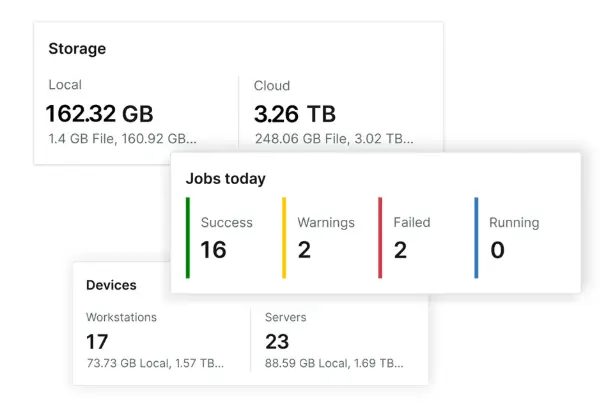
On-Demand Backup
IT business logo
Provide logo
Advantage Technologies logo
Dedicated IT logo
Alticap logo
Network Coverage logo

Flexible, on-demand backup for zero-downtime protection and fast restores

Uninterrupted Protection, Always-On Assurance 

NinjaOne’s backup engine runs silently in the background automated, efficient, and non-disruptive so end users remain productive while your systems stay continuously protected. There are no interruptions and zero downtime. 

Policy-Driven Automation at Scale 

Deploy consistent, centralized backup policies across all endpoints, servers, and remote devices. Whether managing a handful or thousands of systems, NinjaOne ensures protection with minimal manual effort. 

Lightning-Fast Full or granular recovery

Restore individual files in seconds or recover entire systems, even with bare-metal restoration, all from a unified console. NinjaOne restores productivity faster than ever.

One Dashboard, All the Control 

Manage backup health, policy enforcement, retention, and storage visibility from one intuitive interface. Real-time alerts and role-based controls ensure peace of mind and streamlined administration. 


Efficient and Reliable Backups 

NinjaOne employs incremental backups, deduplication, compression, and hybrid storage, capturing only changes to optimize performance, bandwidth, and storage use while keeping systems responsive. 


On-Demand Recovery When You Need It 

Whether planned or unplanned, IT can initiate restores directly from the cloud or local storage, recovering files, folders, or full systems and without onsite presence. 

Safeguard Systems Anytime with On-Demand Backup

Complete Image-Based Protection for Windows 

NinjaOne captures a full, OS-level image of Windows devices, including applications, settings, and files, ensuring precise recovery and business continuity after any system failure. 

Incremental Backups for Speed and Efficiency 

Optimize storage and bandwidth by capturing only the changes since the last backup. This lightweight approach accelerates backup processes while reducing overhead. 

Unlimited storage and optimized restores

Full Device Restore in Minutes

Recover endpoints from ransomware, hardware failures, or software corruption with complete device restoration, bringing systems back online quickly and securely. 

On-Demand Backup for Safeguarding 

Go beyond scheduled backups with the ability to trigger backups anytime. On-demand backups let IT teams protect critical systems before updates, patches, or high-risk changes. 

Storage icon

Flexible Cloud and On-Prem Storage Options 

Choose secure cloud storage, on-premises infrastructure, or a hybrid approach to align backup storage with business, security, and compliance needs.

Centralized Backup and Recovery Management 

Manage policies, monitor job status, and execute restores from a single platform—simplifying workflows for IT teams and MSPs. 

Agile protection and recovery strategies designed for today’s IT challenges 

Flexible Recovery with On-Demand Backup 

Unexpected issues like failed updates, system crashes, or ransomware can strike anytime. With NinjaOne’s on-demand backup, IT teams can capture images, no need to wait for the next scheduled backup. Whether it’s a single file, an application, or the entire system, on-demand protection ensures critical workloads are safeguarded the moment risks emerge, keeping downtime to a minimum. 

Disaster Recovery with Bare Metal Restoration 

NinjaOne empowers organizations to rebuild devices from the ground up with boot image backup and bare metal recovery. Even in the face of catastrophic hardware failures or ransomware lockouts, IT teams can restore full operating systems, applications, and configurations with confidence. By leveraging bootable recovery media and automated backup workflows, businesses ensure continuity and resilience in worst-case scenarios. 

Compliance-Ready Backup and Recovery 

For industries with strict data retention and security regulations, NinjaOne provides encrypted storage, role-based access, and customizable workflows. Windows devices support on-demand backups, bootable recovery images, and full system restores, while macOS supports file and folder backups. This ensures compliance standards are met while maintaining operational readiness, keeping organizations audit-ready and confident that data integrity is never compromised. 

NinjaOne delivers fast, flexible, and secure backup at the click of a button. Eliminate recovery uncertainty, reduce downtime, and keep business operations running smoothly with a modern backup solution built for today’s IT challenges. 

Related Resources

This is why customers love us

Ready to simplify the hardest parts of IT?

On-Demand Backup FAQs

On-demand backup is a manual backup triggered immediately instead of waiting for a scheduled time. It lets IT teams capture the current state of systems, applications, or data—often used before updates, migrations, or risky changes to ensure the most recent version is protected. 


Use an on-demand backup when you need protection outside your normal schedule, such as before updates, troubleshooting, audits, migrations, or during security risks. 

NinjaOne’s on-demand backup lets admins manually trigger a backup outside the set schedule. From the console, you can select a device and choose “Backup Now” to capture its current state immediately. 

No. End users cannot trigger on-demand backups; they can only restore data from existing backups. 

On-demand backups can include system files, applications, configurations, and user data. On Windows, full system image backups are supported, while on macOS only file and folder backups are available. 

No, on-demand backups do not override or interfere with scheduled backups. They run independently, meaning you can trigger an on-demand backup at any time without disrupting your existing backup schedule. Scheduled backups will still run at their defined intervals, and the on-demand backup is simply added to the backup history. 

The speed of an on-demand backup depends on the amount of data, network bandwidth, and storage performance, but it runs as fast as the available resources allow since it starts immediately. 

Yes. Data in an on-demand backup is encrypted in transit and at rest, just like scheduled backups. This ensures files are protected during transfer and while stored in backup repositories. 

Yes. An on-demand backup creates the same type as a scheduled backup, so you can restore from it using the same process—whether you’re doing a full system restore, bare-metal recovery, or restoring specific files. The only difference is how the backup was triggered, not how it’s restored. 

On-demand backup requires internet only when saving to cloud storage; local or network backups work without internet.