1Password

Ensure your organization’s password management infrastructure stays secure and up-to-date with automated patching for 1Password through NinjaOne. Streamline updates across your entire deployment while maintaining strict security standards and minimizing potential vulnerabilities.
1Password
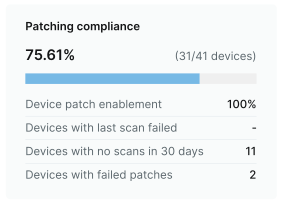
Patching compliance dashboard
Patches installed dashboard

Keep 1Password updated across your org with NinjaOne

Supported OS

  • Windows
  • macOS
  • Linux
  • iOS
  • Android

Supported Versions

  • 8.11.8.40
  • 8.11.6.27
  • 8.11.4.27

Patching for over 6,000 other software titles

Automatically patch them all, from a single pane of glass

  • AnyDesk logo
  • Asana logo
  • BitWarden logo
  • Canva logo
  • ClickUp logo
  • Discord logo
  • Figma logo
  • GitHub logo
  • Google Chrome logo
  • ImageMagick logo
  • LastPass logo
  • MalwareBytes logo
  • Microsoft OneDrive logo
  • Postman logo

Third party patch management is now more convenient and efficient than ever

Patching Management

Enhanced security

Protect your organization from potential threats by ensuring that all software, including third-party applications, is promptly patched. NinjaOne 3rd Party Patch Management acts as a robust defense mechanism against cyber-attacks.

Hardware and Software Inventory

Increased productivity

With automated deployment and minimal disruptions, your team can focus on core tasks without the worry of security vulnerabilities. Boost productivity by eliminating manual application patching efforts and reducing downtime.

Software management

Cost-efficiency

Investing in proactive patch management with NinjaOne is a wise financial decision. The potential losses incurred from a security breach significantly surpass the costs associated with fortifying your network against cyber threats. NinjaOne ensures that you not only enhance security but also save on potential financial setbacks.

Endpoint task automation icon

Simplified compliance

Effortlessly adhere to industry regulations and internal policies with NinjaOne’s comprehensive reporting capabilities. Ensure that your organization is always audit-ready.

Auto-remediation

Actionable insights

Gain detailed insights into patch compliance and vulnerabilities through comprehensive reports. Easily identify areas needing attention and make informed decisions.

Form-based Script Deployment

Centralized management

Manage and monitor patches across all devices from a centralized platform, providing a unified and streamlined approach to application patch management.

About 1Password

1Password is a premium password management solution that helps organizations securely store, share, and manage passwords, sensitive documents, and digital secrets. It provides military-grade encryption, secure password generation, and seamless integration across multiple platforms and browsers. The software enables teams to safely share credentials, enforce password policies, and maintain detailed access logs for compliance.
Used by businesses of all sizes, from startups to enterprises, 1Password offers features like secure password vaults, team management, advanced permission controls, and automated password rotation. It’s particularly valuable for IT administrators, security teams, and organizations that need to maintain strict security protocols while enabling efficient password sharing and management across departments.
With features like Watchtower, which monitors for compromised passwords and security vulnerabilities, and Travel Mode for secure international travel, 1Password goes beyond basic password management to provide comprehensive digital security. The platform also supports secure document storage, credit card information management, and secure notes, making it an all-in-one solution for managing sensitive digital information.

1Password

1Password FAQs

FAQs

NinjaOne implements a secure, automated patching process for 1Password that includes verification of digital signatures and checksums before deployment. Updates are downloaded directly from official AgileBits sources and distributed through encrypted channels, maintaining the highest security standards throughout the update process.

Yes, NinjaOne provides flexible scheduling options for 1Password updates. You can set specific maintenance windows, stagger updates across different user groups, and automate the deployment process during off-hours to ensure minimal impact on productivity while maintaining security.

NinjaOne automatically detects and manages different versions of 1Password across various operating systems in your environment. The platform ensures compatibility and maintains consistent versioning across your entire deployment, while respecting platform-specific requirements and dependencies.

NinjaOne provides comprehensive reporting on 1Password patch status, including successful updates, failed attempts, and current versions across your organization. These detailed reports help maintain compliance requirements and provide clear audit trails for security assessments.

Ready to simplify the hardest parts of IT?