Remote device management software with NinjaOne RMM
NinjaOne RMM lets IT teams monitor, manage, and secure devices across the fleet, with remote access built in for endpoints, from one cloud console.
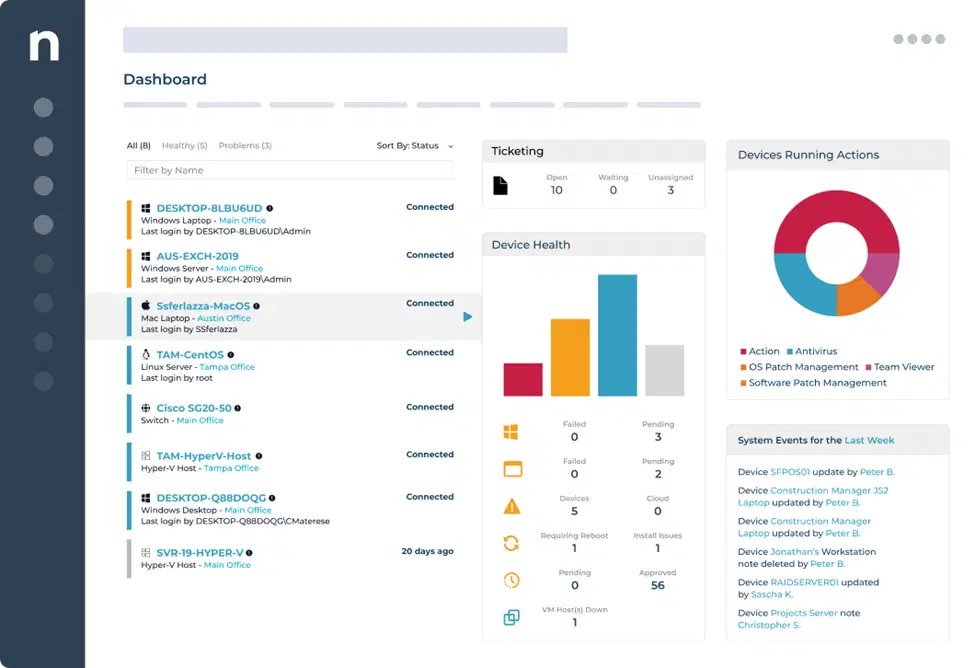
NinjaOne RMM lets IT teams monitor, manage, and secure devices across the fleet, with remote access built in for endpoints, from one cloud console.






Managing a growing, distributed device fleet by hand creates problems that get worse as the fleet grows. Here’s how NinjaOne RMM’s remote device management addresses the most common ones.
Problem | How NinjaOne resolves it |
IT teams manage devices spread across multiple sites and remote workers, with no single view of what’s healthy and what needs attention. | NinjaOne RMM’s centralized dashboard shows the status of every managed device in one console, no matter where it’s located. |
Keeping every device patched by hand falls behind, leaving known vulnerabilities open across the fleet. | Automated patch management applies OS and third-party patches on a schedule, without a technician manually approving and pushing each one. |
Sending a technician on-site for every issue is slow and expensive, especially for remote or distributed users. | Built-in remote access lets technicians connect to a device and resolve most issues without leaving their desk. |
IT doesn’t have an accurate picture of what hardware and software is actually deployed across the organization. | Automated asset inventory tracks hardware and software across every managed device, so reports reflect what’s actually there. |
Centralized visibility means IT doesn’t have to piece together device status from multiple systems.
Automated patching keeps devices current without relying on a technician to push every update by hand.
Remote access lets technicians fix most problems on the spot, cutting down on travel and wait time.
Automated inventory tracking means asset reports reflect what’s actually deployed, not what was last recorded manually.
Policy-based automation and scripting handle routine maintenance so technicians can focus on higher-value work.
saved time on manual tasks through automation
reduced ticket volumes and resolution times
replaced 3-4 tools with NinjaOne

See the status of every managed device, from desktops and servers to network devices and mobile devices, in one console instead of switching between tools.

Get notified when a device or service needs attention, with dashboard alerts that surface issues before they turn into downtime.

Apply OS and third-party patches automatically on a schedule, with configurable approval rules across platforms and AI-driven patch risk analysis for Windows.

Connect to a managed device with NinjaOne Remote to resolve issues directly, without requiring an on-site visit.

Track hardware and software across the fleet automatically, with reports you can export or save as a device group.

Run native or custom automation scripts, on demand or on a schedule, to remediate issues and enforce security configurations.

Apply monitoring, patching, and maintenance policies at scale instead of configuring devices one at a time.

Manage Windows, Mac, and Linux endpoints, VMs, and SNMP-monitored network devices, with mobile devices covered separately through NinjaOne MDM.

Track network health, including device availability and data transmission speed, alongside endpoint monitoring.

NinjaOne Backup protects device data with cloud, local, or hybrid storage, managed from the same console as remote device management.

Restrict or allow specific websites and control which browser extensions can be installed, for Windows devices running Chrome, Edge, or Firefox.

Run automation scripts on demand, trigger them automatically through policy conditions, or schedule them to run at a set time, using the NinjaOne Automation Library or custom scripts.
Extend device records with custom fields to store data beyond what NinjaOne tracks natively, populated manually or through scripts, and used to build device groups, trigger alerts, or run automations.

Turn device alerts into tickets automatically using condition-based rules, with routing and escalation handled natively, without a separate ticketing tool. Technicians can also run automations, trigger Wake-on-LAN, launch remote access or remote tools, and reboot the device directly from the ticket.

Track software license counts, consumption, and expiration dates through NinjaOne’s IT Asset Management app, with alerts for insufficient licensing or upcoming renewals.

Locate, lock, or wipe enrolled iOS, iPadOS, and Android devices through NinjaOne MDM, with device inventory covering hardware details, installed software, and network info. For company-owned or supervised devices, Lost Mode locks the device, displays a custom message and contact info, and tracks its location until it’s recovered.
IT can monitor, patch, and support devices for remote and hybrid employees without needing physical access to any of them.
Proactive monitoring and remote access resolve many issues before or as soon as they’re reported, instead of after a ticket is filed.
Automated inventory gives IT an accurate baseline for budgeting, license management, and compliance reporting.
This overview covers the high-level flow only;
full setup requirements are covered in the Quick Deployment Guide.
Set up policies for alerts, patch schedules, and maintenance tasks that apply automatically across device groups.
Install the NinjaOne agent on Windows, Mac, and Linux devices, enroll mobile devices through NinjaOne MDM, or add network devices and VMs for monitoring, all of which inherit the configured policies automatically.
Check device health, alerts, and asset inventory from the centralized console as part of daily IT operations.
Connect to a device with NinjaOne Remote, run a script, or push a patch outside the regular schedule when something needs attention now.
CrowdStrike deploys and monitors CrowdStrike Falcon sensors from the NinjaOne console. Threat detections and quarantine actions flow into NinjaOne as alerts, so technicians can respond without switching tools.

SentinelOne installs and monitors SentinelOne agents from NinjaOne. Threat alerts appear directly in the NinjaOne dashboard, with one-click access to the incident in the SentinelOne console.
ConnectWise Manage syncs devices and device roles into ConnectWise configurations, and turns NinjaOne alerts into ConnectWise tickets automatically. Resolving the alert on either side closes the loop on both, and technicians can launch remote access to a device directly from ConnectWise.
ServiceNow syncs endpoint and asset data into the ServiceNow CMDB and lets NinjaOne alerts automatically create incidents there, with ticket updates syncing back to NinjaOne.
"Since using NinjaOne’s automatic reboot feature, we’ve reduced the number of helpdesk calls we get by 80%. When we do receive calls, NinjaOne’s remote access reduced our issue resolution time by 89%,"
said Collett, Citrus Motors.
See how NinjaOne RMM lets you monitor, manage, and secure your device fleet, with remote access built in for endpoints, from one console.
Remote device management software lets IT teams monitor, patch, secure, and support devices from a central console, without needing physical access to each one. NinjaOne RMM provides these capabilities for Windows, Mac, Linux, and servers, while SNMP-enabled network devices can be inventoried and monitored. Mobile devices are managed through NinjaOne MDM within the same NinjaOne console.
Yes. NinjaOne Remote is built into the platform and lets technicians connect to a managed device to resolve issues directly.
Yes. NinjaOne RMM automates OS and third-party patching on a schedule, including AI-driven patch risk analysis for Windows.
NinjaOne RMM manages Windows, Mac, and Linux endpoints, VMs, and network devices monitored via SNMP. Interactive remote access is available for Windows, Mac, and Linux endpoints, but not for SNMP-monitored network devices.
Mobile devices are managed separately through NinjaOne MDM. Android devices support full remote control, allowing a technician to interact directly with the device. iOS devices support screen sharing, allowing a technician to view the screen for troubleshooting but not control it directly, due to Apple platform restrictions.
Yes. Hardware and software inventory is tracked automatically across managed devices, with reports you can export or save as a device group.
Yes. Policy-based automation and the NinjaOne Automation Library handle patching, scripts, and maintenance tasks on a schedule or on demand.
Yes. NinjaOne RMM integrates with tools like CrowdStrike, SentinelOne, ConnectWise Manage and ServiceNow.
Remote Tools let technicians work on a device in the background without taking over the screen or disturbing the person using it. Task Manager, File Browser, and Service Manager are available for Windows, Mac, and Linux devices; Remote Registry is Windows only.
Look for a single console that covers every device type in the environment, not just laptops and desktops. Confirm the tool can patch, monitor, and remotely access devices without requiring a VPN or on-site visit, and that it reports on hardware and software inventory automatically rather than through manual audits.