Mobile Asset Management with NinjaOne MDM
NinjaOne MDM gives IT teams real-time visibility into every mobile device, with the tools to track, secure, and manage them from one console.
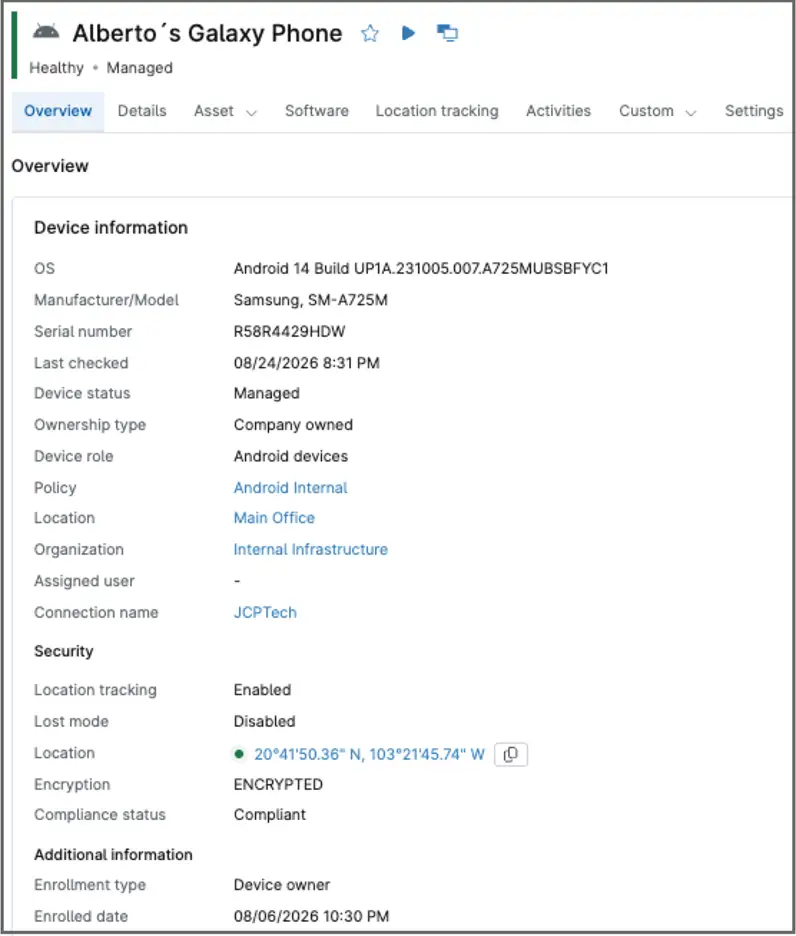
NinjaOne MDM gives IT teams real-time visibility into every mobile device, with the tools to track, secure, and manage them from one console.
Tracking and securing mobile devices without a centralized system introduces problems that ad hoc methods don’t solve. Here’s how NinjaOne MDM addresses the most common ones.
Problem | How NinjaOne resolves it |
Mobile devices move between locations, employees, and networks, so IT teams often lose track of which devices exist, who has them, and whether they’re still in use. | NinjaOne MDM maintains a real-time inventory of every enrolled device, including hardware, OS version, and assigned user, so IT always knows what’s in the fleet. |
A lost or stolen mobile device puts company data at risk for as long as it takes IT to notice it’s missing and take action. | NinjaOne MDM lets administrators remotely lock or wipe a device the moment it’s reported lost or stolen, limiting the window of exposure. |
When a mobile device goes missing or is suspected stolen, IT usually has no way to determine its location, making recovery difficult and forcing teams to decide whether to lock or wipe the device without knowing where it is. | NinjaOne MDM provides location tracking for enrolled devices, so IT can see a device’s last known location to inform recovery efforts or a lock/wipe decision. |
Employees can install unauthorized or risky apps on a mobile device, and IT often doesn’t find out until it’s already created a security or compliance issue. | NinjaOne MDM lets administrators control which applications can be installed, blocking or removing unauthorized apps and deploying approved ones remotely. |
IT always knows what mobile devices exist, who’s using them, and their current status, without maintaining a separate spreadsheet.
Combining location tracking, remote lock/wipe, and Lost Mode lets IT act within minutes of a device going missing, rather than leaving data exposed indefinitely.
Because IT controls which apps can run on a device, the fleet stays free of software that could introduce security or compliance risk.
Because device settings, installed software, and security policies are all managed through policy-based configuration, every device assigned to a given policy stays consistent, even as the fleet grows.
saved time on manual tasks through automation
reduced ticket volumes and resolution times
replaced 3-4 tools with NinjaOne

NinjaOne MDM maintains an up-to-date inventory of every enrolled mobile device, including hardware details, OS version, and assigned user.

Administrators can see a device’s last known location, supporting recovery efforts or informing a lock or wipe decision for a lost or stolen device.

IT can remotely lock or wipe a device the moment it’s reported lost or stolen, limiting how long company data stays exposed.

Administrators can block or remove unauthorized apps and deploy approved ones remotely, keeping installed software consistent with company policy.

IT can enforce passcode requirements and other device restrictions across the fleet to reduce the risk of unauthorized access.

Administrators can put a lost or stolen device into Lost Mode, locking it and displaying a custom message or contact information on the screen to help with recovery.
In today’s digital age, businesses are increasingly spread across multiple locations, and teams often work remotely. This can make IT asset management a challenge.
However, with NinjaOne Mobile Asset Management, you can overcome this hurdle. It allows you to monitor, update, and troubleshoot your IT assets from anywhere in the world.
Whether you need to install a software update, resolve a technical issue, or simply check the status of an asset, NinjaOne has you covered. This not only ensures smooth operations but also saves time and resources that would otherwise be spent on travel or coordination.
IT budgets can be a significant expense for businesses, especially when resources are underutilized or misallocated. NinjaOne Mobile Asset Management provides detailed insights into the usage and performance of your IT assets.
This data can help you identify assets that are underused or not used at all, allowing you to reallocate or decommission them as needed.
Furthermore, by automating routine tasks, NinjaOne can reduce the manpower and time required for IT asset management, leading to further cost savings.
In an era where data breaches and cyber threats are commonplace, maintaining the security of your IT assets is paramount.
NinjaOne Mobile Asset Management helps you achieve this by identifying potential vulnerabilities in your assets and enforcing asset policies. For instance, if an asset is running outdated software that poses a security risk, NinjaOne can alert you to this issue and help you address it.
Additionally, NinjaOne can ensure that all your assets comply with industry regulations or standards, helping you avoid penalties and protect your reputation.
Here’s how mobile asset management is set up and used in NinjaOne MDM, at a high level.
Administrators enable the NinjaOne MDM Apple app and NinjaOne MDM Android app separately, depending on which device types need to be managed.
Administrators configure device policies, covering passcode requirements, app restrictions, and other device settings, before enrolling any devices.
IT enrolls devices under the appropriate organization and location, assigning policies accordingly. Optionally, they can assign users to each device.
IT monitors inventory, location, and compliance status for enrolled devices from the same console used for other endpoint types.
Administrators can enable Lost Mode, remotely lock or wipe a device, or push configuration and app changes to individual devices or groups as circumstances require.
"Mobile devices can be a security risk, but with NinjaOne, we have complete control over all device activity and can monitor those devices from a single dashboard,"
said Tyler Ellison, IT Officer, FCC Behavioral Health.
See how NinjaOne MDM tracks, secures, and manages every mobile device from one console.
This NinjaOne MDM deployment guide is designed to provide a comprehensive roadmap for IT professionals and system administrators who are new to NinjaOne MDM. Its purpose is to simplify the deployment process, ensuring a smooth and efficient onboarding experience.

NinjaOne MDM configures and secures Android devices at scale, with remote actions to protect company data if a device is lost or compromised.
NinjaOne MDM tracks, secures, and manages mobile devices from enrollment through everyday use, maintaining a real-time inventory of hardware, OS version, and assigned user for every device. Administrators enforce policies, control installed apps, and can locate, lock, or wipe a device directly from the same console used for other endpoint types.
Yes. NinjaOne MDM shows a device’s last known location, which helps IT decide whether to attempt recovery or move straight to locking or wiping a lost or stolen device.
Yes. Administrators can block or remove unauthorized apps and deploy approved ones remotely, so installed software stays consistent with company policy across the fleet.
Devices are enrolled under the appropriate organization and location and inherit the policy assigned to that group. Administrators can optionally assign a user to each device, though enrollment itself doesn’t require it.
Yes, through Lost Mode. Administrators can lock a lost or stolen device and show a custom message or contact information on its screen to help with recovery.
Yes. The NinjaOne MDM Apple app and NinjaOne MDM Android app are enabled separately, since each connects to its own device ecosystem.