BYOD Management
Reliable Performance you can count on
Seamless Device Enrollment & Policy Enforcement
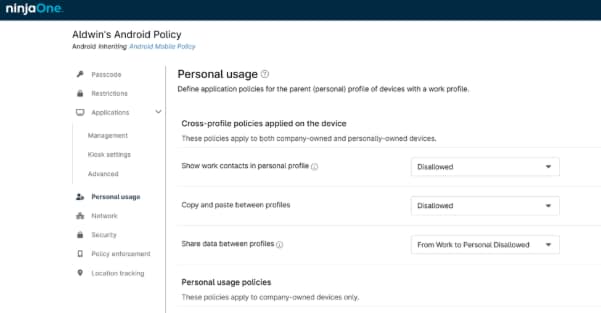
Separation of Work and Personal Data (Containerization)
Minimal disruption, maximum adoption
Cross-Platform Support with Centralized Visibility
Built for Efficiency and Scalability
Secure Corporate Data, no matter where the device Goes
Deploy Business Apps without touching personal data
Full control, any platform
Secure workspaces
Real-World Use Cases That Drive Results
Employee Offboarding Without Affecting Personal Data
Enforcing Security Policies on BYOD Devices
Provide Secure Access to Company Resources
Simplify BYOD management with NinjaOne
BYOD Management FAQs
What is BYOD and how does MDM support it?
BYOD (Bring Your Own Device) management refers to a form of Mobile Device Management (MDM) that applies specifically to employee-owned devices used in the workplace. It typically involves an agreement between the employee and the organization, outlining that the employee consents to install and use work-related applications on their personal device, in addition to using it for personal purposes. MDM supports it by creating a separate container that houses corporate apps and data.
Why is MDM important for BYOD environments?
Mobile Device Management (MDM) is critical in BYOD environments because it allows organizations to secure, manage, and support personal devices used to access corporate resources. Without MDM, BYOD introduces significant risks, including data leakage, compliance violations, and lack of visibility into device health.
What is the difference between BYOD and MDM?
BYOD refers to a device ownership model, while MDM refers to a solution for managing mobile devices.
Can MDM separate work and personal data on BYOD devices?
Yes, one of the main features of MDM for BYOD devices, is the ability to separate work and personal data.
Does MDM invade user privacy on personal devices?
No, NinjaOne MDM does not invade user privacy.
How do users enroll their personal devices in MDM?
Users can enroll personal devices by scanning a NinjaOne-generated QR code and following the on-screen instructions provided during the enrollment process.
What types of controls can MDM enforce on BYOD devices?
NinjaOne MDM can enforce a variety of controls on the corporate-managed portion of a BYOD device. These controls include:
- Passwords
- Restrictions (restrictions may differ depending on the operating system)
- Application management
- Security
- Network
- Location tracking
- OS updates
What happens when an employee leaves the company?
When an employee leaves the company, IT can issue a “Wipe” action through the NinjaOne console to the employee´s device, which removes the corporate container, including apps, data and configurations, leaving personal data untouched.
Can MDM track the location of BYOD devices?
Yes, NinjaOne can track BYOD devices location but only if the end user explicitly grants permission and configures the device to allow location tracking.
What platforms and devices are supported by BYOD MDM?
NinjaOne MDM supports Android, iOS, and iPadOS devices in BYOD environments.
Why NinOne supports personal and work apps and data separation only on Android devices?
Data separation (also known as containerization) is only supported on Android devices; this is not a limitation of NinjaOne, but rather a result of how Apple devices handle application and data management. Other MDM solutions face the same limitation, as iOS and iPadOS do not provide native support for work/personal data separation on BYOD devices.
On the other hand, Apple enforces strict app sandboxing at the operating system level, which makes additional containerization unnecessary. Each app and its data are already isolated by design.
Related Resources
NinjaOne Endpoint Management

What Is Multifactor Authentication (MFA)?
What Is a Man-in-the-Middle Attack?