NinjaOne Application Whitelisting Software: Proactive Endpoint Security for Modern IT

Traditional security tools can’t always keep up with today’s evolving threat landscape. With NinjaOne MDM, IT teams can enforce a zero-trust approach by managing which apps can be installed, ensuring that only approved and secure applications are allowed on managed devices. Whether managing mobile, remote, or hybrid fleets, NinjaOne delivers unified visibility, consistent enforcement, and scalable protection—all from a single, easy-to-manage platform.
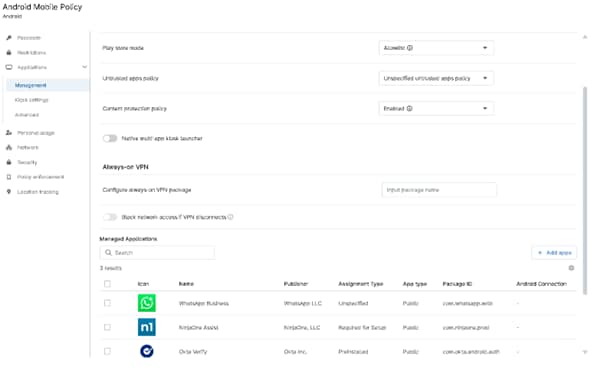
Application Whitelisting
IT business logo
Provide logo
Advantage Technologies logo
Dedicated IT logo
Alticap logo
Network Coverage logo

Application Whitelisting Made Easy with NinjaOne’s Unified Platform

Default-deny security that stops threats before they start 

NinjaOne’s application whitelisting approach proactively blocks unauthorized software installations, ensuring that only verified applications are deployed. This helps minimize exposure to ransomware, fileless malware, and zero-day threats. 

Centralized control across all endpoints and environments 

Manage app policies for all your mobile devices from a single console. Whether you’re securing iOS or Android, NinjaOne MDM ensures consistent policy enforcement across your managed fleet with minimal overhead. 

Streamlined device onboarding flows 

Easily apply whitelisting policies during the device onboarding process to ensure security from day one. NinjaOne makes it simple to configure and deploy trusted application lists as part of your automated provisioning workflows. 

Policy automation and role-based access 

Design and automatically enforce application rules across mobile devices through your MDM. This control supports compliance, governance, and streamlined device management. 

Fully integrated with endpoint management 

NinjaOne’s application whitelisting is built into its broader IT management platform. That means no separate tools, no additional overhead—just seamless integration with your endpoint monitoring, automation. 

Practical Tools to Lock Down Your Applications with Confidence

Manage All Devices from One Dashboard 

Control application policies across all your MDM-managed mobile devices from a single, easy-to-use console. 

Secure Devices from Day One 

Apply whitelisting rules during setup so new devices are protected immediately. Perfect for fast-growing teams that need to onboard devices without sacrificing security. 

Fine-Tune Policies to Fit Your Needs 

Customize app rules to fit your organization’s security and compliance needs—ensuring only approved applications are allowed on managed devices. 

Play Store Allowlisting 

Control which applications can be downloaded from the Play Store by maintaining an approved app list—ensuring only trusted software is accessible on managed devices. 

User Notifications and Policy Transparency 

When administrators block or disable an app, users receive notifications directly on their devices, keeping them informed of policy actions and ensuring transparency without disrupting productivity. 

Enforcing Trust and Control: Real-World Benefits of NinjaOne Application Whitelisting

Preventing Ransomware and Zero-Day Threats Across Distributed Teams 

NinjaOne’s whitelisting solution prevents unauthorized apps—including new or unknown ones—from being installed on your managed devices. This is especially critical for mobile fleets under MDM that operate outside your network perimeter. By allowing only vetted apps, IT teams can proactively reduce risks from ransomware, fileless attacks, and the spread of malicious activity between devices. Enforcement is instant, policy-driven, and nonintrusive—delivering strong protection without disrupting user productivity. 

Securing Mobile and Corporate Devices with MDM Policy Controls 

While MDM may not manage every aspect of a device, it plays a crucial role in protecting active mobile and corporate endpoints connected to your environment. With NinjaOne MDM, IT teams can enforce app installation restrictions, manage approved applications, and maintain compliance with security policies across iOS, Android, and other managed platforms. By controlling which apps can be installed or removed, MDM ensures that only trusted software is used—reducing risk and maintaining consistent protection across the mobile fleet. 

Streamlining Mobile Device Onboarding with Centralized Policy Enforcement 

Fast-growing organizations and MSPs can use NinjaOne MDM to streamline the onboarding of mobile and remote devices with predefined security and compliance settings. Through automated enrollment and centralized policy enforcement, IT teams can ensure each new device is configured according to organizational standards from the moment it’s activated. MDM profiles can define restrictions, required apps, and security baselines tailored to each role or customer group—reducing manual setup, improving compliance, and maintaining consistent protection across managed endpoints. 

Take Control of Your Application Security—The Smarter Way 

NinjaOne empowers IT teams and MSPs to stop threats before they start with a modern, zero-trust application whitelisting solution. Block unauthorized apps, secure every Mobile Device and enforce compliance with ease. With centralized policy management and seamless integration into your existing workflows, NinjaOne makes application control simple, scalable, and effective. 


Ready to reduce risk, lock down your environment, and streamline software governance? 

Related Resources

This is why customers love us

Ready to simplify the hardest parts of IT?

Application Whitelisting FAQs

Application whitelisting is a security method that only allows approved software installed on a system—blocking all others by default. It protects against malware, unauthorized apps, and enforces IT policies by using a list of trusted applications based on file names, hashes, or digital signatures. Common in enterprise and high-security environments, it ensures tighter control and reduces attack surfaces. 

Application whitelisting blocks all software by default, only allowing trusted apps installed. IT admins define approved apps based on file hashes, paths, or digital signatures. With NinjaOne, teams can centrally enforce whitelisting policies across endpoints, automate rule updates, and streamlining protection without manual overhead. 

Application whitelisting enhances endpoint security by allowing only approved applications to be installed while blocking all others by default. This helps prevent malware, ransomware, zero-day threats, and unauthorized software use. It reduces the attack surface and supports compliance, while tools like NinjaOne simplify policy management and monitoring across all endpoints. 

Automate device onboarding with tools like NinjaOne by deploying agents, applying security profiles, and auto-installing essential software. Integrate with identity providers for access control. Monitor compliance to ensure a fast, consistent, and secure process.