Common Cloud-based Linux management challenges
Problem | How NinjaOne resolves it |
Linux hosts are tracked separately from Windows and macOS endpoints. | The NinjaOne Agent brings Linux devices into the same console, with inventory and device details in one view. |
Package updates are applied host by host over SSH, so distributions drift onto different patch levels. | NinjaOne Patch Management applies Linux patch policies across supported distributions and records activity per device. |
Reaching a remote Linux host depends on VPN access or a jump box. | NinjaOne Remote connects to Linux devices over the internet, with no VPN access to the host. |
Linux application updates run through a different tool than Windows software. | Software management installs, uninstalls, and patches Linux applications ad hoc, in bulk, or through policy. |
What cloud-based Linux management improves
Linux hosts stop living in a separate tool, because inventory, patch state, and device details sit beside Windows and macOS endpoints in one console.
Patch levels stay consistent across supported Linux distributions, because one policy governs update behavior on every targeted host.
Technicians reach Linux endpoints without VPN access or a jump box, which shortens the path from alert to fix.
Audit and review requests are answered from scheduled reports rather than a device-by-device evidence hunt.
Customers love NinjaOne
095
%
saved time on manual tasks through automation
094
%
reduced ticket volumes and resolution times
082
%
replaced 3-4 tools with NinjaOne
Features and Solutions

Linux endpoint visibility
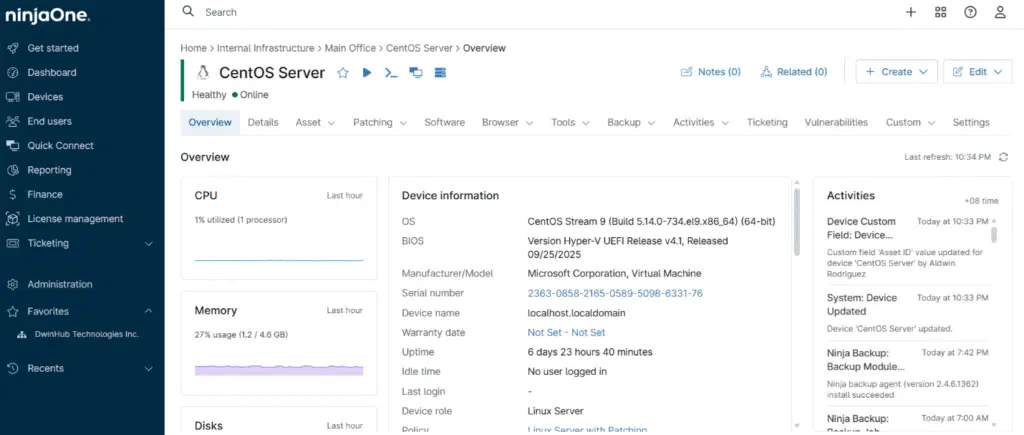
NinjaOne hardware inventory covers computers, servers, network equipment, and peripherals, and the device Details tab shows identification and hardware specifications for each Linux host on one page. Teams see Linux state next to Windows and macOS state instead of maintaining a separate record.

Linux OS patching by policy
NinjaOne Patch Management supports patch management for Linux endpoints across supported distributions. Administrators configure a Linux policy, and the activity view records what was applied on each device.

Linux application management
NinjaOne software management installs, uninstalls, and patches applications on Linux endpoints ad hoc, in bulk, or through policy-based automation. Application updates follow the same process the team uses on Windows and macOS.

Remote access to Linux hosts
NinjaOne Remote supports remote connections to Linux devices. NinjaOne Remote Tools, which are separate from the NinjaOne Remote application, let technicians access and manage parts of a Linux endpoint without taking over the machine.

Scripted Linux automation
The NinjaOne Automation Library includes native scripts that run ad hoc, on a schedule, through policy conditions, or as a scheduled task, and teams can add custom scripts. Scripts run as System or Current User with optional parameters.

Alerting and scheduled reporting
NinjaOne inventory alerts notify administrators by channels such as email or SMS when endpoints meet configured conditions. Reports run on a daily, weekly, or monthly schedule, so Linux patch and inventory state reaches stakeholders without a manual pull.
Transforming Cloud Based Linux Management into a Seamless Experience
Managing Linux servers alongside Windows and macOS fleets
Infrastructure teams running a mix of Linux servers and Windows or macOS workstations apply patch and software policies from the same console for every operating system. Hardware inventory and device details cover servers as well as computers, so the team reviews Linux server state in the same dashboard used for user devices.
Supporting distributed Linux workstations
Organizations with remote engineers and developers on Linux manage those devices over standard internet connections instead of routing access through a VPN. NinjaOne Remote opens a session on the host, and Remote Tools let a technician check a service or a process without interrupting the person working on it.
Managing Linux across MSP client environments
NinjaOne Organizations let a single platform manage multiple customers or departments, so a managed service provider applies a shared Linux patch baseline per client and adjusts it where a client requires different timing. Technicians move between client Linux estates in one console rather than one tool per tenant.
How cloud-based Linux management works in NinjaOne Endpoint Management
Configuration detail lives in the NinjaOne Linux patch policy documentation and the system requirements and compatibility reference.
I. Configure Linux policies
Administrators configure patch policies for supported distributions, and NinjaOne records patch activity per device.
II. Install the NinjaOne Agent on Linux hosts
The agent brings each device under management and reports remote access availability, performance data, hardware details, and patch state.
III. Add software and script automation
Teams assign software management policies and automation scripts, which run ad hoc, on a schedule, or through policy conditions.
IV. Monitor, alert, and report
Inventory alerts fire when a device meets a configured condition, and scheduled reports distribute Linux patch and inventory state on a set cadence.



Ready to elevate your Linux management?
Proven patching outcomes across mixed-OS estates
NinjaOne Patch Management patches endpoints at Great Plains Bank regardless of location or operating system, and the team reports 99.98 percent of 112,000 patches installed in the evidence it produces for auditors.
Nick Lenius, VP of Technology at Great Plains Bank, credits that result with "some of the highest patching scores in our industry."
See cloud-based Linux management in action
More resources
Linux Endpoint Management with NinjaOne
Manage, patch, and support Linux endpoints across distributions easily and at scale.
View more

NinjaOne Patching: Linux Policy Setup
This article describes the patch management features available for Linux endpoints managed by NinjaOne. It also explains how to activate, configure, and view patching activity.
View more
Endpoint management that unifies IT
One platform to manage, patch, secure and support every endpoint.
View more
Cloud based Linux management FAQs
What is cloud-based Linux management in NinjaOne Endpoint Management?
It is the set of NinjaOne Endpoint Management capabilities that manage Linux endpoints from a cloud-native console instead of on-premises management infrastructure. The NinjaOne Agent reports hardware details and performance data, applies patch and software policies, and supports remote troubleshooting. Linux devices appear in the same console as Windows and macOS endpoints.
Which Linux distributions does NinjaOne support?
The NinjaOne Agent for Linux supports a broad set of Linux distributions, including Ubuntu, Debian, and Red Hat Enterprise Linux (RHEL), with patch management coverage extending to Linux endpoints across all of them. Distribution and version specifics are kept current in the NinjaOne system requirements and compatibility reference, and Raspberry Pi ARM devices are managed under the same agent.
How does NinjaOne patch Linux endpoints?
Administrators configure a Linux policy, and NinjaOne applies OS patches to the endpoints that policy targets across supported distributions. Software management handles application installs, removals, and patches on Linux ad hoc, in bulk, or through policy-based automation. Patch activity is recorded per device and can be distributed through scheduled reports.
Can technicians remotely access Linux endpoints with NinjaOne?
Yes. NinjaOne Remote supports remote connections to Linux devices, and NinjaOne Remote Tools let technicians access and manage parts of a Linux endpoint without taking over the machine or interrupting the end user. Remote Tools are a separate capability from the NinjaOne Remote application.
Does NinjaOne manage Linux servers as well as Linux workstations?
Yes. The NinjaOne Agent manages Linux servers and Linux workstations under the same policies, and patch management applies to both device types across supported distributions.
Is cloud-based Linux management part of NinjaOne Endpoint Management or a separate product?
It is part of NinjaOne Endpoint Management, not a separate purchase or console. Linux coverage uses the same agent, policy model, automation library, and reporting that manage Windows and macOS endpoints. Broader Linux capability detail sits on the Linux endpoint management page.
Can Linux automation run on a schedule without a technician present?
Yes. Native scripts in the NinjaOne Automation Library run ad hoc, through policy conditions, or as a scheduled task, and teams can add custom scripts. Scripts run as System or Current User, and optional parameters are supplied at run time.