Cloud Reporting with NinjaOne RMM

NinjaOne RMM‘s reporting tools run in the same cloud console used to monitor and manage endpoints, so IT teams and MSPs can generate and share reports on device health, patching, security, and more without deploying separate reporting software.

Cloud Reporting with NinjaOne RMM featured image
IT business logo
Provide logo
Advantage Technologies logo
Dedicated IT logo
Alticap logo
Network Coverage logo

Common cloud reporting challenges 

Building and sharing IT reports by hand creates problems that get worse as the device fleet and stakeholder list grow. Here’s how NinjaOne Cloud Reporting addresses the most common ones.

Problem

How NinjaOne resolves it

Manually compiling data from patching, antivirus, backup, and ticketing tools into a report for stakeholders or clients takes hours every reporting cycle.

NinjaOne resolves it: NinjaOne Cloud Reporting pulls directly from the same console used for monitoring and management, so reports are generated from existing data instead of assembled by hand.

Proving compliance or insurance requirements, such as historical patch status, after the fact means digging through logs across every device.

NinjaOne Cloud Reporting includes patch compliance and antivirus report sections that document historical status, ready to hand to an auditor or insurer without extra work.

Sending clients or stakeholders a status update every week or month means someone has to remember to pull and send it each time.

NinjaOne Cloud Reporting can schedule Summary Reports and Data Tables for automatic daily, weekly, or monthly delivery, so updates go out without manual follow-up.

A technician wants device-level detail and an executive wants a one-page summary, and building both from scratch for the same data is redundant work.

NinjaOne Cloud Reporting offers report types from detailed Data Tables to a one-page Executive Summary, so the same underlying data can be shaped for either audience.

NinjaOne’s cloud reporting revolutionizes how you manage your IT environment

Less time spent assembling reports by hand

Pulling reports from data already in the console instead of compiling them manually frees up time that would otherwise go into reporting work.

Audit- and insurance-ready documentation on demand

Patch compliance and antivirus report sections give IT teams historical documentation ready to hand to an auditor or insurer without extra work.

Consistent stakeholder updates without manual follow-up

Scheduled report delivery means clients and stakeholders get regular updates automatically, instead of depending on someone remembering to send them.

The right level of detail for each audience

Choosing between detailed Data Tables and a one-page Executive Summary means the same underlying data can serve both a technician and an executive.

Reports without extra software to deploy

Because reporting runs in the same cloud console used for monitoring and management, there’s no separate reporting tool to license or maintain.

Reports that carry your own branding

Adding a logo and cover page means client- or stakeholder-facing reports reflect your brand instead of NinjaOne’s.

Features and Solutions

Cloud-based reporting console

Reports run in the same cloud console used for monitoring and endpoint management, accessible from a browser wherever there’s an internet connection, without deploying separate reporting software.

Unlimited storage and optimized restores

Multiple report types for different audiences

Choose from Regular, Executive Summary, Management Summary, Asset Summary, Patch Compliance, Backup Summary, Ticketing, or a Blank report built from scratch.

Better workflow efficiency

Customizable report sections

Add, remove, and reorder report sections, such as alerts, patch status, antivirus, or software inventory, to match what a specific report needs to show.

Scheduled report delivery

Schedule Summary Reports and Data Tables for automatic daily, weekly, or monthly delivery, so stakeholders receive updates without anyone generating them by hand.

Remote workers icon

Filtering by device group and time period

Filter report data by device group, organization, location, or time scope, such as the last full month or the last 7 days, to focus a report on what matters for that audience.

IT tools icon

Custom data tables

Build a custom data table similar to the Devices search page, adding and sorting columns to filter devices by specific criteria.

Reporting icon

Report sharing controls

Share a report globally or restrict it to specific technician roles, for both Summary Reports and Data Tables.

Reporting icon

Branded reports

Add a logo and cover page to reports so client- or stakeholder-facing reports carry your branding instead of NinjaOne’s.

Folder backup icon

Export to PDF or CSV

Download Summary Reports as PDF and Data Tables as CSV for sharing outside the console.

NinjaOne's Versatile Solutions for Diverse Industry Use Cases

Demonstrating client value as an MSP

MSPs can schedule branded, client-facing reports on uptime, ticket resolution, and device health, so clients see the ongoing value of the service without a manual write-up each cycle.

Meeting compliance and insurance documentation requirements

IT teams in regulated industries or those carrying cyber insurance can pull historical patch and antivirus reports to satisfy audit or policy documentation requirements.

Giving executives a one-page view of IT health

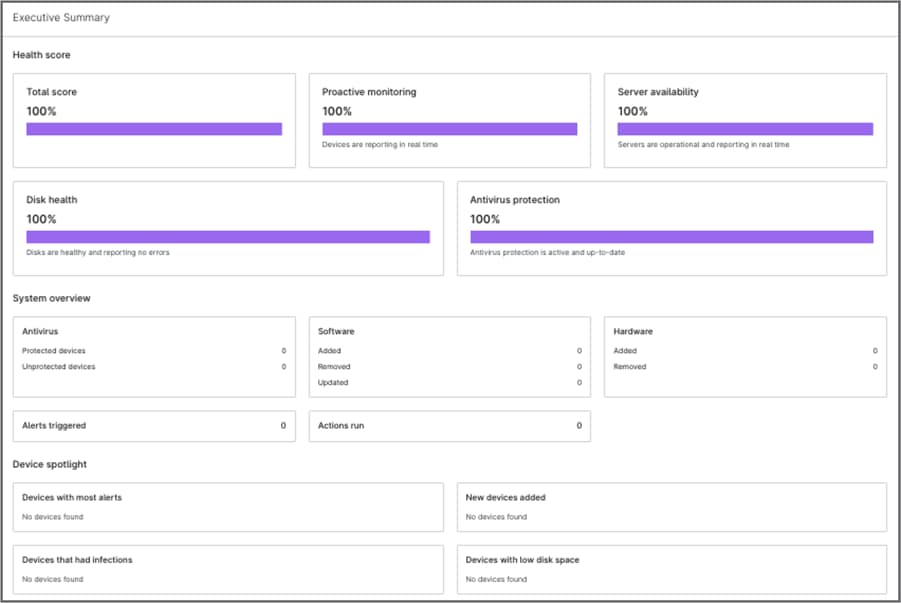
IT leaders can generate a one-page Executive Summary that covers health score, proactive monitoring, disk health, antivirus protection, and alerts by default, without building a custom report from individual data points, and can add more sections if they need to.

This is why customers love us

How Cloud Reporting works in NinjaOne RMM

This overview covers the high-level flow only; full configuration involves several detailed steps, covered in Getting Started with Reports.

I. Choose or create a report

Administrators or technicians with reporting permissions either choose an existing report template or create a new one. Report templates can be Summary Report, Runbooks Report, or a Data Table.

II. Customize sections and filters

For Summary Reports, add, remove, and reorder the sections to include; for Data Tables, select a device group and configure columns. Reports can also be filtered by time scope, device group, or organization.

III. Save, share, and brand the report

Save the report template, decide whether to share it globally or with specific technician roles, and optionally add a logo and cover page for client- or stakeholder-facing reports.

IV. Schedule or export

Set a daily, weekly, or monthly delivery schedule, or download the report on demand as a PDF for Summary Reports or a CSV for Data Tables.

Why organizations trust NinjaOne

"In Ontario, to qualify for cyber insurance, we have to provide detailed reporting on historical patches. NinjaOne reporting completely satisfies that requirement,"

Try Cloud Reporting in NinjaOne RMM

See how NinjaOne RMM turns console data into scheduled, shareable reports without separate reporting software.

Ready to simplify the hardest parts of IT?

Cloud Reporting FAQs

NinjaOne Cloud Reporting generates reports on device health, patching, security, backup, and ticketing data directly from the same cloud console used for monitoring and endpoint management, with no separate reporting software to install.

Yes. Summary Reports and Data Tables can be scheduled for automatic daily, weekly, or monthly delivery.

Yes. Summary Report sections can be added, removed, and reordered, and Data Tables can be filtered by device group, organization, location, or time period.

Yes. The Executive Summary is a one-page report that includes health score, proactive monitoring, server availability, disk health, antivirus protection, site overview by device type and OS, system overview, alerts triggered, and device spotlight by default, with the option to add more sections.

Yes. Administrators can add their own logo and a cover page to reports from the Reporting settings tab.

Yes. Reports can be shared globally or restricted to specific technician roles, for both Summary Reports and Data Tables.

Summary Reports can be downloaded as PDF, and Data Tables as CSV.