Acronis Cyber Protect Home Office

Streamline the patching and security management of Acronis Cyber Protect Home Office through NinjaOne’s automated patch management solution. Ensure your backup and security software stays current with the latest security updates and feature enhancements while maintaining system protection integrity.

Acronis Cyber Protect Home Office
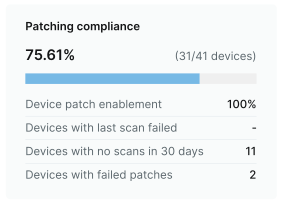
Patching compliance dashboard
Patches installed dashboard

Keep Software Name updated across your org with NinjaOne

Supported OS

  • Windows 11
  • Windows 10
  • Windows 8.1
  • macOS 13
  • macOS 12
  • macOS 11

Supported Versions

  • 28.3.1.41126

Patching for over 6,000 other software titles

Automatically patch them all, from a single pane of glass

  • AnyDesk logo
  • Asana logo
  • BitWarden logo
  • Canva logo
  • ClickUp logo
  • Discord logo
  • Figma logo
  • GitHub logo
  • Google Chrome logo
  • ImageMagick logo
  • LastPass logo
  • MalwareBytes logo
  • Microsoft OneDrive logo
  • Postman logo

Third party patch management is now more convenient and efficient than ever

Patching Management

Enhanced security

Protect your organization from potential threats by ensuring that all software, including third-party applications, is promptly patched. NinjaOne 3rd Party Patch Management acts as a robust defense mechanism against cyber-attacks.

Hardware and Software Inventory

Increased productivity

With automated deployment and minimal disruptions, your team can focus on core tasks without the worry of security vulnerabilities. Boost productivity by eliminating manual application patching efforts and reducing downtime.

Software management

Cost-efficiency

Investing in proactive patch management with NinjaOne is a wise financial decision. The potential losses incurred from a security breach significantly surpass the costs associated with fortifying your network against cyber threats. NinjaOne ensures that you not only enhance security but also save on potential financial setbacks.

Endpoint task automation icon

Simplified compliance

Effortlessly adhere to industry regulations and internal policies with NinjaOne’s comprehensive reporting capabilities. Ensure that your organization is always audit-ready.

Auto-remediation

Actionable insights

Gain detailed insights into patch compliance and vulnerabilities through comprehensive reports. Easily identify areas needing attention and make informed decisions.

Form-based Script Deployment

Centralized management

Manage and monitor patches across all devices from a centralized platform, providing a unified and streamlined approach to application patch management.

About Acronis Cyber Protect Home Office

Acronis Cyber Protect Home Office (formerly Acronis True Image) is a comprehensive backup and cybersecurity solution designed for home users and small offices. It combines reliable backup capabilities with advanced anti-malware protection, providing an all-in-one solution for data protection and cybersecurity. The software offers full-image backup, file-level backup, active disk cloning, and recovery options for entire systems, ensuring complete data protection and business continuity.

The solution integrates essential cybersecurity features including real-time anti-malware protection powered by AI, blockchain-based file certification, and electronic signature validation. Users can protect their data across multiple devices, including Windows PCs, Macs, iOS and Android mobile devices, and external drives. The software also offers cloud backup options with end-to-end encryption for additional data security and accessibility.

Acronis Cyber Protect Home Office is particularly valuable for remote workers, small business owners, IT enthusiasts, and individuals who need enterprise-grade protection for their personal data and systems. Its intuitive interface makes it accessible to users of all technical levels while providing advanced features for those who need them.

Acronis Cyber Protect Home Office

Acronis Cyber Protect Home Office FAQs

FAQs

NinjaOne's intelligent patch management system checks for active backup operations before initiating updates. The automation can be configured to schedule patches during maintenance windows when backups are not running, ensuring data protection processes remain uninterrupted while keeping the software up-to-date.

Yes, NinjaOne provides centralized patch management that can automatically deploy Acronis updates across your entire network of endpoints. This automation ensures consistent security coverage and reduces the administrative burden of managing updates on individual machines.

NinjaOne includes robust error handling and rollback capabilities. If an update fails, the system automatically generates alerts, logs the failure details, and can attempt to rollback to the previous stable version. This ensures your backup and security systems remain functional and protected.

NinjaOne provides comprehensive reporting on patch status, installation history, and compliance across all endpoints running Acronis Cyber Protect Home Office. These reports can be automated and customized to meet specific compliance requirements, offering clear visibility into your security posture.

Ready to simplify the hardest parts of IT?