NinjaOne Patch Management Reporting
NinjaOne Autonomous Patch Management provides customizable reports on patch compliance, status, and update coverage across managed devices for easier review and sharing.
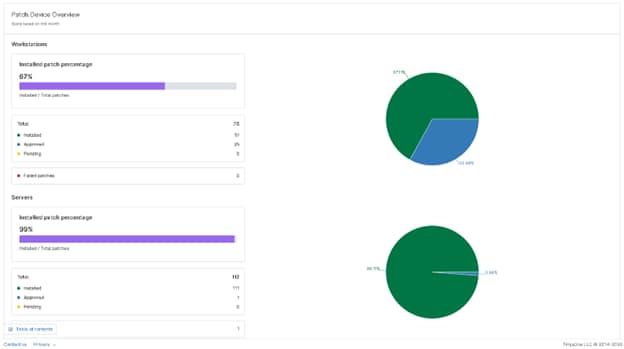
NinjaOne Autonomous Patch Management provides customizable reports on patch compliance, status, and update coverage across managed devices for easier review and sharing.
Problem | How NinjaOne resolves it |
IT teams spend time gathering patch data and turning installation results into reports, making it harder to maintain a consistent view of patching activity. | NinjaOne centralizes patch reporting so administrators can generate reports that summarize patch compliance, patch status, and deployment results from managed devices. |
Standard patch reports may contain more information than stakeholders need, making it difficult to focus on the systems, groups, or reporting periods that matter. | NinjaOne lets administrators customize patch reports using filters such as device groups and reporting dates, helping teams produce focused reports for specific environments or review periods. |
IT teams need to identify missing, pending, or failed updates without manually reviewing individual devices. | NinjaOne patch reports surface compliance status, pending updates, and patch installation issues, helping administrators identify devices that require follow-up or remediation. |
MSPs need clear patching evidence that can be shared with clients and used to demonstrate the work performed. | NinjaOne supports scheduled and automated patch reporting, giving MSPs a consistent way to present patching activity, compliance data, and deployment outcomes to stakeholders. |
Patch compliance is easier to assess by giving IT teams a consolidated view of up-to-date devices, missing patches, and compliance gaps that require attention.
Remediation priorities become clearer by helping administrators identify devices with pending or unsuccessful patches so they can focus follow-up efforts where they are needed most.
Patch-related issues are easier to investigate by providing visibility into patch status and deployment results, helping technicians identify systems that may need troubleshooting or additional action.
Compliance reviews require less manual preparation because patch reports provide documented information about patch status that can support internal reviews and audit preparation.
Routine patch reporting takes less administrative effort by allowing teams to generate and customize reports around relevant devices, groups, dates, and patching metrics instead of manually compiling status information.
NinjaOne’s centralized reporting system acts as a comprehensive hub, offering detailed analytics and insights tailored to your IT infrastructure. This feature simplifies the management of patches by consolidating all necessary information into one accessible location.
NinjaOne’s patch reports deliver thorough insights into patch details and compliance. These detailed reports equip IT teams with the necessary information to make strategic decisions and address vulnerabilities based on their criticality.
NinjaOne Patch Management Reports generate detailed documentation that is invaluable for compliance audits. The reports provide a clear record of patching activities, ensuring that your organization meets regulatory standards and can demonstrate compliance with ease.

NinjaOne reports patch compliance across managed devices, showing installed, approved, pending, and failed patches to help IT teams identify compliance gaps and track patching progress.

NinjaOne provides patch status details for OS and third-party patches, helping administrators see which updates are installed, pending, or failed and where additional remediation may be needed.

NinjaOne lets administrators review patch information by device, including the operating system, patch counts, installation status, last scan date, scan result, and pending reboots.
NinjaOne lets administrators customize patch reports by selecting relevant reporting sections and applying filters such as device groups and reporting periods, so reports can focus on the environment or patching data being reviewed.

NinjaOne reports devices and patches with failed or pending updates, helping IT teams identify where patching requires follow-up and prioritize remediation based on the reported status.
IT teams use NinjaOne patch reports to review which devices successfully received updates, which remain pending, and where patching issues require follow-up. By filtering reports by device groups and date ranges, administrators can focus on the systems covered by a specific maintenance window and quickly identify outstanding patching work, resulting in a clearer post-maintenance review.
Security and IT teams use NinjaOne patch reports to summarize patch compliance and identify devices that do not meet internal update requirements. Instead of manually compiling patch records, teams can present a focused view of patch status and compliance for a defined group or reporting period, giving auditors and stakeholders clearer evidence of patching activity.
MSPs use NinjaOne patch reports to create consistent patch status summaries for individual customer environments, tailoring the reporting scope to each client’s device groups and reporting period. Technicians can highlight compliance gaps, pending updates, and patching results in a standardized format for monthly reviews or QBRs, giving each client a clear view of the work performed and areas requiring attention.
NinjaOne collects patch status and compliance information from managed devices, providing the underlying data used to report on installed, pending, failed, and missing updates across supported environments. Patch Reporting is available for Windows, macOS, and Linux devices.
Reports can focus on specific organizations, locations, device groups, and reporting periods, allowing IT teams and MSPs to evaluate patch activity for the systems or clients that matter to them.
NinjaOne brings patch compliance, patch enablement, and patch status information into structured reports that help teams assess patching performance and identify devices or updates requiring attention. Reports can be customized around the information most relevant to the reporting objective.
IT teams can use reported compliance gaps, failed installations, pending updates, and device-level patch information to prioritize follow-up work, support internal reviews, and provide documented evidence of patching activity. For environments using third-party vulnerability scanners, NinjaOne can also import vulnerability data and map findings to managed devices to support remediation workflows.
NinjaOne Patch Management Reports work with the patching and endpoint data already collected within NinjaOne, giving IT teams a centralized view of patch compliance, patch status, and patching activity. Reports can be filtered by device groups and date ranges and customized to surface the patching metrics most relevant to operational and compliance reviews. Patch reporting is available for Windows, macOS, and Linux devices, and integrates with the same third-party vulnerability scanners used across the NinjaOne patch management platform.
IT teams use NinjaOne to maintain clear visibility into patch status and produce reporting that helps demonstrate whether systems are properly updated and compliant.
"NinjaOne automations completely removed manual server updates that previously took four days — that's 32 human-hours saved every month,"
— Ashley Watson, IT Manager, NWF Agriculture.
Source: NinjaOne
Turn patch data into clear, actionable reports that help your team track patch status, identify missing updates, and review compliance across managed Windows, macOS, and Linux devices. Explore patch reporting capabilities without adding manual reporting work to your IT workflow.
Patch management reports are reports that give IT and security teams centralized visibility into patch status and compliance across managed devices. They show which updates are available, pending, or installed, help track compliance with patch policies, and provide patching status that can support security reviews and audits. By consolidating this information in one console, teams can verify patch coverage without manually checking devices individually.
A NinjaOne patch report can include patch compliance status, OS and third-party patch status, device-level patch details, and failed or pending patches. It can show information such as installed, approved, pending, and failed patches, operating system, patch counts, installation status, last scan date, scan results, and pending reboots. Reports can also be filtered and customized by device group and reporting date range to focus on a specific environment, client, or maintenance period.
Yes. Patch reports can be filtered by device group, such as organizations, locations, or specific device groups, and by date range/reporting period, allowing teams to focus on a particular maintenance cycle or review period.
Yes. NinjaOne supports scheduled and automated patch reporting, helping MSPs consistently deliver patch activity, compliance, and deployment results.
The primary ISO standard for patch management is ISO/IEC 27001, supported by ISO/IEC 27002 for implementation guidance. In ISO/IEC 27002:2022, Control 8.8, “Management of technical vulnerabilities,” is the main control covering patch management. It calls for organizations to identify vulnerabilities, assess their risk, and apply appropriate security updates. ISO 27001 does not mandate a universal patching deadline; organizations are expected to define timelines based on risk and their documented policies.
Patch compliance measures whether systems and software have the required patches installed within a defined timeframe. It helps IT teams identify non-compliant devices and provide reports or evidence that patching requirements are being met.
NinjaOne Patch Reporting supports Windows, macOS, and Linux, providing cross-platform patch compliance and reporting.