Watch a Free Demo of NinjaOne IT Asset Management
By continuing, you agree to our Terms of Use, acknowledge that the Privacy Notice applies, and consent to receive calls and emails. Consent is not required to purchase.




With NinjaOne, we have a single pane of glass to manage backups, [ticketing, antivirus, asset management], software updates, software deployment, remote management, and device management and monitoring. [In] less time, we are able to do so much more.”
Joann Dewwealth-O’Brien, Senior Technology Manager at Rare
We use NinjaOne daily to keep track of inventory of hardware and software. We push updates to all desktops to keep them up to date and use the remote control part to help users with issues or work on the PC when the user is not there.”
Steven Edmonds, VP of IT at Paschall Truck Lines
Easy to use. It’s a single platform for a lot of functions, such as remote support, asset inventory, patching for Windows desktops and servers and rolling out applications through package”
Ibrahim Khalil, Manager of Information Services at Lennox & Addington County General Hospital
IT Asset Management Demo FAQs
How long is the IT asset management demo?
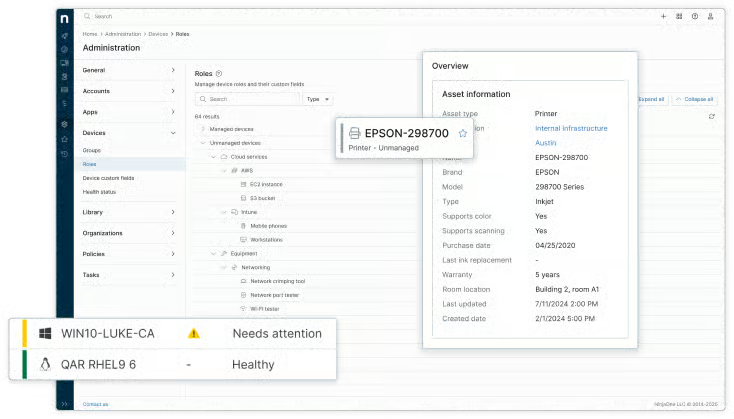
NinjaOne’s on-demand IT asset management demo lasts for three and a half minutes. The NinjaOne ITAM demo covers NinjaOne’s core ITAM capabilities so that you can get an overview of how the platform functions. You can see how NinjaOne centralizes management of online and offline assets, with real-time visibility into hardware, software, and device lifecycles.
What will the ITAM demo show?
The NinjaOne ITAM demo walks through NinjaOne’s IT Asset Management (ITAM) product across four core capabilities. The demo shows NinjaOne’s unmanaged device tracking in action, walking through how the platform identifies and tracks devices outside standard endpoint management, including peripherals and connected hardware. In addition, NinjaOne can be used to capture asset IDs, serial numbers, cost information, and relationships between devices and the users or endpoints they’re associated with. The demo also shows how users can track software licenses and then automate tickets in the same dashboard, in addition to features such as generating warranty status reports for major device manufacturers and producing inventory reports with relevant metrics.
What to look for with an IT asset management software demo?
When you’re trying out an ITAM demo, look at how much information the asset inventory provides. You should be able to see if the platform can tell you which licenses are underused or which assets are approaching the end of life, so that you can optimize costs and manage licenses. A strong ITAM demo should also show you how the software automatically detects assets and surfaces hidden endpoints that might cause risks and compliance gaps. Viewing the ITAM platform’s interface is also important so that you can see whether its user experience is streamlined so that your IT team can work efficiently.
What is the difference between this ITAM demo and scheduling an ITAM demo with a product specialist?
NinjaOne’s on-demand IT asset management demo gives you a detailed overview and guided tour of NinjaOne’s ITAM capabilities. However, if your organization has specific requirements or needs, scheduling a live demo with a product specialist offers you a personalized session. Our knowledgeable product specialist can answer any questions you might have that are specific to your environment and show you how NinjaOne can answer your organization’s asset management challenges. If you have already watched the on-demand demo, consider reaching out for an ITAM demo with a product specialist.