Server patch management software with NinjaOne Patch Management
NinjaOne Patch Management automates the discovery, approval, scheduling, and deployment of Windows and Linux server patches from one centralized console.
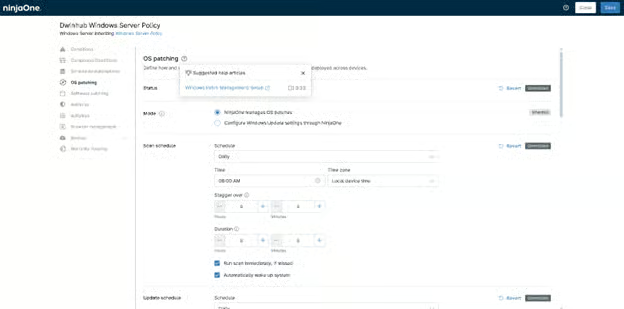
NinjaOne Patch Management automates the discovery, approval, scheduling, and deployment of Windows and Linux server patches from one centralized console.
| Problem | How NinjaOne resolves it |
| Windows and Linux servers require regular security updates, but manually tracking and deploying patches across production environments is time-consuming and increases the risk of missed updates. | NinjaOne centralizes server patch management, allowing administrators to scan, approve, schedule, and deploy operating system patches across managed Windows and Linux servers from a single console. |
| Applying server patches during business hours can interrupt critical workloads and require unexpected reboots. | Administrators configure maintenance windows and reboot policies, so server patches deploy during approved maintenance periods with controlled restart behavior. |
| Critical security updates are delayed because patch approval workflows require manual review for every deployment. | Patch approval policies automate the approval process based on administrator-defined rules, helping routine security updates move into scheduled deployments more quickly. |
| IT teams lack visibility into which servers are missing security updates or have failed patch installations. | NinjaOne provides centralized dashboards and reporting that show patch compliance, deployment status, and failed updates across managed servers. |
Server patch compliance becomes easier to maintain by helping organizations keep Windows servers up to date with approved security and quality updates.
Security risk is reduced by closing known operating system vulnerabilities sooner through consistent patch deployment across managed servers.
Maintenance windows become more predictable by automating routine patch deployment and reducing the manual effort required to update servers.
Operational continuity improves through planned patching, reboot controls, and deployment policies that minimize disruption to production workloads.
Patch status is easier to verify through centralized reporting that helps administrators identify successful deployments, failed updates, and servers requiring attention.

NinjaOne scans managed Windows and Linux servers for missing operating system patches and identifies available updates from vendor patch catalogs. Patch status appears centrally, so administrators can review patch compliance across their server environment.

NinjaOne automates server patch approval and deployment through configurable patch policies. Administrators can define approval rules, maintenance schedules, reboot behavior, and deployment timing for different server groups.

NinjaOne tracks patch installation status across managed servers and reports successful, pending, failed, or missing updates. Compliance data is available from centralized dashboards and reports for ongoing monitoring.

NinjaOne deploys server patches during scheduled maintenance windows to align updates with planned maintenance activities. Patch policies help coordinate installations while reducing disruption to production workloads.

NinjaOne records patch deployment results and identifies servers requiring additional action after failed or incomplete installations. Administrators can review deployment history, investigate failures, and rerun patch jobs from the same management console.
IT teams use NinjaOne to identify missing Windows Server updates, approve patches through policy-based workflows, and deploy them during scheduled maintenance windows. Patch status and deployment results are tracked centrally so administrators can verify compliance and address failed installations before the next maintenance cycle.
Organizations managing servers across branch offices, data centers, or cloud-hosted environments apply standardized patch policies without administering each server individually. Administrators monitor deployment progress, restart status, and patch compliance from a single console, helping maintain consistent update practices across the server estate.
Managed service providers deploy server patches for multiple customer organizations from a single console while maintaining tenant separation. Customer-specific patch policies, maintenance schedules, and approval workflows allow technicians to manage updates according to each client’s requirements, improving patch consistency without increasing administrative overhead.
NinjaOne inventories supported Windows and Linux servers, identifies installed operating systems and applications, and establishes the patch management baseline for each managed device.
The platform scans servers for missing operating system and supported third-party application updates, providing visibility into patch status, deployment history, and compliance across the environment.
Patch policies define how updates are approved, scheduled, and deployed according to organizational maintenance windows helping standardize server patching while reducing manual administrative effort.
Administrators review deployment status, compliance reporting, and patch-related alerts from the NinjaOne console to verify successful installations and identify servers requiring follow-up. See the NinjaOne documentation for deployment and configuration guidance.
NinjaOne Patch Management works alongside the vulnerability scanners already deployed in server environments, so patch priorities reflect real exposure data. It integrates with Rapid7, Tenable, Qualys, and CrowdStrike Spotlight, and it ingests each scanner’s vulnerability data to prioritize server patch policies by CVE severity.
IT teams rely on NinjaOne to keep Windows servers patched and compliant without adding to already-stretched workloads.
"Thanks to the intuitive NinjaOne user interface and the robust Windows server patching, we were able to reduce our workload by 22%,"
— Michel Schmid, IT team member, Solothurner Spitäler
Automate Windows and Linux server patching, prioritize updates by risk, and schedule deployments around maintenance windows, all without adding manual work for your team.
Automatically evaluate updates, deploy trusted patches faster, and keep every endpoint secure without operational disruption.

AI-powered vulnerability intelligence delivered in real time, including Known Exploited Vulnerability (KEV) insights, so IT teams can prioritize and remediate faster.
Patching a Linux server is a crucial task for maintaining system security and stability. Regular updates ensure that the server is protected against known vulnerabilities, which can be exploited by attackers to gain unauthorized access or disrupt services.
Server patch management software automates finding, prioritizing, and installing updates on server operating systems and the applications running on them. NinjaOne Patch Management scans servers for missing patches, ranks them by severity (often using CVE/CVSS data), deploys them on a schedule, lets teams patch around maintenance windows to avoid downtime, and reports on compliance status.
Test patches on a small, non-critical server group first, then prioritize the remaining rollout by CVE/CVSS severity. NinjaOne patch policies let administrators stage this rollout automatically, deploy during scheduled maintenance windows, and keep a rollback plan ready in case a patch causes issues.