Key Points
- EDR deployment strengthens endpoint security by detecting, investigating, and responding to threats in real time.
- Planning is essential: conduct a risk assessment, define goals, and align EDR implementation with budget and resources.
- Choosing the right EDR solution requires evaluating scalability, integration with SIEM and security tools, and vendor support.
- Successful deployment involves agent rollout, policy configuration, and ongoing monitoring and tuning for accuracy.
- Continuous maintenance—including patching agents, refining alerts, and monitoring health—ensures maximum protection against evolving cyber threats.
Endpoint detection and response (EDR) deployment is a layered defense tool integral to your cybersecurity framework. It involves implementing EDR software, which helps you monitor, detect, and respond to the increasing endpoint-targeted cyberattacks like ransomware and fileless malware. This enhances your cybersecurity defenses, improves incident response times, and reduces the risk of data breaches .
This comprehensive guide provides an overview of EDR deployment, covering key concepts, strategies, and best practices to help organizations effectively strengthen their defenses against the latest cybercrimes .
A visual walkthrough of the deployment process is also available in our video: EDR Deployment.
🛑 Stop active threats immediately with NinjaOne Protect, an all-in-one RMM + EDR + Backup solution.
What is EDR?
EDR software detects and mitigates threats at the endpoint level. Unlike traditional antivirus software, which relies on signature-based detection methods, EDR combines behavioral analytics, heuristics, and machine learning to detect and respond to threats in real time. By monitoring endpoints for signs of malicious behavior, EDR solutions can help organizations quickly detect and neutralize threats, minimizing the risk of any security vulnerability in an EDR endpoint.
Why is EDR software important?
EDR implementation lessens the risks caused by threat actors who constantly employ increasingly complex and inventive techniques to compromise organizational data and systems. From ransomware attacks to data breaches, organizations face various cybersecurity threats that can have devastating consequences. As such, there is a critical need for robust endpoint security solutions that can proactively detect and respond to these threats before they cause significant damage.
Steps to Plan EDR Deployment
Assess your organization’s security needs
Before embarking on an EDR deployment journey, it’s essential to assess your organization’s security needs and goals. This involves conducting a thorough risk assessment to identify potential vulnerabilities and prioritize areas of concern. By understanding your organization’s specific security requirements, you can tailor your EDR deployment strategy to address the most pressing threats effectively.
Define clear goals
Whether your goal is to improve threat detection capabilities, enhance incident response times, or strengthen overall cybersecurity posture, having a clear roadmap in place will help guide your deployment efforts and ensure alignment with organizational priorities.
Understand your IT budget
Budget considerations and resource planning are also key aspects of EDR deployment planning. While investing in robust cybersecurity solutions is crucial, it’s helpful to balance between cost and effectiveness. Assessing any budget constraints and resource availability will help you make informed decisions when selecting EDR solutions and allocating resources for deployment and ongoing maintenance.
What to Look For in an EDR Solution
When choosing an EDR solution, several factors must be considered to ensure it meets your organization’s specific needs and requirements. These factors include the solution’s detection capabilities, scalability, ease of integration, and support solutions. Additionally, considering factors such as vendor reputation, industry recognition, and customer reviews can help you make an informed decision
Comparing EDR vendors
While many EDR solutions share similar core functionalities, they may differ in features, pricing, and support options. By evaluating multiple vendors and their offerings, you can identify the solution that best aligns with your organization’s needs and budgetary constraints.
EDR Vendor Comparison Checklist
Some considerations to take note of while deciding include:
- Scalability: As your organization grows and evolves, your cybersecurity needs may change, so it’s essential to choose a solution that can scale with your business.
- Integration: Ensuring seamless integration with existing security tools and platforms maximizes the effectiveness of your EDR software.
- Support: Evaluating the vendor’s support offerings, including training, technical support, and updates, can help ensure a smooth deployment and ongoing maintenance process.
Preparing for deployment
Assess your existing IT infrastructure
You must identify any potential compatibility issues or gaps in coverage. Conducting a thorough audit of your endpoints, networks, and applications will help ensure a smooth deployment process and minimize the risk of disruptions.
Establish a dedicated EDR deployment team
This team should consist of individuals with expertise in cybersecurity, IT operations, and endpoint management who can oversee the deployment process from start to finish. Assigning clear roles and responsibilities within the deployment team will help ensure accountability and streamline the deployment process.
Prepare your endpoint devices protected by EDR
Take special care in preparing an EDR endpoint for deployment, including ensuring that it meets the minimum system requirements for running the EDR agent and conducting any necessary software updates or patches to ensure compatibility.
Additionally, configuring endpoints to communicate with the EDR software central management console and setting up monitoring policies and alerts will help ensure effective threat detection and response capabilities.
Integrating EDR with SIEM and security tools
Ensure compatibility with other security tools
Before any EDR implementation, make sure that your intended software is compatible with other security tools and platforms, such as Security Information and Event Management (SIEM) systems, network security appliances, and endpoint management solutions. By integrating EDR with incident response workflows and other security telemetry sources, organizations can gain greater visibility into potential threats and streamline incident response processes.
Leveraging EDR data for threat intelligence and analysis
By aggregating and analyzing data from endpoints across the organization, EDR solutions can provide valuable insights into emerging threats, attack patterns, and vulnerabilities. This threat intelligence can then inform security policies, prioritize security investments, and enhance overall cybersecurity posture.
Coordinating EDR implementation with your organization’s security strategy ensures alignment with broader security objectives and priorities. This involves integrating EDR deployment plans with existing security policies, incident response procedures, and IT risk management frameworks.
EDR deployment process
EDR deployment specifics vary between suppliers, but the core approach remains the same:
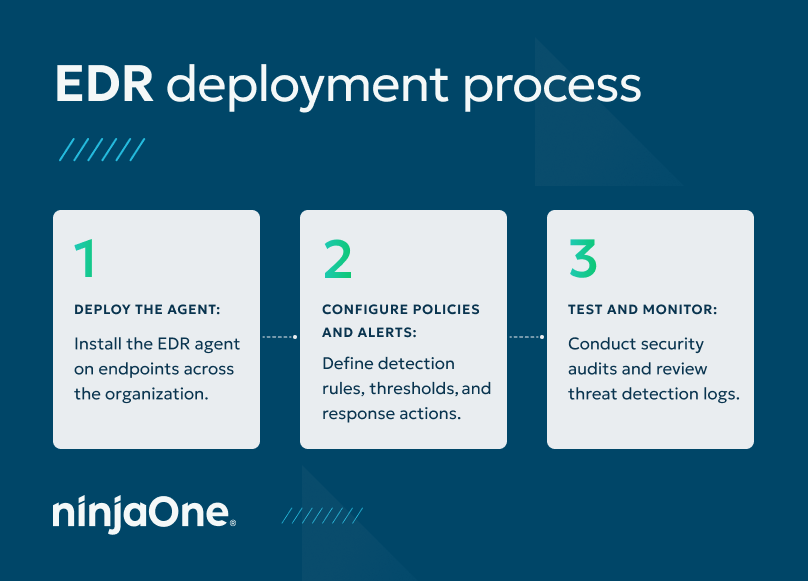
- Deploy the agent: This involves deploying lightweight software agents that monitor endpoint activity in real time and communicate with the central management console to provide visibility into potential threats. Depending on your environment, agent deployment may require network changes to permit telemetry data flows, either to internal management systems or external SaaS platforms.
- Configure policies and alerts: This involves defining detection rules, thresholds, and response actions based on the organization’s security requirements and risk tolerance. By customizing EDR policies and alerts to align with specific threats and attack vectors, organizations can improve the accuracy of threat detection and minimize false positives.
- Test and monitor: This involves conducting regular security audits, reviewing threat detection logs, and testing incident response procedures to ensure that the EDR solution is functioning as intended. By continuously monitoring and testing the EDR system, organizations can identify and address any potential issues or gaps in coverage before they can be exploited by threat actors.
Managing and maintaining EDR
Patch every EDR endpoint
Regular updates and patch management for EDR agents are important for ensuring optimal performance and protection against emerging threats. This involves staying up-to-date with the latest software updates, security patches, and threat intelligence feeds provided by the EDR vendor. By regularly updating EDR endpoints, organizations can ensure that they have the latest security features and protections in place to defend against evolving threats.
Fine-tuning alert settings and response procedures
Review and refine EDR policies and alerts based on feedback from security analysts, incident responders, and threat intelligence sources. By continuously optimizing alert settings and response procedures, organizations can improve the accuracy of threat detection and reduce the time to respond to security incidents.
EDR health monitoring agent
Effective EDR implementation involves monitoring the health and performance of EDR agents deployed across the organization, identifying any potential issues or anomalies, and taking corrective action as needed. By proactively monitoring and optimizing EDR agent health, organizations can ensure that their endpoints are protected against threats and vulnerabilities at all times.
Defend your managed environments from ransomware with an all-in-one EDR and endpoint management software solution.
Protect your endpoints with the right EDR deployment strategy
By following the steps outlined in this guide, organizations can successfully select and deploy EDR solutions that meet their unique security needs and objectives, enhancing their overall cybersecurity posture and protecting against emerging threats. To see these steps in action, check out our video walkthrough of the EDR deployment process.
As organizations continue to face evolving cybersecurity challenges, the importance of EDR deployment cannot be overstated. NinjaOne compliments EDR solutions with remote monitoring and management tools, enabling more comprehensive management of endpoints and EDR solutions.
NinjaOne Protect is an all-in-one ransomware protection, response, and recovery tool, providing IT teams worldwide with a more comprehensive solution to defend their IT environments from ransomware and improve their response speed and resiliency.
If you’re ready, request a free quote , sign up for a 14-day free trial , or watch a demo.