Il patch management per app di terze parti: Aumenta la sicurezza degli endpoint

Gestisci le app di terze parti insieme agli aggiornamenti del sistema operativo da un’unica console e mantieni le app di terze parti sicure e aggiornate con un’automazione centralizzata e basata su criteri.
Third-Party Patching featured image

Common third-party patching challenges 

Problem

How NinjaOne resolves it

Third-party applications like Adobe Reader, Chrome, and Java update on their own schedules, leaving vulnerabilities open between operating system patch cycles.

NinjaOne scans managed endpoints for outdated third-party software and applies vendor updates automatically through patch policies.

Tracking and updating dozens of third-party applications by hand consumes technician time.

Default Approvals automatically approve critical updates for NinjaOne-supported third-party applications, so routine patches deploy without manual review.

Third-party updates that install during business hours interrupt end users and force unplanned restarts.

Administrators set scan and deployment schedules so third-party patches apply inside approved maintenance windows.

IT has no single view of which third-party applications are current across the fleet.

The dashboard reports third-party patch status and compliance across managed endpoints.

Riduci i rischi e migliora la conformità alle patch più rapidamente

Centralizza gli aggiornamenti per le applicazioni di terze parti più diffuse (come Adobe, Java, Chrome). Automatizza il patching per ridurre al minimo l’esposizione e mantenere protetti gli endpoint.

Pianifica gli aggiornamenti durante le finestre di manutenzione per ridurre le interruzioni e mantenere le applicazioni aggiornate e sicure senza bisogno di VPN o server on-premise.

Personalizza i criteri di patch management per allinearli alle esigenze specifiche della tua organizzazione. NinjaOne offre un controllo granulare, consentendo di definire criteri basati su criticità aziendali, livelli di rischio o gruppi di utenti specifici.

Tieni traccia dei progressi delle implementazioni e della situazione di conformità in tempo reale da un’unica interfaccia. Esporta report su richiesta per documentare le attività relative alle patch per audit e per tenere informati gli stakeholder.

IT sees third-party patch compliance across the fleet in one view, instead of checking applications device by device.

Il patch management di terze parti adesso è più conveniente ed efficiente che mai

Patch management

Sicurezza migliorata

Riduci i rischi mantenendo le applicazioni di terze parti sempre patchate su tutti gli endpoint.
Inventario hardware e software

Aumento della produttività

Automatizza gli aggiornamenti di routine in modo che i team si possano concentrare su attività di maggior valore, senza dover utilizzare tempo per il patching manuale.

Gestione dei software

Convenienza in termini di costi

Evita incidenti costosi e tempi di inattività non pianificati grazie alla manutenzione proattiva dei software di terze parti.

Endpoint task automation icon

Conformità semplificata

Rispetta senza problemi le normative di settore e i criteri interni con le funzionalità di reporting complete di NinjaOne. Assicurati che la tua organizzazione sia sempre pronta per gli audit.

Distribuzione di script basati su moduli

Dati da cui è possibile intervenire

Ottieni informazioni dettagliate sulla conformità alle patch e sulle vulnerabilità attraverso report completi. Identifica facilmente le aree che richiedono attenzione e prendi decisioni consapevoli.

How organizations use third-party patching

Closing third-party vulnerabilities on remote endpoints

Organizations with remote staff patch third-party applications over the internet with no VPN required. Administrators confirm update status for off-site and on-premises devices from the same dashboard, so remote machines follow the same patch policies as those in the office. Third-party patch status appears next to operating system patch status, so no separate tool is required.

Keeping regulated fleets audit-ready

IT teams in healthcare, finance, and education standardize third-party application versions and record every patch action. When an audit begins, the team pulls third-party patch history from the console instead of collecting evidence device by device.

Standardizing third-party patching across MSP clients

Managed service providers apply third-party patch policies to every customer tenant and align schedules to each customer’s business hours. Technicians manage separate customer environments from one console, which reduces application version drift across organizations. Each customer keeps a consistent third-party software baseline without a per-organization packaging process.

How third-party patching works in NinjaOne Autonomous Patch Management

I. Enable third-party patching

Administrators turn on third-party software patching in a patch policy for the target device groups.

II. Select applications and approvals

Teams choose the NinjaOne-supported applications to manage and set approval rules, or use Default Approvals for critical updates.

III. Schedule scans and deployment

NinjaOne scans for outdated third-party software and installs approved updates during the defined maintenance windows.

IV. Monitor compliance

The dashboard shows third-party patch status and flags failed installations for remediation. See the NinjaOne documentation for step-by-step configuration.

Pronto a semplificare le parti più complesse dell'IT?

Proven results with automated patching

The City of Sarnia cut patch time by 90 percent with NinjaOne automated patching.

"NinjaOne's automated patching reduced our patch time by 90%."

See third-party patching in action

Discover how NinjaOne Patch Management helps organizations monitor patch compliance across remote offices, standardize patching policies, and maintain compliance across distributed environments.

Related Resources

Domande frequenti

Il patch management per app di terze parti si riferisce al processo di gestione e aggiornamento di applicazioni e sistemi software non sviluppati internamente o non appartenenti al sistema operativo principale. Riguarda le operazioni per mantenere aggiornate le applicazioni di terze parti, come quelle di fornitori indipendenti, con le ultime patch di sicurezza e correzioni di bug e i più recenti aggiornamenti.

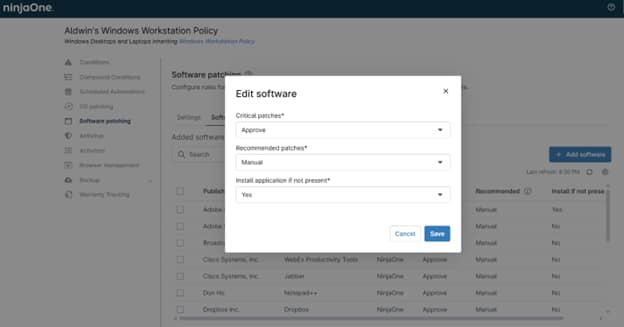
NinjaOne patches a catalog of supported third-party applications, including common titles such as Adobe Reader, Chrome, and Java. Administrators select which applications to manage from the Software Patching tab in each agent policy. Select Add Software to open the Software Library and view the full catalog.

Yes. Third-party software patch management is available for Windows and macOS endpoints, and each platform is configured and monitored through agent policies. Coverage depends on the applications supported for each operating system.

Yes. After third-party software patching and approval settings are enabled, NinjaOne approves critical updates by default, while recommended updates require manual approval. Administrators can change the approval action for each update category to Approve, Manual, or Reject.

Enable third-party patching in an agent policy, then select which applications to manage. The policy sets the approval rules and the scan and deployment schedule that apply across all selected applications. Once assigned to a device group, the policy runs automatically, and routine updates deploy on schedule without manual steps.

Third-party patching is one capability within NinjaOne Autonomous Patch Management, which also handles operating system and Microsoft application updates. The same policies, schedules, and dashboard cover operating system and third-party patches together.